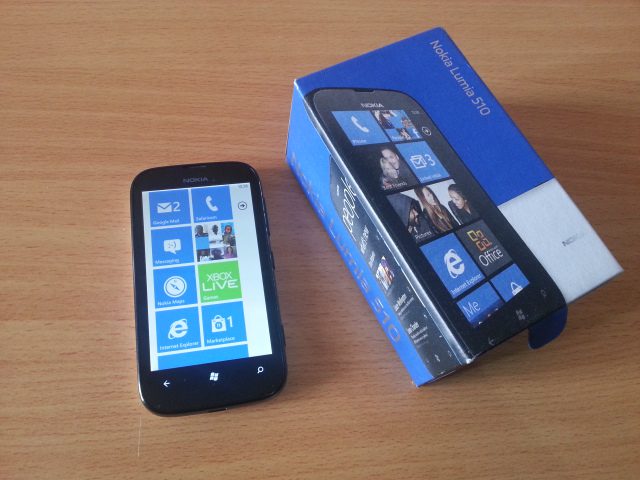
 Nokia launched the first Windows phone devices at the high end, and naturally this created a void for mid and low end devices as this was the main Windows phone partner for Microsoft, the rest would come later but not make an impact as huge as Nokia. Understandable, Nokia was coming from a point where it was the global leader in Mobile, and had just sworn to go all Windows for smartphones. Lumia 800 was the first for ice-breaking, then came a mid range Lumia 710 which was followed by the big Lumia 900. Later on Nokia released Lumia 610 to go further down the food chain, this gave users some hope, you know the mass market device. Then Nokia in a surprise move announced Lumia 510 which would first be seen in China, later to spread out wings into the rest of the emerging markets(there is still this debate whether China and India are in the emerging markets). And that’s how we find ourselves reviewing the Lumia 510.
Nokia East Africa decided to introduce the Lumia 510 before any other Lumia. Ofcourse there was all other Lumias available in the grey, but not really advisable to purchase since the mother is not supporting it in the region, could be tough for a non-superuser.
Lumia features
Lumia 510 is a 4″ TFT LCD screen device with WVGA resolution powered by Windows 7.5 and Qualcomm Snapdragon S1 MSM72271 800MHz processor. At the low end, this device has 256MB RAM which has come to be a hindrance to many applications not optimised for low RAM. Lumia 510 has a 5mp camera, autofocus and no flash or nice names like Carl Zeiss attached to it like brothers up the food chain, but at Kshs 17,000 it really is a bargain. Meant to rope in users from down the income groups. Lumia 510 is eligible to be a suitor for Windows 7.8 but hasn’t yet sold running it. You see Windows 7.5 lacks some nice things like resizeable tiles and Bluetooth compatibility is quite scanty. I tried moving a file from an Android device and it was as easy as looking through a brick wall. You are stuck with Zune which many of you Windows phone users will agree with me isn’t quite a good experience.
Lumia 510 Hardware
This device has quite a good solid build, not as beautiful as the Lumia 920 but still there somewhere manages to impress, the back soft touch texture is quite good to feel, and they are also replaceable with black, yellow, white, red and blue colours. The front is all black which is good enough. The buttons on the side are well blended in and I dont see you pulling accidental switch-offs or accidental camera shots, atleast I didnt.
I have to say this device is quite good for the removable back cover and battery, even though the 1300mAh battery performs quite well on Windows, you will feel good if you can replace the battery. One thing it misses is microSD support, considering the meager 4 GB internal storage with only 2.5 GB of usable memory. Free Skydrive storage doesn’t count for much when you don’t have an internet connection, particularly for those who wish to have huge reserves of music files locally.
The 5 inch camera would take good shots in good light, but goes as far as that, low light and you get pixelated images, in the dark you naturally cannot take pics.
Software, stock and pre-installed
As always Nokia has a strength with their applications, mainly Nokia Drive and maps which, with voice turn by turn navigation and local language support and detailed maps for over 100 countries, is one of the most advanced navigation you can get on a smartphone, offline maps compliment it.
Sound and call quality is quite impressive with the loudspeaker blaring music very well, the out of the box earphones on the other hand are not really something to look forward to, especially for a user who has seen better earphones like those on the higher end Lumias.
One of the very important software features for this market is USSD. Quite enough applications that mobile phone users rely on for daily use are run on USSD. We are not yet big on applications from the store since developers have to consider a platform that can work across the board. That’s why you will find applications running on USSD like pay-bills, Short codes and Mobile money. On this end, the USSD on Lumia 510 is not quite developed and you can only do some basic transactions that don’t require a high level of interactivity with USSD. For example, you cannot purchase a data bundle via short-code dial like *544# as it will not query. However there are some longer ways of achieving this like finding out the SMS number to send a certain massage to for the same goal.
Out of the box contents:
- AC10 microUSB charger
- USB cable
- WH-208 headset
- Documentation
In conclusion, Lumia 510 achieves its goal of reaching out to the entry level market, it being the cheapest Windows phone device in the market with quite a good experience is a huge plus for Nokia. It has good hardware and meets most basics, but for that one reason that is USSD you might want to have a backup phone for those transactions, which might prove tasking considering it’s a micro-SIM device and most of the others are mini-SIM. For Windows users who had longed to experience the much talked about Windows Phone OS but would be cash limited, this device would be good for you while you wait for the Lumia 620 to become available. Or at-least a better experience when Windows 7.8 is available for download.