

• Latest
  • All
  • How To
GMAIL

Gmail: How to Have an Efficient and Minimalist Desktop Interface

April 1, 2021
KRA Extends Working Hours for Tax Return Filing as Deadline Nears

KRA Extends Working Hours for Tax Return Filing as Deadline Nears

June 18, 2026
viewers Desert DSTV, GOtv, StarTimes as Kenyan Pay TV Market Loses 73.2% of Subscribers

Kenyans’ Exodus From DSTV Continues, as Pay TV Sector Loses Over 85K Subscribers

June 18, 2026
Anthropic Claude

Claude Users Face Service Disruptions as Anthropic Suspends Fable 5

June 18, 2026
How mobile money agents grew into kenya's financial spine but the bank doesnt die

M-Pesa, Airtel Money Hit Over 600K Mobile Money Agents in Kenya

June 18, 2026
DHgate Tablet Cases deals
Kenya Internet Bandwidth Jumps to 28,130 Gbps: SEACOM Leads with 53% Quarter Growth

SEACOM 53.3% Bandwidth Growth Pushes Kenya’s Total Internet Capacity to 28,130 Gbps

June 18, 2026
The AI Gold Rush Goes Public

The AI Gold Rush Goes Public

June 17, 2026
NTSA Pilots Smart Driving License Enrollment at Huduma Center in Kimilili

NTSA Pilots Smart Driving License Enrollment at Huduma Center in Kimilili

June 17, 2026
bZ4X

Toyota Enters Kenya’s EV Market With New bZ4X Electric Crossover

June 17, 2026
Visa

Visa and ChatGPT Team Up to Let AI Shop for You

June 17, 2026
China Kills Meta’s $2 Billion Manus Deal: How The Deal Unravelled

China Kills Meta’s $2 Billion Manus Deal: How The Deal Unravelled

June 16, 2026
UK Bans Social Media For Under-16s, Joining a Growing Global Push

UK Bans Social Media For Under-16s, Joining a Growing Global Push

June 16, 2026
Huduma Kenya call centre open till 9 Pm

New: Huduma Center Services Halted After Data Center Loses Power

June 16, 2026
Techweez | Tech News, Reviews, Deals, Tips and How To
  • News
  • Entertainment
  • Reviews
  • Features
  • Editorial
No Result
View All Result
Techweez | Tech News, Reviews, Deals, Tips and How To
  • News
  • Entertainment
  • Reviews
  • Features
  • Editorial
No Result
View All Result
Techweez | Tech News, Reviews, Deals, Tips and How To
No Result
View All Result

Gmail: How to Have an Efficient and Minimalist Desktop Interface

George Kamau by George Kamau
April 1, 2021
in Editorial, How To
Reading Time: 5 mins read
279
1
GMAIL

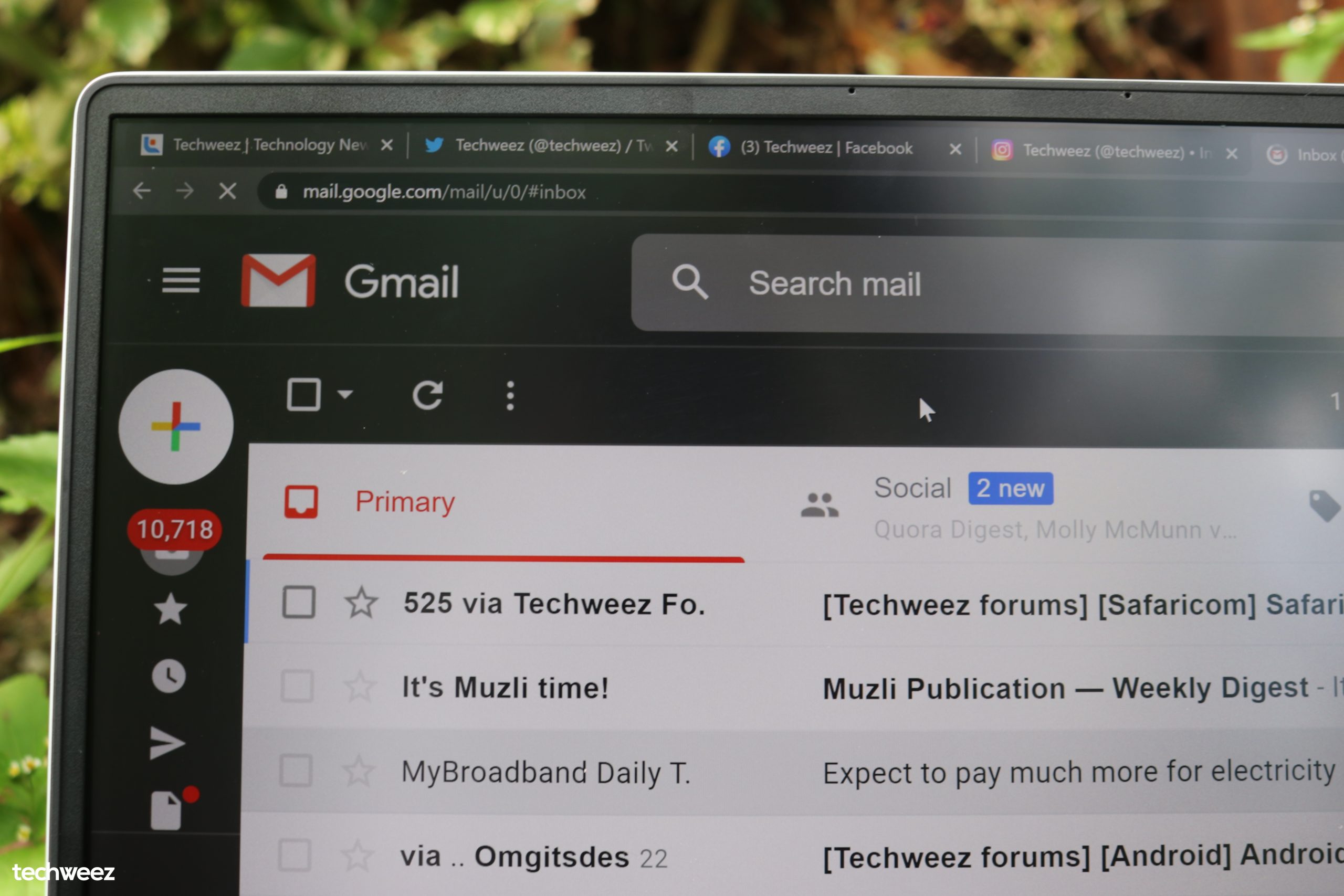
Gmail has gotten better especially with new additional features. Here are some tweaks you can play around with to get that minimalist look and make your inbox more efficient.

To achieve that simple view, you’ll have to remove most of the clutter such as the text, buttons and retain some features you actually use and couldn’t live without.

Make use of Gmail’s keyboard shortcuts

Gmail has some commands that can be enabled by the keyboard and you can configure them to your preferences. Doing so will remove the need for buttons that clutter the Gmail’s web interface.

Gmail general settings (the gear icon on your top right) > Keyboard shortcuts > click enable > save changes
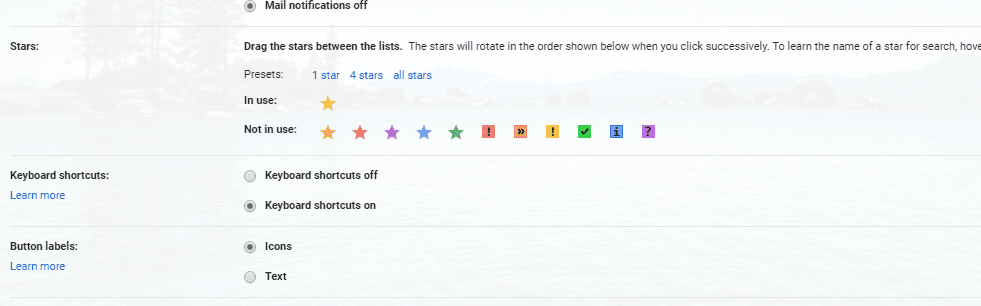
keyboard shortcuts

Once Gmail reloads, go to Gmail settings > Advanced > Custom keyboard shortcuts > click enable > save changes and wait for Gmail to reload.
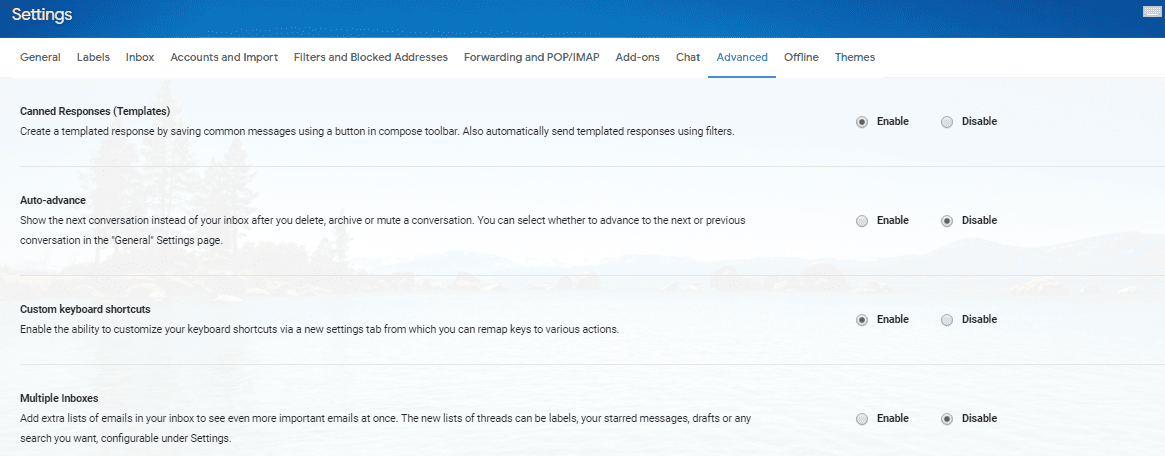
.
advanced custom keyboard shortcuts

After Gmail reloads, go to Gmail settings where you’ll see that the Keyboard shortcuts tab has been added along the top bar. From here, go creative with keyboard shortcuts such i to get to your inbox or c for composing a new email or ESC for closing an email.

Minimise Gmail’s left side panel

This means you need to get rid of the text and only allow for icons to save on space

Tap the three-line menu icon that’s found in Gmail’s left side corner on the top to change the panel into a  minimal one. The panel will expand if you need to access it by just hovering over it.

Lessen the number of icons Google shows you by default. While on the panel, move your mouse over it and you’ll see More at the bottom. Clicking it will reveal more of your labels and categories for you to see.

If you don’t use the Hangouts Chat down below, go ahead and disable it. Head over to Gmail’s settings and from the tabs, you‘ll see Chat which you can then disable. You can also customize your Inbox view but I just decided to remain with the basics: my inbox, my snoozed emails, my sent emails, my drafts and my all mail. After all this, you can collapse this view by tapping on less to get that less distracting left panel.
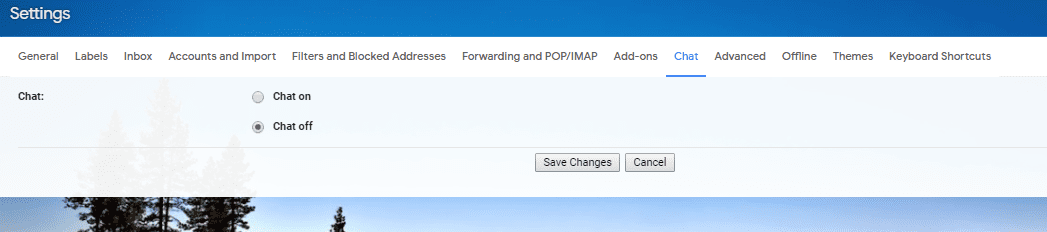
Chat off

Let go of Gmail’s right side panel

Gmail’s right side panel contains links to access widgets like the Keep Notes, Trello and Calendar. There are useful but if you don’t need them at the moment, you can just hide them by clicking the right facing arrow at the bottom right. To access them, just click the arrow which will now be facing the left.

Change your display density

This feature ported from Inbox may be well-intentioned but it puts a lot of clutter to your inbox as it creates large thumbnails for things like attachments.

Go to settings > Display density > select Comfortable view that removes the attachment files
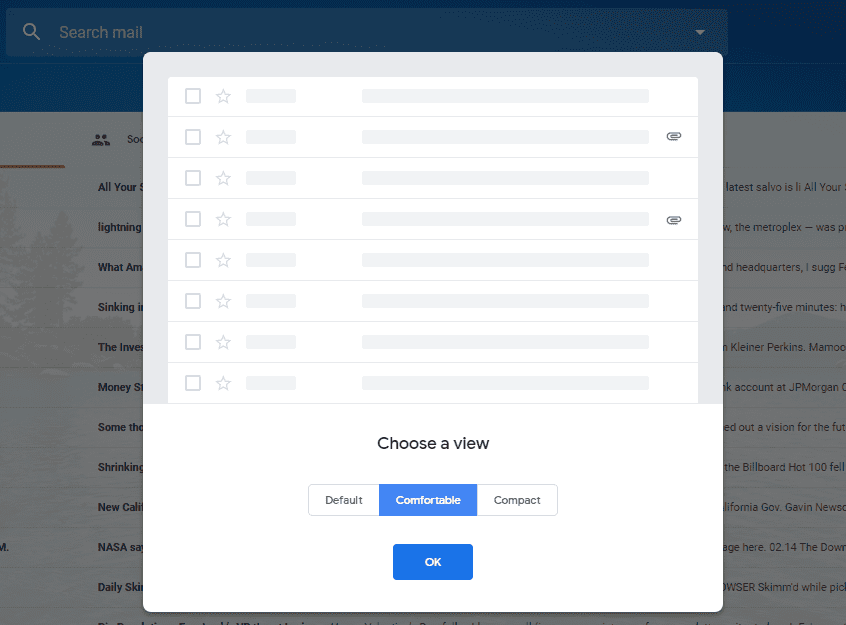
Comfortable View

This will give your inbox unified appearance that’s less distracting.

Get Stylebot extension to modify Gmail’s interface

Stylebot is a free CSS-modifying Chrome extension that you can play around for removing some Gmail elements such as margins, the compose button or the Gmail icon.

Removing the Gmail icon can be done by:

Right-click the Gmail icon > select Stylebot > select style element > When the extension’s control panel pops up > scroll to the “Layout & Visibility” section > click the hide button
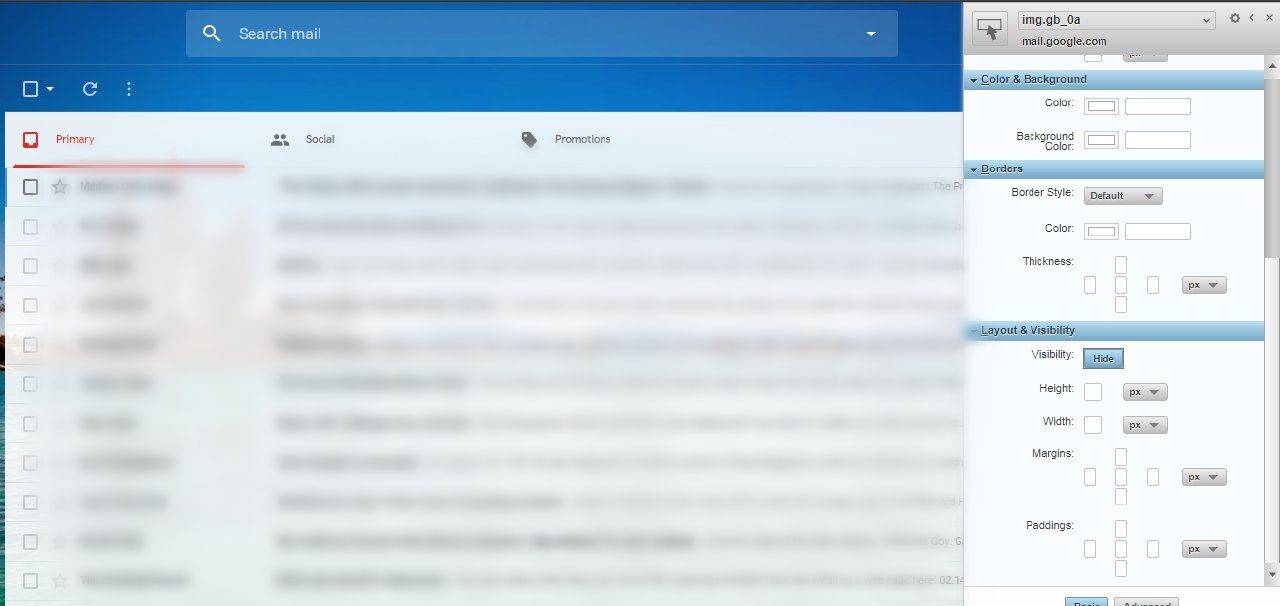
Hide gmail icon

The same method can be done to the compose button if you’ve already set up a keyboard shortcut for that.
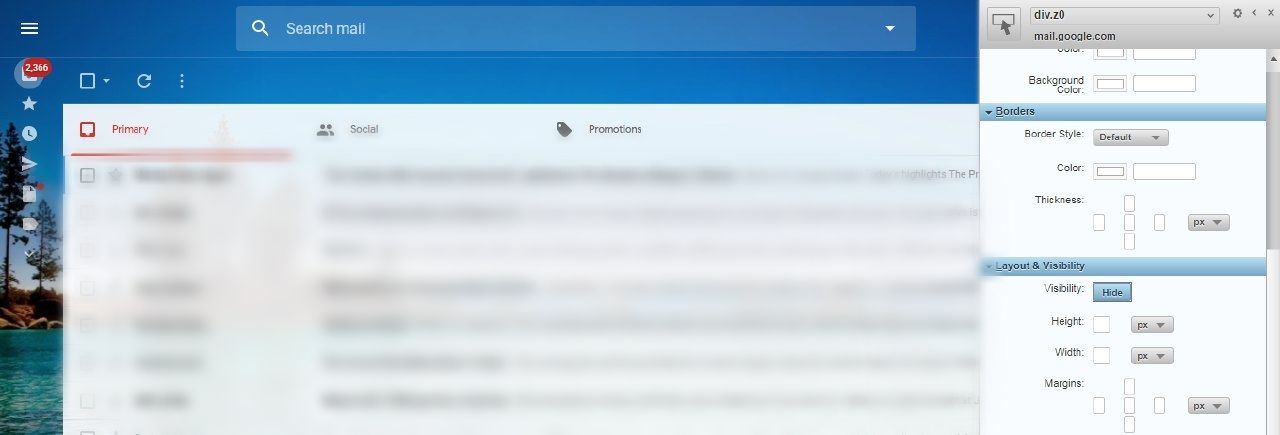
hide compose button

Colour your labels or categories

This will make it easy for you to recognize emails at a glance. Do this by hovering your mouse over each label, then click the three-dot menu icon that is on the side. Select the label colour that will get your attention.

Get a theme

Make your inbox look neater with the right theme. Go to Gmail settings > select themes and scroll over the selections. Once you get one, a theme box will show up. You get to customise the theme such as applying the blur effect or vignette so that you get the same good looking image that will not be distracting in the long term each time you open your inbox.
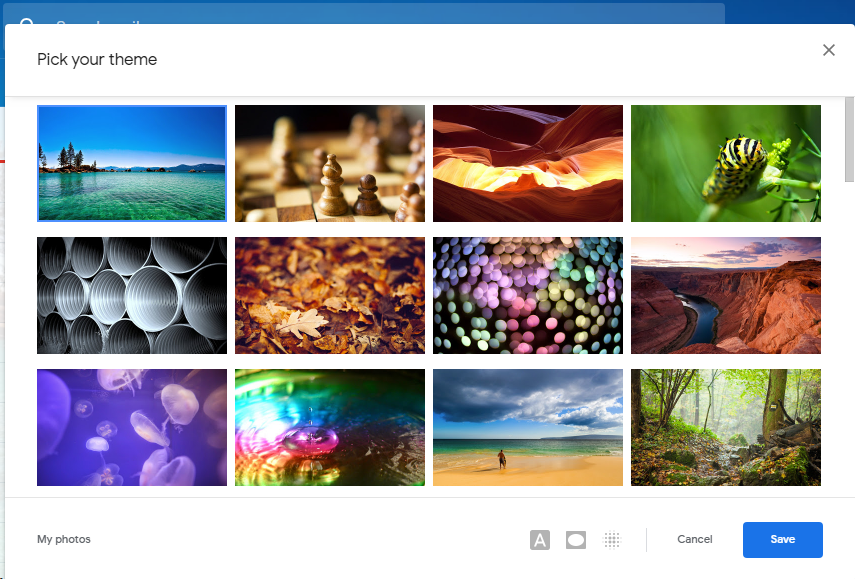
Gmail theme

These are some of the steps you can make to make your Gmail inbox look neat and minimalist while at the same time bringing efficiency to your email productivity.

Tags: Gmail
SendShare156Tweet98
George Kamau

George Kamau

I brunch on consumer tech | [email protected]

Related Posts

Google I/O 2026

Google Rebuilds Search Around AI as Gemini Usage Crosses 3.2 Quadrillion Tokens

May 21, 2026
Google AI Inbox

Gmail Gets AI Inbox That Summarizes Emails and Flags What Matters Most

April 3, 2026
Gmail

Gmail Is Killing Two Features Used to Manage Other Email Accounts

January 6, 2026
Google's Gmail logo

Hate Your Gmail Address? You Can Now Change It

December 27, 2025
gmail purchases tab

Gmail Introduces New Feature to Track Your Online Orders

September 16, 2025
Gmail

How to Switch Your Default Gmail Account Without Losing Emails

September 8, 2025

Latest

KRA Extends Working Hours for Tax Return Filing as Deadline Nears

KRA Extends Working Hours for Tax Return Filing as Deadline Nears

June 18, 2026
viewers Desert DSTV, GOtv, StarTimes as Kenyan Pay TV Market Loses 73.2% of Subscribers

Kenyans’ Exodus From DSTV Continues, as Pay TV Sector Loses Over 85K Subscribers

June 18, 2026
Anthropic Claude

Claude Users Face Service Disruptions as Anthropic Suspends Fable 5

June 18, 2026
How mobile money agents grew into kenya's financial spine but the bank doesnt die

M-Pesa, Airtel Money Hit Over 600K Mobile Money Agents in Kenya

June 18, 2026
Kenya Internet Bandwidth Jumps to 28,130 Gbps: SEACOM Leads with 53% Quarter Growth

SEACOM 53.3% Bandwidth Growth Pushes Kenya’s Total Internet Capacity to 28,130 Gbps

June 18, 2026
The AI Gold Rush Goes Public

The AI Gold Rush Goes Public

June 17, 2026

Best devices

Best Infinix Phones of 2025

Best Infinix Phones of 2025: Budget Prices With Premium Features

December 31, 2025

The Best Infinix Accessories Worth Buying in 2025

November 26, 2025

Best Budget Wireless Earbuds To Buy in Kenya (2025)

October 8, 2025

Samsung Galaxy A36 5G vs Samsung Galaxy A56 5G: Comparison Review

August 29, 2025

Infinix Hot 60 Pro+ vs Infinix Hot 60i: Comparison Review

August 22, 2025

Best Budget Smartwatches To Buy in Kenya 2025

February 13, 2025

Techweez is where tomorrow’s tech stories break today, thanks to intelligent analysis, real-world insight, and visionary storytelling.

Follow Us

Editorials

Airbuds: The App That Turns Your Music Into a Social Feed

Kenya Might Need to Crack Down on Wealth Porn Like China

Techweez and Gearhaus Score BAKE Awards 2026 Nominations

Death by AI: Opportunities That Were Disrupted by Automation

CBK Approved 200+ Digital Lenders, But That’s Not the Real Story

Data Centers, Petrodollars and the Price of Building the AI Age

More News

NTSA Pilots Smart Driving License Enrollment at Huduma Center in Kimilili

Toyota Enters Kenya’s EV Market With New bZ4X Electric Crossover

Visa and ChatGPT Team Up to Let AI Shop for You

China Kills Meta’s $2 Billion Manus Deal: How The Deal Unravelled

UK Bans Social Media For Under-16s, Joining a Growing Global Push

New: Huduma Center Services Halted After Data Center Loses Power

  • Terms Of Use
  • Techweez Brand
  • Privacy & Policy
  • Contact Us

© 2024 Techweez - Palahala Media Group may earn a commission when you buy through links on our sites.
A Palahala Media Group Brand. All rights reserved.
.

Welcome Back!

Login to your account below

Forgotten Password?

Retrieve your password

Please enter your username or email address to reset your password.

Log In

Add New Playlist

Techweez | Tech News, Reviews, Deals, Tips and How To
Crunchy Cookies 🍪 Ahead!

Hey there! Just a heads-up: we're big fans of cookies - both the digital and edible kind! 🍪 We use our cookies and some from third parties to ensure your browsing experience on our site is smooth sailing and secure.


But wait, there's more! We also use cookies to gather stats and insights on how you navigate our site. It's like getting a behind-the-scenes peek at your digital adventures!


Don't worry, you're in control. You can adjust your cookie settings anytime to suit your preferences. Feeling curious? Dive into our Privacy Policy for all the juicy details. Happy browsing! 🚀

Functional Always active
Listen, this legal stuff is about as exciting as watching paint dry. But it basically says we only use your stuff for what you asked us to do, and nobody else gets to peek!
Preferences
The technical storage or access is necessary for the legitimate purpose of storing preferences that are not requested by the subscriber or user.
Statistics
It's those sneaky cookie crumbs websites leave behind to count visitors, like counting ants at a picnic! Totally harmless, just for fun facts. The technical storage or access that is used exclusively for anonymous statistical purposes. Without a subpoena, voluntary compliance on the part of your Internet Service Provider, or additional records from a third party, information stored or retrieved for this purpose alone cannot usually be used to identify you.
Marketing
Hey there! Just letting you know we use some fancy gizmos to remember your preferences. This way, we can show you ads that are, well, not completely bananas.
Manage options Manage services Manage {vendor_count} vendors Read more about these purposes
Make cookies
{title} {title} {title}
Techweez | Tech News, Reviews, Deals, Tips and How To
Crunchy Cookies 🍪 Ahead!
To provide the best experiences, we use technologies like cookies to store and/or access device information. Consenting to these technologies will allow us to process data such as browsing behavior or unique IDs on this site. Not consenting or withdrawing consent, may adversely affect certain features and functions.
Functional Always active
Listen, this legal stuff is about as exciting as watching paint dry. But it basically says we only use your stuff for what you asked us to do, and nobody else gets to peek!
Preferences
The technical storage or access is necessary for the legitimate purpose of storing preferences that are not requested by the subscriber or user.
Statistics
It's those sneaky cookie crumbs websites leave behind to count visitors, like counting ants at a picnic! Totally harmless, just for fun facts. The technical storage or access that is used exclusively for anonymous statistical purposes. Without a subpoena, voluntary compliance on the part of your Internet Service Provider, or additional records from a third party, information stored or retrieved for this purpose alone cannot usually be used to identify you.
Marketing
Hey there! Just letting you know we use some fancy gizmos to remember your preferences. This way, we can show you ads that are, well, not completely bananas.
Manage options Manage services Manage {vendor_count} vendors Read more about these purposes
Make cookies
{title} {title} {title}
No Result
View All Result
  • News
  • Reviews
  • Features
  • Editorial
  • Automotive
  • Entertainment

© 2024 Techweez - Palahala Media Group may earn a commission when you buy through links on our sites.
A Palahala Media Group Brand. All rights reserved.
.