I have been spending more of my time on Google plus of late, trying to savour the goodness of Google’s social network not from the fringes but inside it. Been getting used to it. I just clicked refresh and viola! There was a new Google+ staring at me. First thing I noted was the moved chat box. Previously below the circles, this has since moved to the right, kinda looks like what Facebook had previously before the onset of the timelines, complete with the click to hide chat.
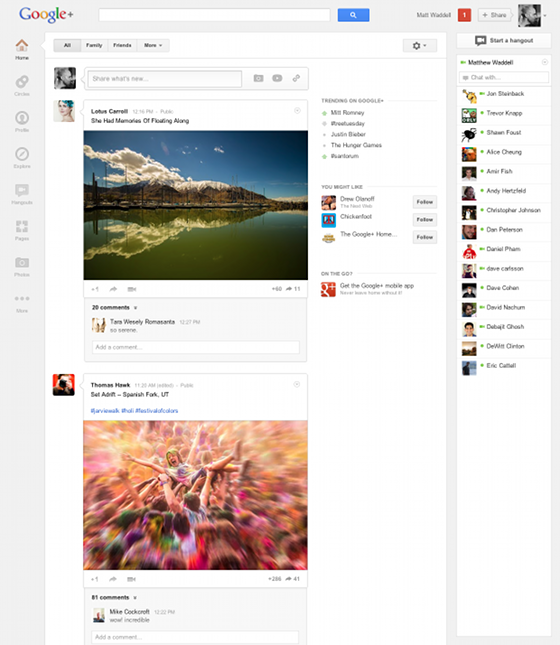 Something else, quite noticeable, is the trending box, yes! Trending box, Google+ now shows what is being discusses alot on the social network. Now you will be able to engage more on what is being said by the masses, just like on twitter. Lemme say I love the new look. The bar on the left side has some nifty features and customizations.
To make things more easier for me as I am just discovering more and more of these, lemme just do bullet points of them:
- The plus one button has been camouflaged to blend with the greyish background, highlights when moused over.
- The update box, looks snazzier than before.
- Circles have been moved to the top
- The navigaton box has all other applications and menus, profile, games, circles, hangouts, just rearrange them as you wish, click and drag
- Head over to the profile and Bam! You got the cover image section.
- Profile photo just like it is on Facebook but on the right, and the circles below that,
Will update more as I discover them, here is a video detailing the changes. Upgrade is just a refresh away, or just open google+ if you hadn’t already. Nothing new on the mobile versions.
And just like anyone else, I love getting added to your circles, here is my google plus profile and the blog page.
Your thoughts?
[UPDATE 1] Google plus pages remain the same.
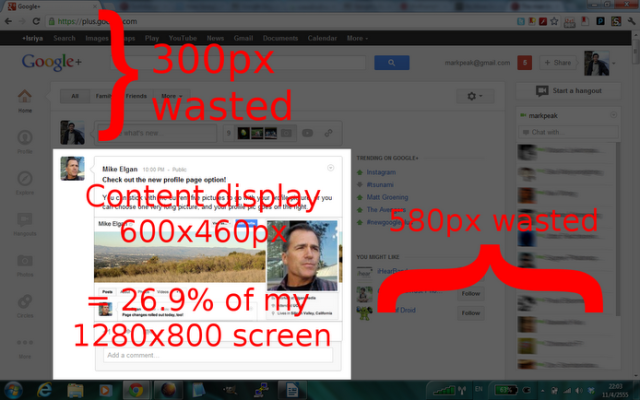
[UPDATE 2] There is already a trending image that Isriya Paireepairit screen shot giving his opinion of space utilization.