• Latest
  • All
  • How To
How to Scan Documents Using Your Smartphone

How to Scan Documents Using Your Smartphone

September 22, 2017
eCitizen

Government Plans to Sell eCitizen and State Data to Generate Revenue in New Proposal

June 8, 2026
Former Isiolo MP Bahari Ali Appointed as Konza Technopolis Chairperson

Former Isiolo MP Bahari Ali Appointed as Konza Technopolis Chairperson

June 8, 2026
NTSA Speed Cameras

NTSA Automated Traffic Fines System Frozen by High Court Days After Launch

June 7, 2026
IP Rating

What IP Rating Mean on Smartphones and Devices

June 6, 2026
DHgate Tablet Cases deals
Airtel

How to Top Up Airtel Airtime from M-Pesa without Charges

June 5, 2026
How To Watch Your Speed and Avoid New NTSA Fines

How To Watch Your Speed and Avoid New NTSA Fines

June 5, 2026
The Housing Levy Was Never Really About Housing Now That It’s a Permanent Deduction

The Housing Levy Was Never Really About Housing Now That It’s a Permanent Deduction

June 5, 2026
Electric Vehicle (EV)

Kenya Power Brings EV Chargers Onto the Right Tariff

June 4, 2026
The Tools Kenya Has to Track Ebola and How They Work

The Tools Kenya Has to Track Ebola and How They Work

June 4, 2026
2026 World Cup

YouTube to Bring FIFA 2026 World Cup Matches With a Catch

June 4, 2026
OpenAI

Florida’s OpenAI Lawsuit Has a Lesson for Kenya’s AI Bill

June 3, 2026
Influencers

Kenya Might Need to Crack Down on Wealth Porn Like China

June 3, 2026
Techweez | Tech News, Reviews, Deals, Tips and How To
  • News
  • Entertainment
  • Reviews
  • Features
  • Editorial
No Result
View All Result
Techweez | Tech News, Reviews, Deals, Tips and How To
  • News
  • Entertainment
  • Reviews
  • Features
  • Editorial
No Result
View All Result
Techweez | Tech News, Reviews, Deals, Tips and How To
No Result
View All Result

How to Scan Documents Using Your Smartphone

Saruni Maina by Saruni Maina
September 22, 2017
in Features
Reading Time: 3 mins read
249
0

Our smartphones have become very powerful gadgets, the computing power within them can achieve a lot if put to use in the right way. We have heard of scientists who “mine” computational power from smartphones all over the world to complete tasks but today, we’re going to be looking at one of the easiest ways to get more from your smartphone, such as scanning a document.

It’s not once I have seen someone take a picture of a document, maybe for safe keeping or to send it to someone, I have done this too and that’s how I came about Quick PDF Scanner and Cam Scanner. Most people preffer the latter from the former, they literally work the same way, but I like what I like and that’s Quick PDF Scanner and here’s how it works:

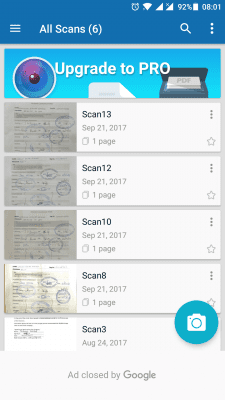
Once you fire up the application, you are met by a homescreen that will, by default, show you up to 5 previously scanned documents, that’s if you have been using the app like I have. There is a floating camera icon and that is what you should pay attention to.
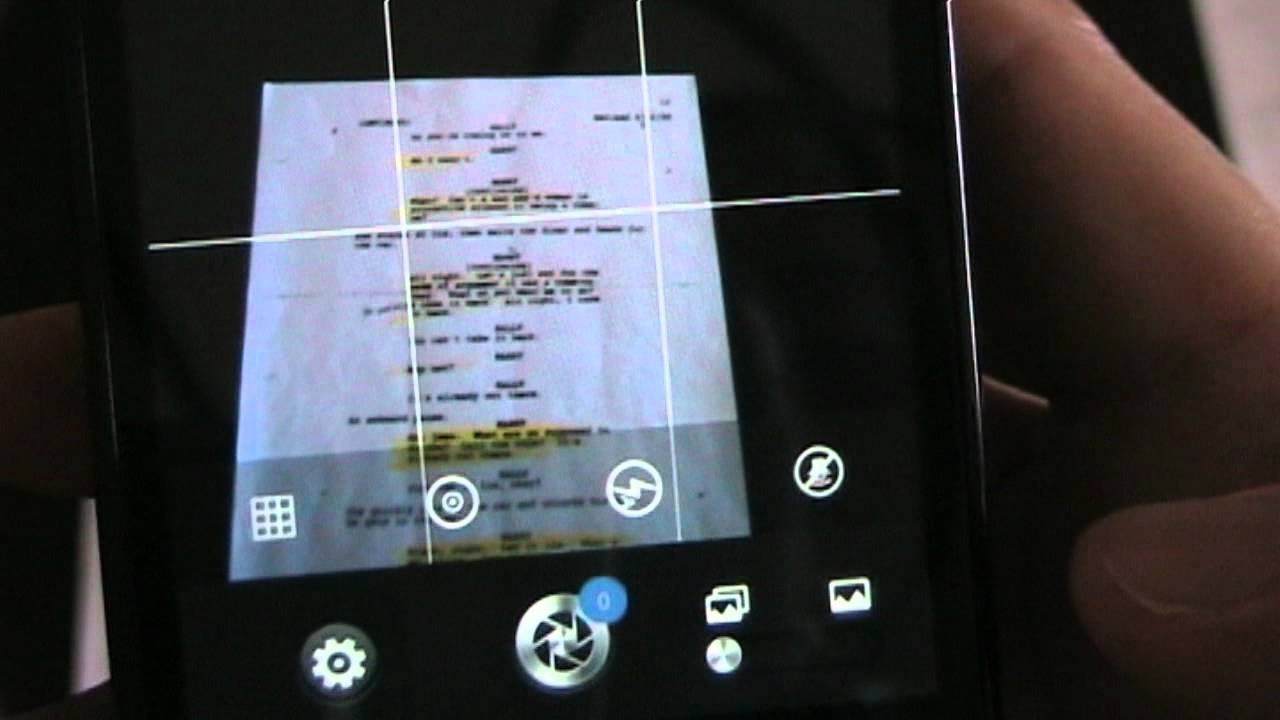
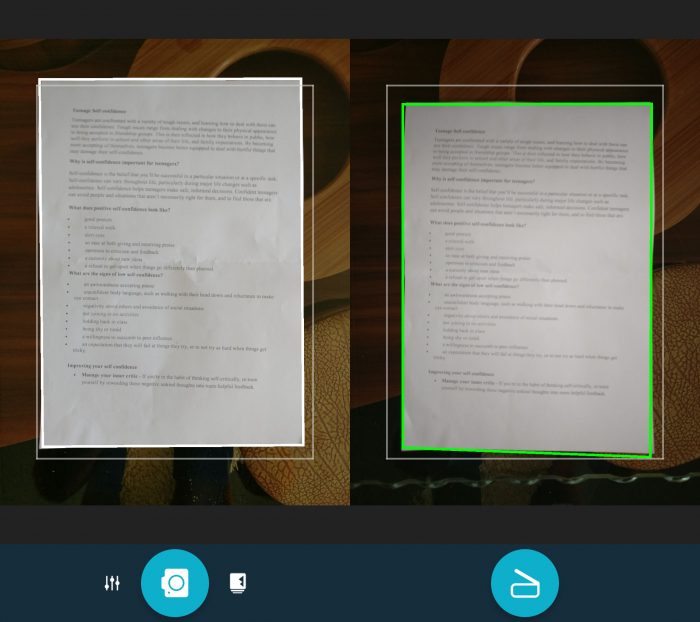
Tapping it opens up a view finder that you will use to scan the document you want. The process is automatic, once you align the document to the grid lines, the lines turn from white to green and if a second or so, the image is captured and processed.
.

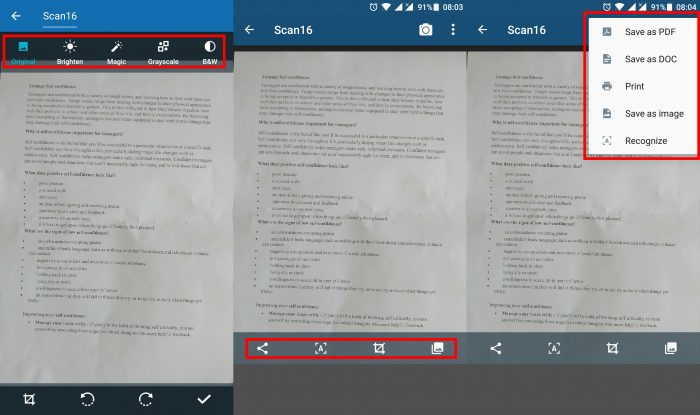
After processing, you can edit the image by changing how it looks, I recommend sticking to original or magic – if you scanned a black and white document. Next you can share the document, crop it and if you are up to it, you can use the OCR (Optical Character Recognition) feature which recognizes the text in your document and allows you to edit, but keep in mind this doesn’t always work. If you are pleased with the document, you can go ahead and save it on your phone or share it, either as a PDF, .doc file or as an image. There’s even an option to send the scan directly to a printer.
So far, Quick PDF scanner has worked perfectly for me, in good lighting and with a well printed document, the scans come out looking great. The quality of the scan is very dependent on your phone’s camera, if your camera doesn’t take great photos, no amount of magic can make it scan a document well.

So why should you use an app to scan a document instead of just taking a picture? Well, like I mentioned, dedicated scanning apps offer better quality and they get rid of the background where you had placed your document, any more questions? There’s a comment section below.

Here’s a free business idea, if you have a great camera phone and are feeling entreprenuerial, why not start a scanning business, using your phone? Oh wait, you can’t actually start that scanning business because everyone with a smartphone knows about this now, or can you?

Download Quick PDF Scanner of Android

Download Quick PDF Scanner of iOS

Download Cam Scanner of Android

Download Cam PDF Scanner of iOS

Tags: AndroidAppsiOS
SendShare147Tweet92
Saruni Maina

Saruni Maina

I Google Bing until it Yahoos! | Email: [email protected]

Related Posts

Android

Android Storage Hacks: How to Recover Space Your Phone Is Hiding

May 18, 2026
Googlebook

Google’s New Laptop Is Called Googlebook, and It Runs on Android

May 14, 2026
Feature Phones

Kenya Now Has 93 Smartphones for Every 100 Phones as Feature Phones Decline

April 7, 2026
vivo V70

vivo V70 Launches in Kenya With 50 MP ZEISS Camera, 20x Zoom and 4K 60FPS Video

April 7, 2026
Samsung Galaxy A57 5G and A37 5G

Samsung Launches Galaxy A57 5G and A37 5G in Kenya

March 31, 2026
"M-Pesa Tanzania users can now tap their Android phones to pay at any Visa terminal

M-Pesa Adds Tap-to-Pay on Android Phones in Tanzania

March 17, 2026

Latest

eCitizen

Government Plans to Sell eCitizen and State Data to Generate Revenue in New Proposal

June 8, 2026
Former Isiolo MP Bahari Ali Appointed as Konza Technopolis Chairperson

Former Isiolo MP Bahari Ali Appointed as Konza Technopolis Chairperson

June 8, 2026
NTSA Speed Cameras

NTSA Automated Traffic Fines System Frozen by High Court Days After Launch

June 7, 2026
IP Rating

What IP Rating Mean on Smartphones and Devices

June 6, 2026
Airtel

How to Top Up Airtel Airtime from M-Pesa without Charges

June 5, 2026
How To Watch Your Speed and Avoid New NTSA Fines

How To Watch Your Speed and Avoid New NTSA Fines

June 5, 2026

Best devices

Best Infinix Phones of 2025

Best Infinix Phones of 2025: Budget Prices With Premium Features

December 31, 2025

The Best Infinix Accessories Worth Buying in 2025

November 26, 2025

Best Budget Wireless Earbuds To Buy in Kenya (2025)

October 8, 2025

Samsung Galaxy A36 5G vs Samsung Galaxy A56 5G: Comparison Review

August 29, 2025

Infinix Hot 60 Pro+ vs Infinix Hot 60i: Comparison Review

August 22, 2025

Best Budget Smartwatches To Buy in Kenya 2025

February 13, 2025

Techweez is where tomorrow’s tech stories break today, thanks to intelligent analysis, real-world insight, and visionary storytelling.

Follow Us

Editorials

Kenya Might Need to Crack Down on Wealth Porn Like China

Techweez and Gearhaus Score BAKE Awards 2026 Nominations

Death by AI: Opportunities That Were Disrupted by Automation

CBK Approved 200+ Digital Lenders, But That’s Not the Real Story

Data Centers, Petrodollars and the Price of Building the AI Age

The Standardization of the USB-C Port: What It Means for Users

More News

The Housing Levy Was Never Really About Housing Now That It’s a Permanent Deduction

Kenya Power Brings EV Chargers Onto the Right Tariff

The Tools Kenya Has to Track Ebola and How They Work

YouTube to Bring FIFA 2026 World Cup Matches With a Catch

Florida’s OpenAI Lawsuit Has a Lesson for Kenya’s AI Bill

Kenya Might Need to Crack Down on Wealth Porn Like China

  • Terms Of Use
  • Techweez Brand
  • Privacy & Policy
  • Contact Us

© 2024 Techweez - Palahala Media Group may earn a commission when you buy through links on our sites.
A Palahala Media Group Brand. All rights reserved.
.

Welcome Back!

Login to your account below

Forgotten Password?

Retrieve your password

Please enter your username or email address to reset your password.

Log In

Add New Playlist

Techweez | Tech News, Reviews, Deals, Tips and How To
Crunchy Cookies 🍪 Ahead!

Hey there! Just a heads-up: we're big fans of cookies - both the digital and edible kind! 🍪 We use our cookies and some from third parties to ensure your browsing experience on our site is smooth sailing and secure.


But wait, there's more! We also use cookies to gather stats and insights on how you navigate our site. It's like getting a behind-the-scenes peek at your digital adventures!


Don't worry, you're in control. You can adjust your cookie settings anytime to suit your preferences. Feeling curious? Dive into our Privacy Policy for all the juicy details. Happy browsing! 🚀

Functional Always active
Listen, this legal stuff is about as exciting as watching paint dry. But it basically says we only use your stuff for what you asked us to do, and nobody else gets to peek!
Preferences
The technical storage or access is necessary for the legitimate purpose of storing preferences that are not requested by the subscriber or user.
Statistics
It's those sneaky cookie crumbs websites leave behind to count visitors, like counting ants at a picnic! Totally harmless, just for fun facts. The technical storage or access that is used exclusively for anonymous statistical purposes. Without a subpoena, voluntary compliance on the part of your Internet Service Provider, or additional records from a third party, information stored or retrieved for this purpose alone cannot usually be used to identify you.
Marketing
Hey there! Just letting you know we use some fancy gizmos to remember your preferences. This way, we can show you ads that are, well, not completely bananas.
Manage options Manage services Manage {vendor_count} vendors Read more about these purposes
Make cookies
{title} {title} {title}
Techweez | Tech News, Reviews, Deals, Tips and How To
Crunchy Cookies 🍪 Ahead!
To provide the best experiences, we use technologies like cookies to store and/or access device information. Consenting to these technologies will allow us to process data such as browsing behavior or unique IDs on this site. Not consenting or withdrawing consent, may adversely affect certain features and functions.
Functional Always active
Listen, this legal stuff is about as exciting as watching paint dry. But it basically says we only use your stuff for what you asked us to do, and nobody else gets to peek!
Preferences
The technical storage or access is necessary for the legitimate purpose of storing preferences that are not requested by the subscriber or user.
Statistics
It's those sneaky cookie crumbs websites leave behind to count visitors, like counting ants at a picnic! Totally harmless, just for fun facts. The technical storage or access that is used exclusively for anonymous statistical purposes. Without a subpoena, voluntary compliance on the part of your Internet Service Provider, or additional records from a third party, information stored or retrieved for this purpose alone cannot usually be used to identify you.
Marketing
Hey there! Just letting you know we use some fancy gizmos to remember your preferences. This way, we can show you ads that are, well, not completely bananas.
Manage options Manage services Manage {vendor_count} vendors Read more about these purposes
Make cookies
{title} {title} {title}
No Result
View All Result
  • News
  • Reviews
  • Features
  • Editorial
  • Automotive
  • Entertainment

© 2024 Techweez - Palahala Media Group may earn a commission when you buy through links on our sites.
A Palahala Media Group Brand. All rights reserved.
.