




 Despite the major steps we have made in the technological space as human beings, there are two things that seem to be too complex for our minds, editing tweets and playing YouTube videos in the background while using the official app. No one said it better than this guy:
Can someone tell me why they’ve made robot sex dolls but I STILL can’t play music on YouTube with the app closed?
Can we prioritise our scientists better please?
— Dr Ben Hall (@DrBenLHall) January 20, 2018
In this case, we will be looking to solve the issue of YouTube videos, those who want to edit tweets can go join those who dream of an African president who will just sit for one term on one side.
Moving on, the hack is pretty simple, all you need is to use a little bit of your brain:
Have Google Chrome installed on your android phone, which is highly likely the case.
Next, simply go to www.youtube.com and select the video you want to play.
After the video starts playing, tap on the menu icon and select Desktop site.
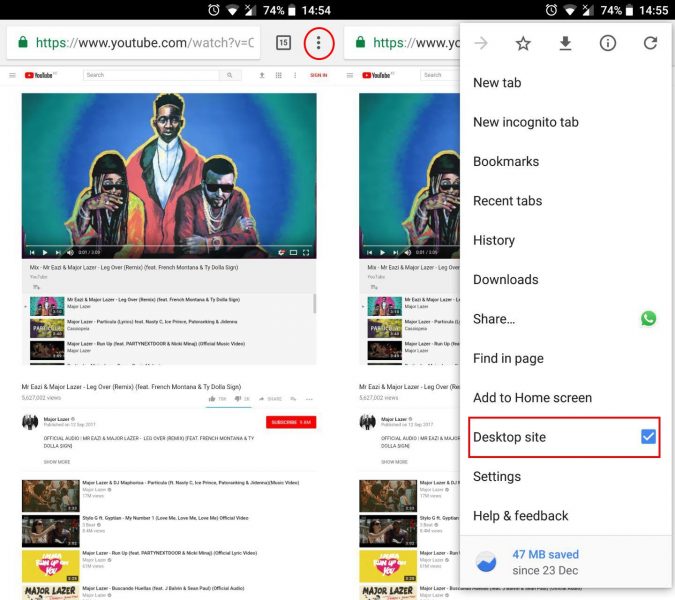
After the webpage is done refreshing, now hit play on your video.
Tap on the home button to close the browser.
The video will stop playing, but since you will have media controls on your notification drawer, just tap play.
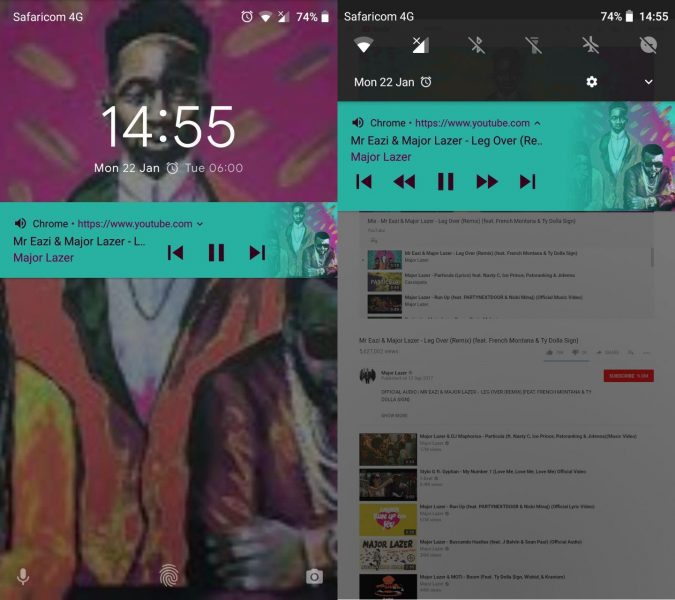
Eureka! You can now listen to playlists and podcasts without having YouTube open.
We can confirm that this hack works best with playlists since you can easily skip a song and move to the next one or go to the previous one. One more thing, you will definitely have to bear with hearing the ads as well.
Thanks to Cornelius (@CornColly) for the tip!