



• Latest
  • All
  • How To
AI photo editor

Best Free AI Photo Editors in 2026 – Tested & Rated

April 14, 2026
China Kills Meta’s $2 Billion Manus Deal: How The Deal Unravelled

China Kills Meta’s $2 Billion Manus Deal: How The Deal Unravelled

June 15, 2026
UK Bans Social Media For Under-16s, Joining a Growing Global Push

UK Bans Social Media For Under-16s, Joining a Growing Global Push

June 15, 2026
Huduma Kenya call centre open till 9 Pm

New! Huduma Centre Services Halted After Data Centre Loses Power

June 15, 2026
Big Brother is Watching as Kenya Joins the CCTV Surveillance Club

Big Brother is Watching as Kenya Joins the CCTV Surveillance Club

June 15, 2026
How to Download and Verify Your NTSA eLogbook

How to Verify an NTSA eLogbook Is Not Fake

June 15, 2026
Outside Enterprise Allegedly Used Gemini to Build Massive Phishing Operation

Google Sues Scammers Using Gemini to Build Fake Government and Brand Sites

June 13, 2026
SpaceX

SpaceX Debuts at $2.1 Trillion Valuation in Largest IPO Ever

June 13, 2026
Elon Musk

Elon Musk Becomes World’s First Trillionaire

June 13, 2026
Who Will Win The World Cup According to Prediction Models

Who Will Win The World Cup According to Prediction Models

June 12, 2026
Airbuds: The App That Turns Your Music Into a Social Feed

Airbuds: The App That Turns Your Music Into a Social Feed

June 13, 2026
How a Remote IMEI Kill Switch Is Shaking Up the Stolen iPhone Market Worldwide

Following London Success, Apple Deploys Global Killswitch Feature to Eliminate Stolen iPhones Market

June 12, 2026
CS Mbadi clarifies: June 30 remains tax deadline; nil return may shift to January 31

Kenya’s June 30 Tax Deadline Remains, But Nil Returns Deadline May Move to Jan 31

June 12, 2026
Techweez | Tech News, Reviews, Deals, Tips and How To
  • News
  • Entertainment
  • Reviews
  • Features
  • Editorial
No Result
View All Result
Techweez | Tech News, Reviews, Deals, Tips and How To
  • News
  • Entertainment
  • Reviews
  • Features
  • Editorial
No Result
View All Result
Techweez | Tech News, Reviews, Deals, Tips and How To
No Result
View All Result

Best Free AI Photo Editors in 2026 – Tested & Rated

James Ndirangu by James Ndirangu
April 14, 2026
Reading Time: 10 mins read
275
0

Looking for the best free AI photo editor in 2026?

We tested today’s top tools to see which photo editor AI solutions deliver real results. From free AI photo editor options to AI photo editor online free platforms, here’s what actually works and which ones are worth your time.

Part 1: Why More People Are Turning to AI for Photo Editing

Gone are the days of tedious manual edits. Traditional tools often demanded skill and time to achieve pro-level results. Now, AI photo editors learn from millions of images to automatically enhance color, clarity, and composition.

The outcome? Faster, smarter edits for everyone.

  • Hobbyists share perfect shots in minutes.
  • Small businesses can create polished imagery without an expert.
  • Pros save hours on batch edits by focusing more on creativity than corrections.

Part 2: How to Edit Photos with AI Step by Step

Here are the various ways you can use to edit photos with AI:

1. HitPaw FotorPea

HitPaw FotorPea is designed for beginners who want professional-level photo editing by using AI. This software specifically uses Nano Banana Pro to make adjustments to your images.

It focuses on modern AI editing tasks, including background removal, color control, lighting adjustments, and text-to-image generation. These tools make it easy to edit social media posts, product photos, thumbnails, and much more.

What makes HitPaw FotorPea stand out is that it supports upscaling up to 8K, which means final images stay sharp enough for print or ads.

Main functions

  • Intuitive Drag-and-Drop Workspace

Easily move images, text, and design elements with a simple drag-and-drop interface. This user-friendly layout makes editing fast and effortless, even for beginners.

  • One-Click Background Removal & Replacement

Instantly remove unwanted backgrounds with a single click. Replace them with solid colors, custom images, or creative designs in seconds.

  • AI-Powered Object Removal

Remove unwanted objects or people seamlessly. The AI intelligently fills in the removed area, preserving natural details and image quality.

  • AI Image Expansion

Extend your images beyond their original borders using AI. Perfect for creating social media posts, banners, and wider compositions.

  • Rich Text & Design Elements

Add text, stickers, and shapes directly to your canvas. Customize fonts, layouts, and styles to create visually engaging designs.

How to edit photos with HitPaw FotorPea

Step 1: Download, Install, and Launch
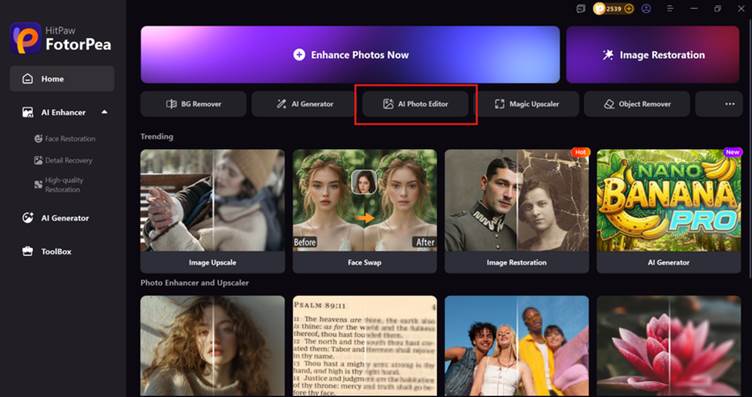
 Download HitPaw FotorPea from the official website, install it, and open the software. Click “AI Photo Editor” to get started.
Step 2: Upload Image to AI Canvas
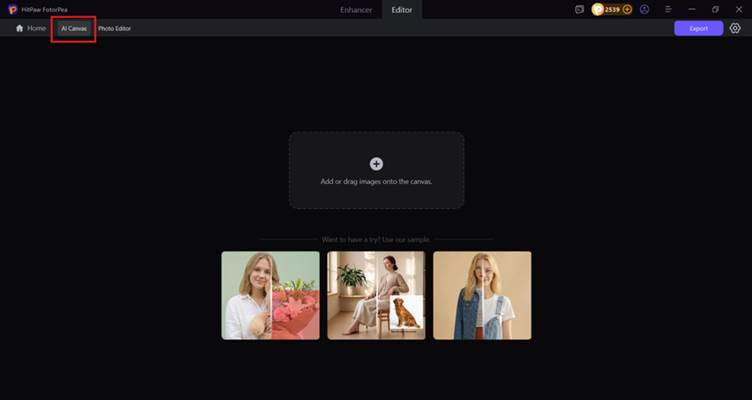
Select “AI Canvas”, then upload your photo by clicking the “+” icon or using drag-and-drop.
Step 3: Select Area and Apply AI Editing
Highlight the area you want to edit, enter your prompt, and press Enter to let the AI process the changes automatically.

Step 4: Preview and Export
Review the before-and-after result, then click Export to save your image in your preferred format.
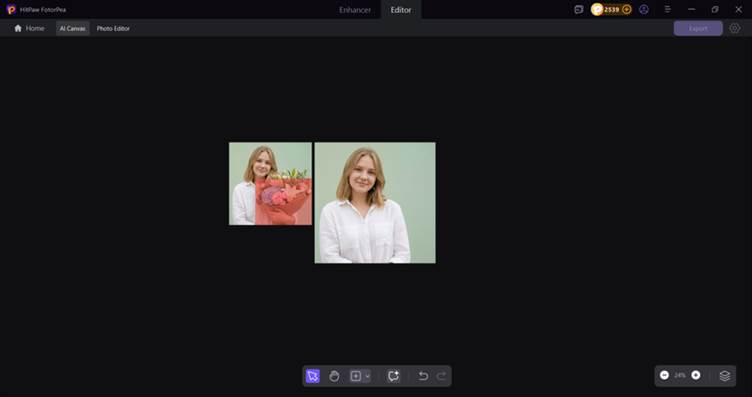
AI Canvas is transforming image editing by replacing complex tools with simple text prompts, allowing users to effortlessly remove objects, change backgrounds, and create new visuals in seconds. Instead of relying on advanced software or technical skills, users can simply describe what they want, and the AI brings it to life with impressive accuracy. Tools like HitPaw FotorPea make this process fast, intuitive, and enjoyable, delivering realistic results through a streamlined workflow—making it an ideal solution for creators, e-commerce sellers, and everyday users alike.

2. Fiverr AI Image Editing Service

Fiverr is one of the largest freelancing platforms, with hundreds of editors offering AI-powered photo enhancement as part of their services. Here, you can choose any of the editors, send in your image, and explain what you need fixed.

The only thing to watch out for is quality variation, since every seller uses different tools and skill levels. Also, read the reviews beforehand to find a reliable person.

3. Colorcinch

Colorcinch works directly in your browser and feels simple from the moment you open it. You upload a photo, adjust a few sliders, and the tool applies AI-powered improvements such as clarity, sharpness, and artistic effects.

It’s great for quick edits without installing anything. However, the only drawback is that the free version exports at a lower resolution, so it’s better suited for online use rather than high-quality prints.

4. PicMa

PicMa focuses on improving realism when enlarging or sharpening images. To use this tool, add your photo, tap enhance, and the tool previews the upgraded version within seconds. You can use it for free, but you need the paid version for higher resolutions.

The tool is helpful for older images or pictures that have lost detail. Even so, its simple layout makes it easy for beginners to get cleaner results without confusion.

5. YouCam Enhance

YouCam Enhance is a quick mobile solution for sharpening images, fixing blur, and improving low-resolution photos. Simply upload your picture and watch the app rebuild the details.

It’s handy when editing on a phone, especially for personal photos. The only trade-off is that free users may see ads or experience slower export processing, which can interrupt longer editing sessions.

6. Promeo

Promeo is also a mobile app designed for social-media-ready graphics. All you need to do is import a photo. Then, you can easily remove the background in one tap, choose a template, and instantly get a polished post.

One downside is that the installer is relatively large, so older devices might lag during setup or heavy editing.

7. Instories

Instories helps creators quickly produce vertical posts, reels, and short-form content. It includes AI tools that remove backgrounds, auto-caption spoken content, and resize visuals for different platforms.

It works well for people who want fast, polished results for reels and stories. However, the app requires a decent amount of phone storage, which may be inconvenient for some users.

8. AI Image Editor

AI Image Editor works in the browser and allows you to change a photo using prompts. In this tool, you upload any image from your device, describe the changes you want, and the tool applies them for you.

An issue many users encountered was the lag while running online. That’s why, for a smooth experience, you need a stable, fast internet connection.

9. Imagen

Imagen is built for photographers who edit large batches of photos and want a consistent style. It speeds up repetitive tasks and helps teams keep a uniform style throughout their collection.

The only issue here is that the free plan usually limits the number of images you can process. As a result, you may need to purchase the pro version.

10. GOOEY
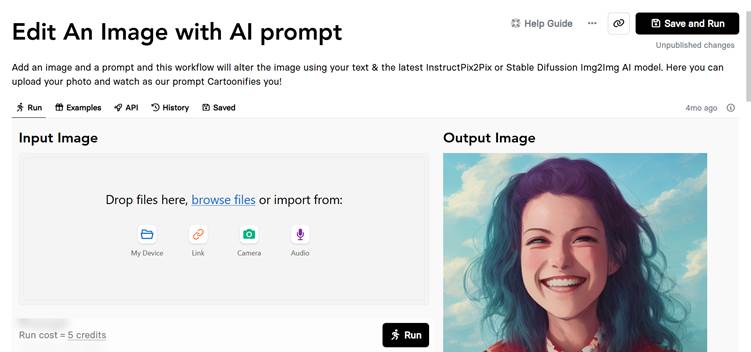
GOOEY offers a creative AI workflow that lets you start with an image and guide the transformation with written prompts. It runs online, so all you need to do is upload the image and provide a prompt for how you want it edited.

Because everything depends on your prompt, vague descriptions can lead to unexpected or unrealistic outputs.

Part 3: FAQs

Q1: Are AI photo editors safe to use with private images?

Most reputable tools process data locally or delete uploads after a short window. Read each tool’s privacy page before you start.

Q2: Do free editors leave watermarks?

Some do. HitPaw adds a small corner mark, while Colorcinch and Aiimageeditor export clean files at reduced resolution.

Q3: Which editor works best on low-spec hardware?

Browser tools like Colorcinch or AI Image Editor offload heavy lifting to remote servers, so even a budget Chromebook can run them.

Conclusion

After comparing this year’s top performers, it’s clear that every editor has their own strengths. Some excel at portraits, others at noise reduction, and a few offer strong creative features but weak enhancement quality.

However, the tool that consistently performs well across all major editing needs is HitPaw FotorPea. It brings together multiple AI models that handle the full spectrum of editing work, including sharpening soft images, removing noses, and upscaling to 8K. If you want an AI photo editor that delivers sharp improvements and practical creative tools in one place, HitPaw FotorPea is the most balanced choice in 2026.


SendShare153Tweet96

Latest

China Kills Meta’s $2 Billion Manus Deal: How The Deal Unravelled

China Kills Meta’s $2 Billion Manus Deal: How The Deal Unravelled

June 15, 2026
UK Bans Social Media For Under-16s, Joining a Growing Global Push

UK Bans Social Media For Under-16s, Joining a Growing Global Push

June 15, 2026
Huduma Kenya call centre open till 9 Pm

New! Huduma Centre Services Halted After Data Centre Loses Power

June 15, 2026
Big Brother is Watching as Kenya Joins the CCTV Surveillance Club

Big Brother is Watching as Kenya Joins the CCTV Surveillance Club

June 15, 2026
How to Download and Verify Your NTSA eLogbook

How to Verify an NTSA eLogbook Is Not Fake

June 15, 2026
Outside Enterprise Allegedly Used Gemini to Build Massive Phishing Operation

Google Sues Scammers Using Gemini to Build Fake Government and Brand Sites

June 13, 2026

Best devices

Best Infinix Phones of 2025

Best Infinix Phones of 2025: Budget Prices With Premium Features

December 31, 2025

The Best Infinix Accessories Worth Buying in 2025

November 26, 2025

Best Budget Wireless Earbuds To Buy in Kenya (2025)

October 8, 2025

Samsung Galaxy A36 5G vs Samsung Galaxy A56 5G: Comparison Review

August 29, 2025

Infinix Hot 60 Pro+ vs Infinix Hot 60i: Comparison Review

August 22, 2025

Best Budget Smartwatches To Buy in Kenya 2025

February 13, 2025

Techweez is where tomorrow’s tech stories break today, thanks to intelligent analysis, real-world insight, and visionary storytelling.

Follow Us

Editorials

Airbuds: The App That Turns Your Music Into a Social Feed

Kenya Might Need to Crack Down on Wealth Porn Like China

Techweez and Gearhaus Score BAKE Awards 2026 Nominations

Death by AI: Opportunities That Were Disrupted by Automation

CBK Approved 200+ Digital Lenders, But That’s Not the Real Story

Data Centers, Petrodollars and the Price of Building the AI Age

More News

SpaceX Debuts at $2.1 Trillion Valuation in Largest IPO Ever

Elon Musk Becomes World’s First Trillionaire

Who Will Win The World Cup According to Prediction Models

Airbuds: The App That Turns Your Music Into a Social Feed

Following London Success, Apple Deploys Global Killswitch Feature to Eliminate Stolen iPhones Market

Kenya’s June 30 Tax Deadline Remains, But Nil Returns Deadline May Move to Jan 31

  • Terms Of Use
  • Techweez Brand
  • Privacy & Policy
  • Contact Us

© 2024 Techweez - Palahala Media Group may earn a commission when you buy through links on our sites.
A Palahala Media Group Brand. All rights reserved.
.

Welcome Back!

Login to your account below

Forgotten Password?

Retrieve your password

Please enter your username or email address to reset your password.

Log In

Add New Playlist

Techweez | Tech News, Reviews, Deals, Tips and How To
Crunchy Cookies 🍪 Ahead!

Hey there! Just a heads-up: we're big fans of cookies - both the digital and edible kind! 🍪 We use our cookies and some from third parties to ensure your browsing experience on our site is smooth sailing and secure.


But wait, there's more! We also use cookies to gather stats and insights on how you navigate our site. It's like getting a behind-the-scenes peek at your digital adventures!


Don't worry, you're in control. You can adjust your cookie settings anytime to suit your preferences. Feeling curious? Dive into our Privacy Policy for all the juicy details. Happy browsing! 🚀

Functional Always active
Listen, this legal stuff is about as exciting as watching paint dry. But it basically says we only use your stuff for what you asked us to do, and nobody else gets to peek!
Preferences
The technical storage or access is necessary for the legitimate purpose of storing preferences that are not requested by the subscriber or user.
Statistics
It's those sneaky cookie crumbs websites leave behind to count visitors, like counting ants at a picnic! Totally harmless, just for fun facts. The technical storage or access that is used exclusively for anonymous statistical purposes. Without a subpoena, voluntary compliance on the part of your Internet Service Provider, or additional records from a third party, information stored or retrieved for this purpose alone cannot usually be used to identify you.
Marketing
Hey there! Just letting you know we use some fancy gizmos to remember your preferences. This way, we can show you ads that are, well, not completely bananas.
Manage options Manage services Manage {vendor_count} vendors Read more about these purposes
Make cookies
{title} {title} {title}
Techweez | Tech News, Reviews, Deals, Tips and How To
Crunchy Cookies 🍪 Ahead!
To provide the best experiences, we use technologies like cookies to store and/or access device information. Consenting to these technologies will allow us to process data such as browsing behavior or unique IDs on this site. Not consenting or withdrawing consent, may adversely affect certain features and functions.
Functional Always active
Listen, this legal stuff is about as exciting as watching paint dry. But it basically says we only use your stuff for what you asked us to do, and nobody else gets to peek!
Preferences
The technical storage or access is necessary for the legitimate purpose of storing preferences that are not requested by the subscriber or user.
Statistics
It's those sneaky cookie crumbs websites leave behind to count visitors, like counting ants at a picnic! Totally harmless, just for fun facts. The technical storage or access that is used exclusively for anonymous statistical purposes. Without a subpoena, voluntary compliance on the part of your Internet Service Provider, or additional records from a third party, information stored or retrieved for this purpose alone cannot usually be used to identify you.
Marketing
Hey there! Just letting you know we use some fancy gizmos to remember your preferences. This way, we can show you ads that are, well, not completely bananas.
Manage options Manage services Manage {vendor_count} vendors Read more about these purposes
Make cookies
{title} {title} {title}
No Result
View All Result
  • News
  • Reviews
  • Features
  • Editorial
  • Automotive
  • Entertainment

© 2024 Techweez - Palahala Media Group may earn a commission when you buy through links on our sites.
A Palahala Media Group Brand. All rights reserved.
.