



• Latest
  • All
  • How To

Try Omni Reference to Guide Every Image-to-Video Result Precisely

November 10, 2026
Apple Overtakes Nvidia as the World’s Most Valuable Company After a 12% Share Slide

Apple Overtakes Nvidia as the World’s Most Valuable Company After a 12% Share Slide

November 10, 2026
How to Update Everything Once on Windows Laptop or PC

How to Update Everything Once on Windows Laptop or PC

November 10, 2026
Lydia Chelagat Nominated as Kenya’s Data Commissioner to Succeed Immaculate Kassait

Lydia Chelagat Nominated as Kenya’s Data Commissioner to Succeed Immaculate Kassait

November 9, 2026
Kenya’s Crypto Rules Put It Among Africa’s Most Regulated Markets as the Continent Stays a Patchwork

Kenya’s Crypto Rules Put It Among Africa’s Most Regulated Markets as the Continent Stays a Patchwork

November 9, 2026
Commerce and Adult Content Dominate as TikTok Takes Down 750,185 Kenyan Content

Commerce and Adult Content Dominate as TikTok Takes Down 750,185 Kenyan Content

November 9, 2026
How to Connect WhatsApp to Your Laptop or Computer: A Step-by-Step Guide

How to Connect WhatsApp to Your Laptop or Computer: A Step-by-Step Guide

November 9, 2026
Nvidia Board Opens Independent Investigation Into Jensen Huang Over China Spy Claims

Nvidia Board Opens Independent Investigation Into Jensen Huang Over China Spy Claims

November 9, 2026
Hustler Fund loan limit

How to Increase Your Hustler Fund Loan Limit Before 2026 Ends

November 9, 2026
Epomaker TH80 V2 keyboard

Epomaker TH80 V2 Review: A Good Entry Point Into Mechanical Keyboards

Redtech Plans a Kenya-Nigeria Payments Corridor With Kenyan Launch in 2027

Redtech Plans a Kenya-Nigeria Payments Corridor With Kenyan Launch in 2027

November 7, 2026
Safaricom Is Becoming a Financial Services Company With a Telco Attached

Safaricom Is Becoming a Financial Services Company With a Telco Attached

November 7, 2026
KRA Passes KES 1 Trillion a Month Early, but the Harder Months Lie Ahead

KRA Passes KES 1 Trillion a Month Early, but the Harder Months Lie Ahead

November 5, 2026
Techweez | Tech News, Reviews, Deals, Tips and How To
  • News
  • Entertainment
  • Reviews
  • Features
  • Editorial
No Result
View All Result
Techweez | Tech News, Reviews, Deals, Tips and How To
  • News
  • Entertainment
  • Reviews
  • Features
  • Editorial
No Result
View All Result
Techweez | Tech News, Reviews, Deals, Tips and How To
No Result
View All Result

Try Omni Reference to Guide Every Image-to-Video Result Precisely

Techweez by Techweez
November 10, 2026
Reading Time: 7 mins read
264
0

Text prompts can be used to describe movement but can be challenging to convey all of the visual detail. Dreamina AI does not just use a text prompt, but also provides visual prompts to help with image-to-video generation. It has an Omni reference feature for multiple references (where applicable depending on selected workflow). Another option provided by Dreamina Seedance 2.5 is the ability to interpret movement, spatial relationships, and character positioning through reference-to-video (R2V). These tools are used to help set a creative direction but do not ensure that it will be reproduced exactly. The selection of appropriate references, prompt writing, and analysis of results are still crucial.

What Is Omni Reference in Dreamina AI?

Dreamina AI’s Omni reference feature allows you to convey your visual intent via several reference images. Images of characters can be used to explain appearance, and images of the environment can be used to explain atmosphere, composition, and lighting. Product references can draw attention to unique shapes, materials, and design elements. These references, together with the starting image and written prompt, offer further context for the video generation. When credits and features allow, this may be a useful technique to use in a AI video generator workflow. However, the options and behaviours of the reference are different for each interface and selected model. Supplied images are used to help and guide generation and not to ensure that the generation is the same image.

Choose References According to Their Creative Purpose

Choose references to convey the information required in each image. Facial features, hairstyle, clothes, and even distinguishing accessories should be evident in character identity references. Environment can be used to create lighting, atmosphere, backgrounds, and spatial arrangements. Product images should be clearly seen and demonstrate key product geometry, materials, textures, and branding. Style references are used to convey color treatments and artistic direction, not identity requirements. Prevent the use of images that are in conflict with each other or present incompatible designs or appearances. Clear references help Dreamina AI in interpreting the creative brief and minimize unneeded ambiguity.

Steps to Try Omni Reference to Guide Every Image-to-Video Result Precisely

Step 1: Upload your images and write a guiding prompt

  1. Sign up or log in to Dreamina, then upload all the reference images you need.
  2. Open the “Create” tab from the left menu and then select the “AI video” option.
  3. Write a detailed text prompt that explains exactly how the video should look and feel. State video elements, theme, and concept so the AI understands your vision from the start.
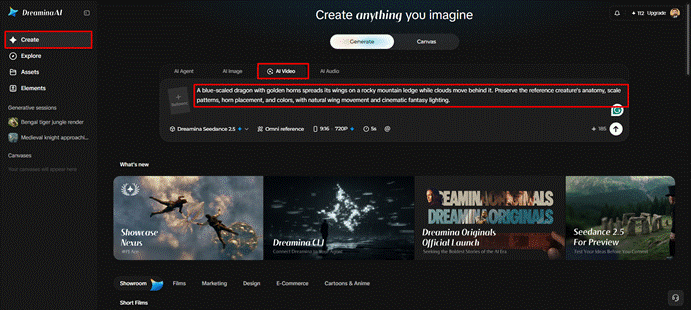
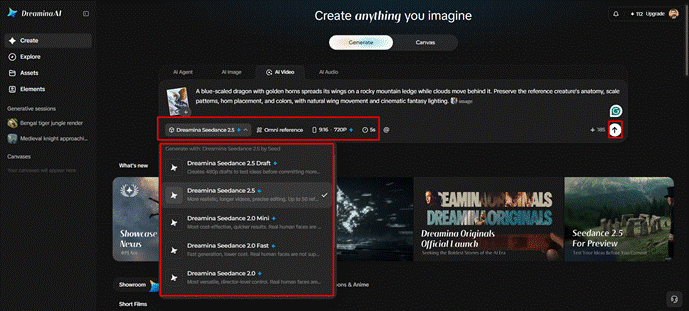
Step 2: Apply Omni reference, choose settings, and generate

  1. Next, choose a model from the available options at the bottom of the dialogue box.
  2. Models to test include Dreamina Seedance 2.5, Dreamina Seedance 2.0, and Dreamina Seedance 2.0 Fast. Dreamina Seedance 2.0 Mini, Dreamina Seedance 1.0, and many more versions appear in that list.
  3. Click on “Omni reference” and guide the AI with multiple reference images for accurate results. Each added image then steers the AI toward the exact video result that you picture.
  4. Adjust the custom aspect ratio and resolution in the “Aspect ratio” and “Resolution” tabs first.
  5. Finally, click the “Generate” tab to begin creating your reference-guided video from all your images.
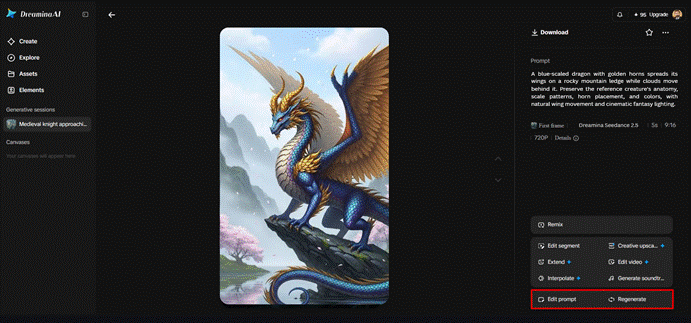
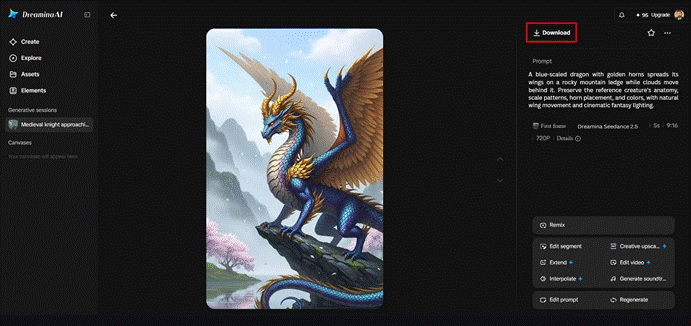
Step 3: Review the result and export your final video

  1. If the video misses your vision, you can “Edit prompt” or “Regenerate” to refine it.
  • Open the “Edit video” option to modify the generated video exactly as you need it.
  • Pick “Edit segment” to edit only part of the video while the rest stays intact.
  • Lengthen the clip with “Extend video” if you need a bit more time on screen. Raise the clarity with “Creative upscale” to make every detail from your references stand out.
  • Dreamina gives you complete freedom to edit your video until it fully matches your references.
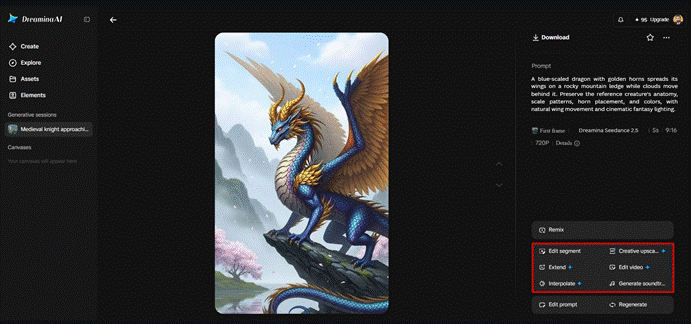
  • Finally, click the “Download” tab sitting at the very top right of the main interface. This action saves the video file straight onto your local device for any later use.
Six Principles for Using Omni Reference More Effectively

  • Reference clarity: Choose images that show key details clearly, without hidden or confusing details.
  • Purposeful selection: Give each reference a specific function rather than include irrelevant visual data.
  • Instructional consistency: Provide a correlation between written prompts and references, including a description of any intentional changes in pose, setting, or appearance.
  • Identity preservation: Explain defining features of character/objects and look at them as they move.
  • Spatial awareness: Give clear information about the position of the subject and the relationship of foreground and background elements and other objects in the scene.
  • Iterative evaluation: Check each result for comparison with your goal; add or remove references or prompts as needed when certain information is lost.

Understand How R2V Reference-Based Generation Supports Creative Direction

The R2V technology is available in Dreamina Seedance 2.5 for visual material and other inputs to generate videos based on their content. These can vary from images, video, green screen footage, and white model references, depending on the workflow. These inputs may convey character location, character relations, and movement. Omni Reference is a particular aspect of the interface, while R2V refers to the general approach of reference to video. Both require checking the footage that has been produced for mistakes. Even if the references and instructions are consistent, there may be variations when it comes to interpretation.

Use Omni Reference for Different Image-to-Video Projects

Dreamina AI offers diverse creative uses with its visual generation powered by references. Portraits can be used to help convey appearance and direction of a scene in character animation. Materials, shapes, and unique design features can be accentuated in product presentations. References of atmosphere, lighting, and composition are beneficial in a cinematic environment. Character design can be linked with appropriate setting references through illustrated storytelling. Promotional graphics may be a mix of the existing artwork and additional direction for style. Different occurrences of a multi-character scene can be referenced separately, and positioning can be explained. The results are dependent on the quality of the reference, model behavior, and complexity of the movement.

Troubleshoot Reference Conflicts and Unexpected Results

If there are any sudden changes of characters, make descriptions of defining characteristics more forceful and remove contradictory information. If composition changes, explain what you want the subject to be in and eliminate any confusing background/camera directions. If it is a motion other than appearance requirements, explain the motion separately. If it is a visual artifact, examine confusing information in the source and find the affected parts. Make localized edits with support if needed or remake the clip if extensive edits are required. Every change should be for a specific issue, not for over-complications.

Evaluate the Final Video Against the Original Creative Brief

See if the subject, setting, and style of art are identifiable throughout the clip. Look for inconsistencies in movement for unstable details, unexpected changes, and spatial relationships. Check camera behaviour – does it help the intended action? Check against the purpose given for each reference image. Select fast revisions, regeneration, or editing at local spots depending on the remaining problem. Check the video you export before you post it or use it in a larger production.

Conclusion

Dreamina AI includes source images, written prompts, and reference-guided generation to assist with more intentional video creation. It has some Seedance features that can be used to convey character identity, scene set-up, and movement. But references can’t ensure precise reproduction and cannot fix all discrepancies in the picture. The image selection, instructions, and iterative evaluation are clearer, and this offers a better foundation. Use Omni reference as creative guidance, and then check each of the results against the original artistic goal.


SendShare146Tweet92

Latest

Apple Overtakes Nvidia as the World’s Most Valuable Company After a 12% Share Slide

Apple Overtakes Nvidia as the World’s Most Valuable Company After a 12% Share Slide

November 10, 2026
How to Update Everything Once on Windows Laptop or PC

How to Update Everything Once on Windows Laptop or PC

November 10, 2026
Lydia Chelagat Nominated as Kenya’s Data Commissioner to Succeed Immaculate Kassait

Lydia Chelagat Nominated as Kenya’s Data Commissioner to Succeed Immaculate Kassait

November 9, 2026
Kenya’s Crypto Rules Put It Among Africa’s Most Regulated Markets as the Continent Stays a Patchwork

Kenya’s Crypto Rules Put It Among Africa’s Most Regulated Markets as the Continent Stays a Patchwork

November 9, 2026
Commerce and Adult Content Dominate as TikTok Takes Down 750,185 Kenyan Content

Commerce and Adult Content Dominate as TikTok Takes Down 750,185 Kenyan Content

November 9, 2026
How to Connect WhatsApp to Your Laptop or Computer: A Step-by-Step Guide

How to Connect WhatsApp to Your Laptop or Computer: A Step-by-Step Guide

November 9, 2026

Top stories

Copia Global

Copia Kenya Ordered Into Liquidation After Two-Year Rescue Effort

September 30, 2026

CBK Licenses 29 New Digital Lenders, Bringing Total to 281

September 30, 2026

New Bill Could Let M-Pesa and Airtel Money Invest Customer Funds

September 30, 2026

Kenya Has 22,000 Digital Services but Still Face a Manual Backend

September 23, 2026

WSO2 Says Kenyan Businesses Must Make Systems Ready for AI Agents

September 23, 2026

New Payment Bill Wants to Force Banks and M-PESA to Open Up Their Data

September 22, 2026

Techweez is where tomorrow’s tech stories break today, thanks to intelligent analysis, real-world insight, and visionary storytelling.

Follow Us

Editorials

Safaricom Is Becoming a Financial Services Company With a Telco Attached

ThingsBook Turns Social Media Into a Museum of Your Own Life

Meet Pressed Petals: A Botanical Journal App

Sofa Time Lets You Track Movies and Shows Across Streaming Services

Albo: The App That Turns Saved Social Media Posts Into a Library

ADaM: The Outbreak Tracking Tool That Could Help Contain Ebola in Kenya

More News

Nvidia Board Opens Independent Investigation Into Jensen Huang Over China Spy Claims

Try Omni Reference to Guide Every Image-to-Video Result Precisely

How to Increase Your Hustler Fund Loan Limit Before 2026 Ends

Epomaker TH80 V2 Review: A Good Entry Point Into Mechanical Keyboards

Redtech Plans a Kenya-Nigeria Payments Corridor With Kenyan Launch in 2027

Safaricom Is Becoming a Financial Services Company With a Telco Attached

  • Terms Of Use
  • Techweez Brand
  • Privacy & Policy
  • Contact Us

© 2024 Techweez - Palahala Media Group may earn a commission when you buy through links on our sites.
A Palahala Media Group Brand. All rights reserved.
.

Welcome Back!

Login to your account below

Forgotten Password?

Retrieve your password

Please enter your username or email address to reset your password.

Log In

Add New Playlist

Techweez | Tech News, Reviews, Deals, Tips and How To
Crunchy Cookies 🍪 Ahead!

Hey there! Just a heads-up: we're big fans of cookies - both the digital and edible kind! 🍪 We use our cookies and some from third parties to ensure your browsing experience on our site is smooth sailing and secure.


But wait, there's more! We also use cookies to gather stats and insights on how you navigate our site. It's like getting a behind-the-scenes peek at your digital adventures!


Don't worry, you're in control. You can adjust your cookie settings anytime to suit your preferences. Feeling curious? Dive into our Privacy Policy for all the juicy details. Happy browsing! 🚀

Functional Always active
Listen, this legal stuff is about as exciting as watching paint dry. But it basically says we only use your stuff for what you asked us to do, and nobody else gets to peek!
Preferences
The technical storage or access is necessary for the legitimate purpose of storing preferences that are not requested by the subscriber or user.
Statistics
It's those sneaky cookie crumbs websites leave behind to count visitors, like counting ants at a picnic! Totally harmless, just for fun facts. The technical storage or access that is used exclusively for anonymous statistical purposes. Without a subpoena, voluntary compliance on the part of your Internet Service Provider, or additional records from a third party, information stored or retrieved for this purpose alone cannot usually be used to identify you.
Marketing
Hey there! Just letting you know we use some fancy gizmos to remember your preferences. This way, we can show you ads that are, well, not completely bananas.
Manage options Manage services Manage {vendor_count} vendors Read more about these purposes
Make cookies
{title} {title} {title}
Techweez | Tech News, Reviews, Deals, Tips and How To
Crunchy Cookies 🍪 Ahead!
To provide the best experiences, we use technologies like cookies to store and/or access device information. Consenting to these technologies will allow us to process data such as browsing behavior or unique IDs on this site. Not consenting or withdrawing consent, may adversely affect certain features and functions.
Functional Always active
Listen, this legal stuff is about as exciting as watching paint dry. But it basically says we only use your stuff for what you asked us to do, and nobody else gets to peek!
Preferences
The technical storage or access is necessary for the legitimate purpose of storing preferences that are not requested by the subscriber or user.
Statistics
It's those sneaky cookie crumbs websites leave behind to count visitors, like counting ants at a picnic! Totally harmless, just for fun facts. The technical storage or access that is used exclusively for anonymous statistical purposes. Without a subpoena, voluntary compliance on the part of your Internet Service Provider, or additional records from a third party, information stored or retrieved for this purpose alone cannot usually be used to identify you.
Marketing
Hey there! Just letting you know we use some fancy gizmos to remember your preferences. This way, we can show you ads that are, well, not completely bananas.
Manage options Manage services Manage {vendor_count} vendors Read more about these purposes
Make cookies
{title} {title} {title}
No Result
View All Result
  • News
  • Reviews
  • Features
  • Editorial
  • Automotive
  • Entertainment

© 2024 Techweez - Palahala Media Group may earn a commission when you buy through links on our sites.
A Palahala Media Group Brand. All rights reserved.
.