• Latest
  • All
  • How To

How to Use New Outlook Account to Access Old OST File

January 22, 2025
Airtel

How to Top Up Airtel Airtime from M-Pesa without Charges

June 5, 2026
How To Watch Your Speed and Avoid New NTSA Fines

How To Watch Your Speed and Avoid New NTSA Fines

June 5, 2026
The Housing Levy Was Never Really About Housing Now That It’s a Permanent Deduction

The Housing Levy Was Never Really About Housing Now That It’s a Permanent Deduction

June 5, 2026
Electric Vehicle (EV)

Kenya Power Brings EV Chargers Onto the Right Tariff

June 4, 2026
DHgate Tablet Cases deals
The Tools Kenya Has to Track Ebola and How They Work

The Tools Kenya Has to Track Ebola and How They Work

June 4, 2026
2026 World Cup

YouTube to Bring FIFA 2026 World Cup Matches With a Catch

June 4, 2026
OpenAI

Florida’s OpenAI Lawsuit Has a Lesson for Kenya’s AI Bill

June 3, 2026
Influencers

Kenya Might Need to Crack Down on Wealth Porn Like China

June 3, 2026
Nairobi Railways

Electric Trains Set to Replace Nairobi’s Aging Diesel Rail System Under KES 65B Plan

June 3, 2026
PayPal

PayPal Is Freezing Kenyan Accounts Amid Anti-Money Laundering Scrutiny

June 3, 2026
Nvidia RTX laptop

Nvidia Wants to Sell You a PC Again

June 2, 2026
World Cup 2026

How Technology and New Rule Changes Will Influence the Upcoming World Cup 2026

June 2, 2026
Techweez | Tech News, Reviews, Deals, Tips and How To
  • News
  • Entertainment
  • Reviews
  • Features
  • Editorial
No Result
View All Result
Techweez | Tech News, Reviews, Deals, Tips and How To
  • News
  • Entertainment
  • Reviews
  • Features
  • Editorial
No Result
View All Result
Techweez | Tech News, Reviews, Deals, Tips and How To
No Result
View All Result

How to Use New Outlook Account to Access Old OST File

Samuel K Itotia by Samuel K Itotia
January 22, 2025
Reading Time: 5 mins read
300
0

OST file is a local copy of your mailbox items downloaded on your computer. It is automatically created when you connect Outlook with an Outlook 365, Exchange, or IMAP account. The OST file even allows you to access your mailbox items when you are offline or disconnected from the mailbox server. This file is encrypted with MAPIEntriID GUID key. This means that OST file is linked to the account/profile in which it is created and cannot be opened/accessed in another Outlook account or profile. If you have a new Outlook account and want to use (access) your old OST file, then you need to convert the OST file into Outlook importable PST file format. In this article, we will be discussing a few methods to convert the OST file into PST and then import it into Outlook.

How to Access Old OST file in a New Outlook Account?

To access an old OST file in a new Outlook account, you are required to convert the OST file into PST file first. Then, you can open or import this PST file into your new Outlook account. You can use the following methods. 

Method 1 – Use Microsoft Outlook Import/Export Wizard

To convert OST file to PST file, you can use the Microsoft Outlook Import/Export feature. Following are the steps to convert the OST file into PST format:

.

Note: This method will only work if you’re able to access the old OST file in the same account/profile in which it is created.  

  • Open MS Outlook account in which the OST file is created.
  • Go to the top left corner of the application and click on File.
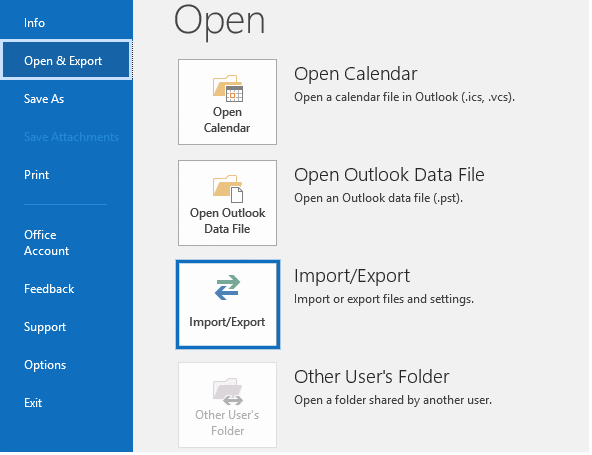
  • Select Open & Export from the options.
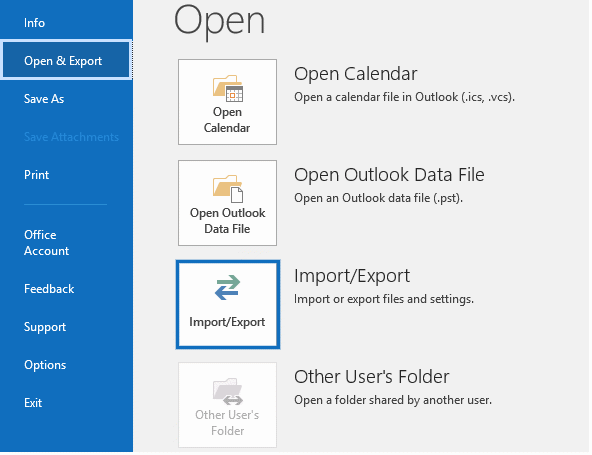
  • Now, click on Import/Export. The Import and Export Wizard window will appear.

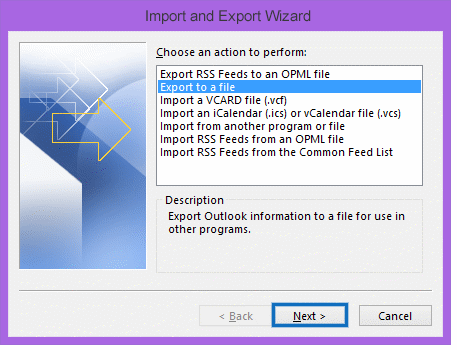
  • Select Export to a File, under Choose an action to perform, and then click on Next.
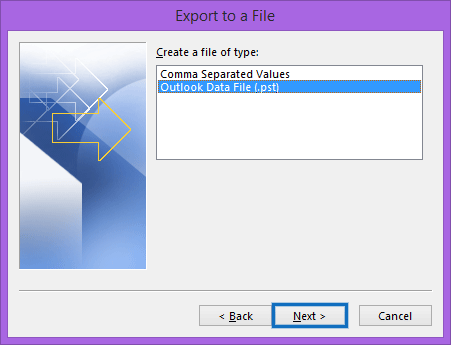
  • In the new Export to a File window, select Outlook Data File (.pst).
  • In the Export Outlook Data File window, select the folder(s) or mailbox items that you want to export.
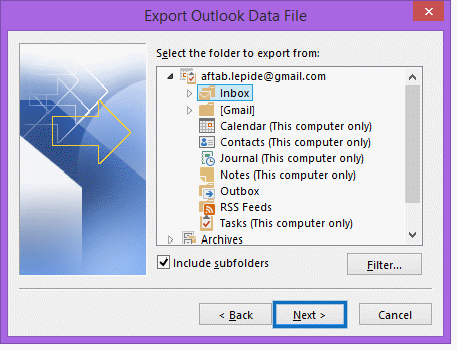
  • Before clicking Next, select the Include subfolders option.
  • Choose the location to save the PST file. Click on the Browse button and select the desired location. Select the Do not export duplicate items radio button and then click on Finish. 
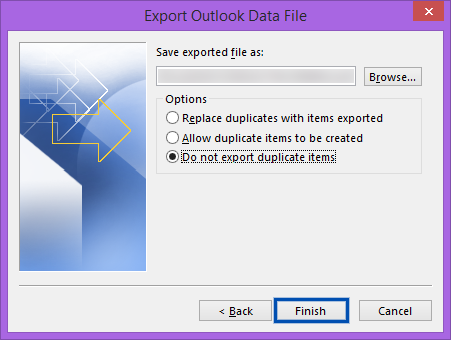
After converting the OST file into PST format, you are now required to import the file into the new Outlook account. Follow the steps given below:

  • Launch your new Outlook and go to File.
  • Select the Open & Export option.
  • In the next window, click on the Import/Export option.
  • In the Import and Export Wizard, select Import from another program or file and then click on the Next button.
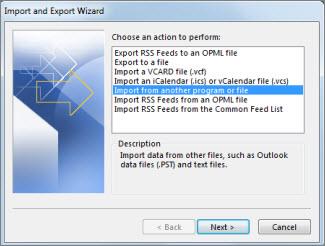
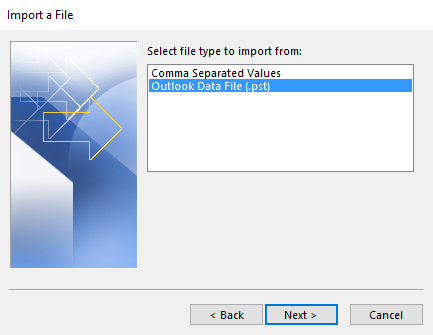
  • In the Import a File window, select Outlook Data File (.pst), and click on Next.

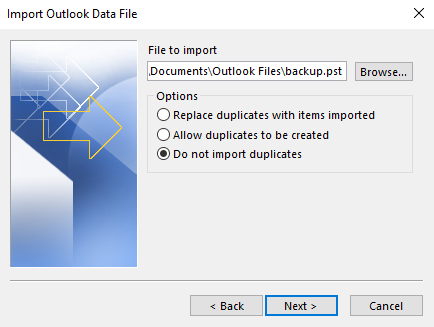
  • Click the Browse button under File to import to select the PST file.
  • Select the radio button Do not import duplicates and then click on Next.
  • Now, select the folder that you want to import from and then click on Finish.
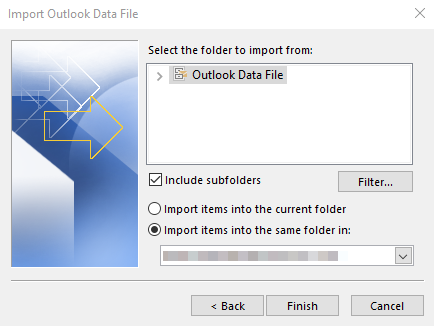
This may take a while depending on the volume of data.

Method 2: Use an OST to PST Converter Software 

The above process can help you to convert the old OST file into PST and then import it into the new Outlook account. However, this method will work if the OST file is healthy and accessible. If the OST file is inaccessible, orphaned, or the Outlook account associated with the OST file is not working, then you need to use a specialized OST to PST converter software, like Stellar Converter for OST. This software can easily convert the old OST file, even if it is orphaned or inaccessible and created in any Outlook version. After conversion, it saves the mailbox items in a PST file without changing the folder hierarchy and original structure. It also allows you to directly export the OST file items to an existing Outlook profile, Outlook 365 (Office 365), or live Exchange Server. You can also convert an encrypted OST file. In addition, you can save the OST file items in various other file formats, like RTF, HTML, PDF, and MSG.

Following are the steps to convert OST to PST with Stellar Converter for OST:

  • Download and install the Stellar Converter for OST software on your system.
  • Launch the software. 
  • In the ‘Select Outlook Data File for Conversion’ window, you can click the ‘Profile List’ tab if you want to select the OST file from your configured Outlook profile. Else, click the ‘Choose Mailbox Manually’ tab to browse and select the OST file manually. 
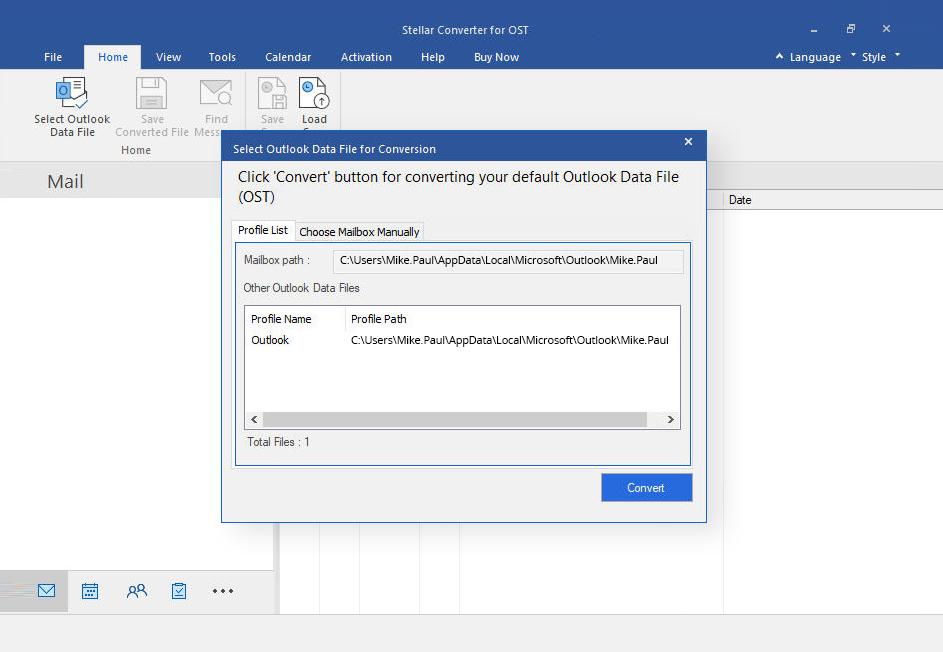
  • Click on the ‘Convert’ button after selecting the OST file.
  • The software will begin scanning the OST file and convert the data (items) of OST file.

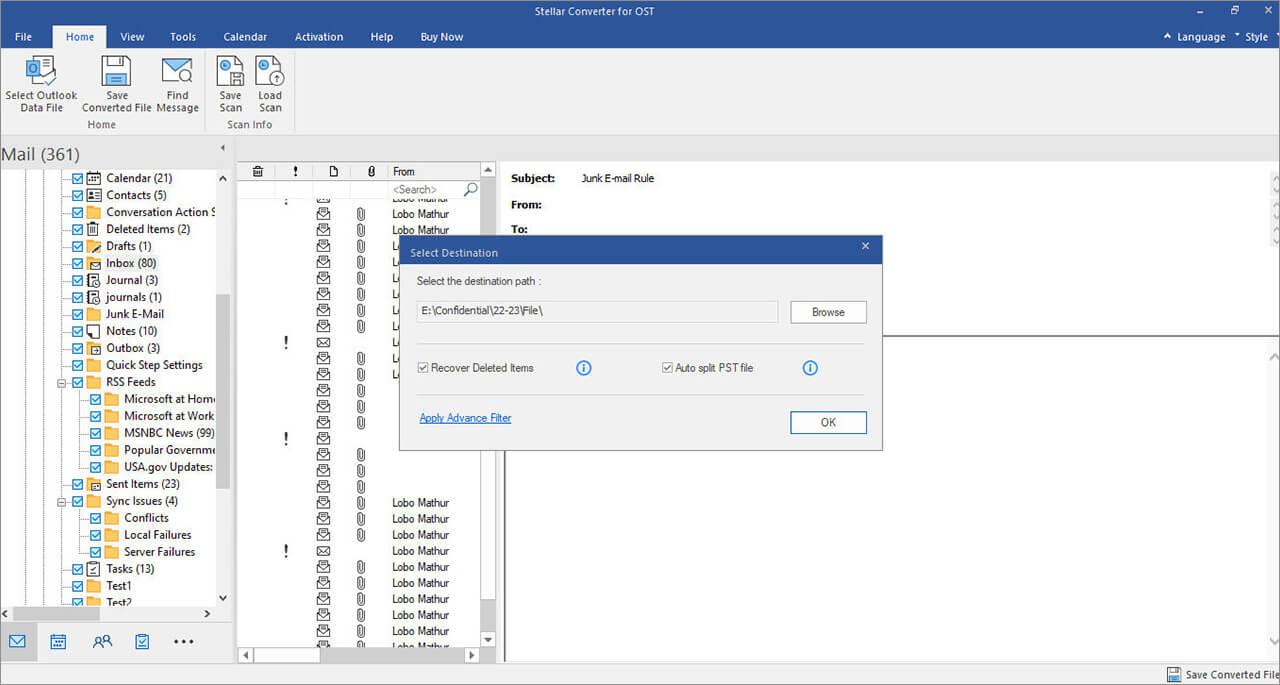
  • When the OST file is converted, the software will list all the mailbox items. You can click on any item to see its preview. You can choose and select the items or folders you want to save in PST file.

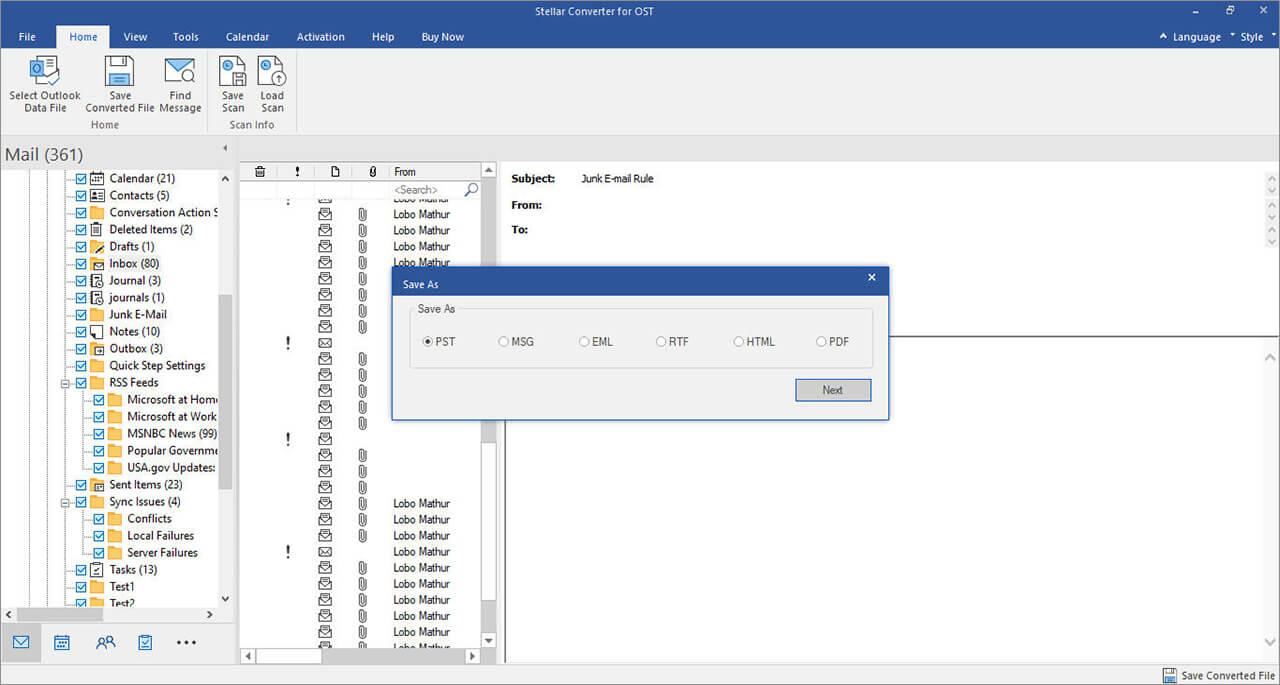
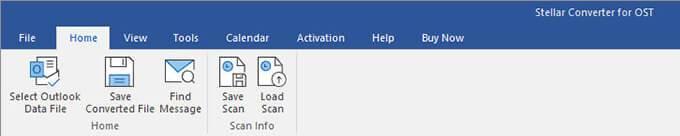
  • Next, click on the Home button and select Save Converted File.

  • Select PST from the options and click on Next.
  • In the Select Destination window, click on Browse to select the location to save the converted file. Then, click OK.
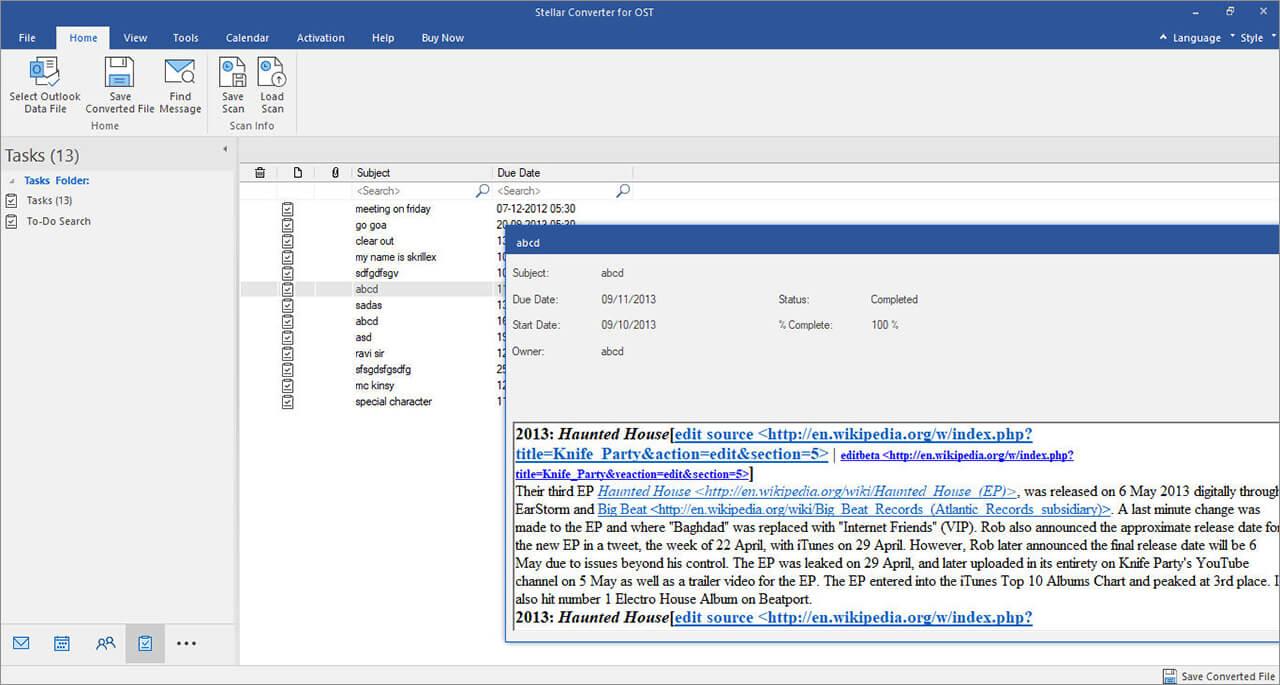
The converted PST file will be saved at the given location. You can now easily import this PST file into your new Outlook account by using the Import and Export feature.

Conclusion 

Above, we have discussed different ways to access old OST in a new Outlook account. If you have deleted your old Outlook account and want to access the OST file associated with it, then you require an OST to PST converter software, like Stellar Converter for OST for converting the OST file to PST file. This software is recommended to convert orphaned or inaccessible OST files. You can save the OST file items in PST format or directly export them to existing Outlook profile, Office 365, or live Exchange Server. 

SendShare170Tweet107

Related Posts

Airtel

How to Top Up Airtel Airtime from M-Pesa without Charges

June 5, 2026
How To Watch Your Speed and Avoid New NTSA Fines

How To Watch Your Speed and Avoid New NTSA Fines

June 5, 2026
The Housing Levy Was Never Really About Housing Now That It’s a Permanent Deduction

The Housing Levy Was Never Really About Housing Now That It’s a Permanent Deduction

June 5, 2026
Electric Vehicle (EV)

Kenya Power Brings EV Chargers Onto the Right Tariff

June 4, 2026
The Tools Kenya Has to Track Ebola and How They Work

The Tools Kenya Has to Track Ebola and How They Work

June 4, 2026
2026 World Cup

YouTube to Bring FIFA 2026 World Cup Matches With a Catch

June 4, 2026

Latest

Airtel

How to Top Up Airtel Airtime from M-Pesa without Charges

June 5, 2026
How To Watch Your Speed and Avoid New NTSA Fines

How To Watch Your Speed and Avoid New NTSA Fines

June 5, 2026
The Housing Levy Was Never Really About Housing Now That It’s a Permanent Deduction

The Housing Levy Was Never Really About Housing Now That It’s a Permanent Deduction

June 5, 2026
Electric Vehicle (EV)

Kenya Power Brings EV Chargers Onto the Right Tariff

June 4, 2026
The Tools Kenya Has to Track Ebola and How They Work

The Tools Kenya Has to Track Ebola and How They Work

June 4, 2026
2026 World Cup

YouTube to Bring FIFA 2026 World Cup Matches With a Catch

June 4, 2026

Best devices

Best Infinix Phones of 2025

Best Infinix Phones of 2025: Budget Prices With Premium Features

December 31, 2025

The Best Infinix Accessories Worth Buying in 2025

November 26, 2025

Best Budget Wireless Earbuds To Buy in Kenya (2025)

October 8, 2025

Samsung Galaxy A36 5G vs Samsung Galaxy A56 5G: Comparison Review

August 29, 2025

Infinix Hot 60 Pro+ vs Infinix Hot 60i: Comparison Review

August 22, 2025

Best Budget Smartwatches To Buy in Kenya 2025

February 13, 2025

Techweez is where tomorrow’s tech stories break today, thanks to intelligent analysis, real-world insight, and visionary storytelling.

Follow Us

Editorials

Kenya Might Need to Crack Down on Wealth Porn Like China

Techweez and Gearhaus Score BAKE Awards 2026 Nominations

Death by AI: Opportunities That Were Disrupted by Automation

CBK Approved 200+ Digital Lenders, But That’s Not the Real Story

Data Centers, Petrodollars and the Price of Building the AI Age

The Standardization of the USB-C Port: What It Means for Users

More News

Florida’s OpenAI Lawsuit Has a Lesson for Kenya’s AI Bill

Kenya Might Need to Crack Down on Wealth Porn Like China

Electric Trains Set to Replace Nairobi’s Aging Diesel Rail System Under KES 65B Plan

PayPal Is Freezing Kenyan Accounts Amid Anti-Money Laundering Scrutiny

Nvidia Wants to Sell You a PC Again

How Technology and New Rule Changes Will Influence the Upcoming World Cup 2026

  • Terms Of Use
  • Techweez Brand
  • Privacy & Policy
  • Contact Us

© 2024 Techweez - Palahala Media Group may earn a commission when you buy through links on our sites.
A Palahala Media Group Brand. All rights reserved.
.

Welcome Back!

Login to your account below

Forgotten Password?

Retrieve your password

Please enter your username or email address to reset your password.

Log In

Add New Playlist

Techweez | Tech News, Reviews, Deals, Tips and How To
Crunchy Cookies 🍪 Ahead!

Hey there! Just a heads-up: we're big fans of cookies - both the digital and edible kind! 🍪 We use our cookies and some from third parties to ensure your browsing experience on our site is smooth sailing and secure.


But wait, there's more! We also use cookies to gather stats and insights on how you navigate our site. It's like getting a behind-the-scenes peek at your digital adventures!


Don't worry, you're in control. You can adjust your cookie settings anytime to suit your preferences. Feeling curious? Dive into our Privacy Policy for all the juicy details. Happy browsing! 🚀

Functional Always active
Listen, this legal stuff is about as exciting as watching paint dry. But it basically says we only use your stuff for what you asked us to do, and nobody else gets to peek!
Preferences
The technical storage or access is necessary for the legitimate purpose of storing preferences that are not requested by the subscriber or user.
Statistics
It's those sneaky cookie crumbs websites leave behind to count visitors, like counting ants at a picnic! Totally harmless, just for fun facts. The technical storage or access that is used exclusively for anonymous statistical purposes. Without a subpoena, voluntary compliance on the part of your Internet Service Provider, or additional records from a third party, information stored or retrieved for this purpose alone cannot usually be used to identify you.
Marketing
Hey there! Just letting you know we use some fancy gizmos to remember your preferences. This way, we can show you ads that are, well, not completely bananas.
Manage options Manage services Manage {vendor_count} vendors Read more about these purposes
Make cookies
{title} {title} {title}
Techweez | Tech News, Reviews, Deals, Tips and How To
Crunchy Cookies 🍪 Ahead!
To provide the best experiences, we use technologies like cookies to store and/or access device information. Consenting to these technologies will allow us to process data such as browsing behavior or unique IDs on this site. Not consenting or withdrawing consent, may adversely affect certain features and functions.
Functional Always active
Listen, this legal stuff is about as exciting as watching paint dry. But it basically says we only use your stuff for what you asked us to do, and nobody else gets to peek!
Preferences
The technical storage or access is necessary for the legitimate purpose of storing preferences that are not requested by the subscriber or user.
Statistics
It's those sneaky cookie crumbs websites leave behind to count visitors, like counting ants at a picnic! Totally harmless, just for fun facts. The technical storage or access that is used exclusively for anonymous statistical purposes. Without a subpoena, voluntary compliance on the part of your Internet Service Provider, or additional records from a third party, information stored or retrieved for this purpose alone cannot usually be used to identify you.
Marketing
Hey there! Just letting you know we use some fancy gizmos to remember your preferences. This way, we can show you ads that are, well, not completely bananas.
Manage options Manage services Manage {vendor_count} vendors Read more about these purposes
Make cookies
{title} {title} {title}
No Result
View All Result
  • News
  • Reviews
  • Features
  • Editorial
  • Automotive
  • Entertainment

© 2024 Techweez - Palahala Media Group may earn a commission when you buy through links on our sites.
A Palahala Media Group Brand. All rights reserved.
.