




Period tracking apps have quietly become one of the more crowded corners of health tech, with most competitors racing to add AI insights, wellness coaching, and subscription paywalls that feel more like a lifestyle platform than a practical tool.
Period Tracker: Period Calendar (My Calendar on the Play Store) has spent over a decade doing the opposite. It tracks cycles, logs symptoms, and gets out of the way, and a user base of more than 300 million women across 45 countries has rewarded that restraint with numbers that are hard to argue with.
It holds a rating of 4.9 on App Store from 171,000 reviews, where it ranks 42nd in Health & Fitness, and a 4.5 on Play Store from 37,900 reviews with over one million downloads.
The gap in ratings between the two platforms is noticeable, though both figures point to an app that has held its audience through consistency rather than hype.
What You See When You Open It
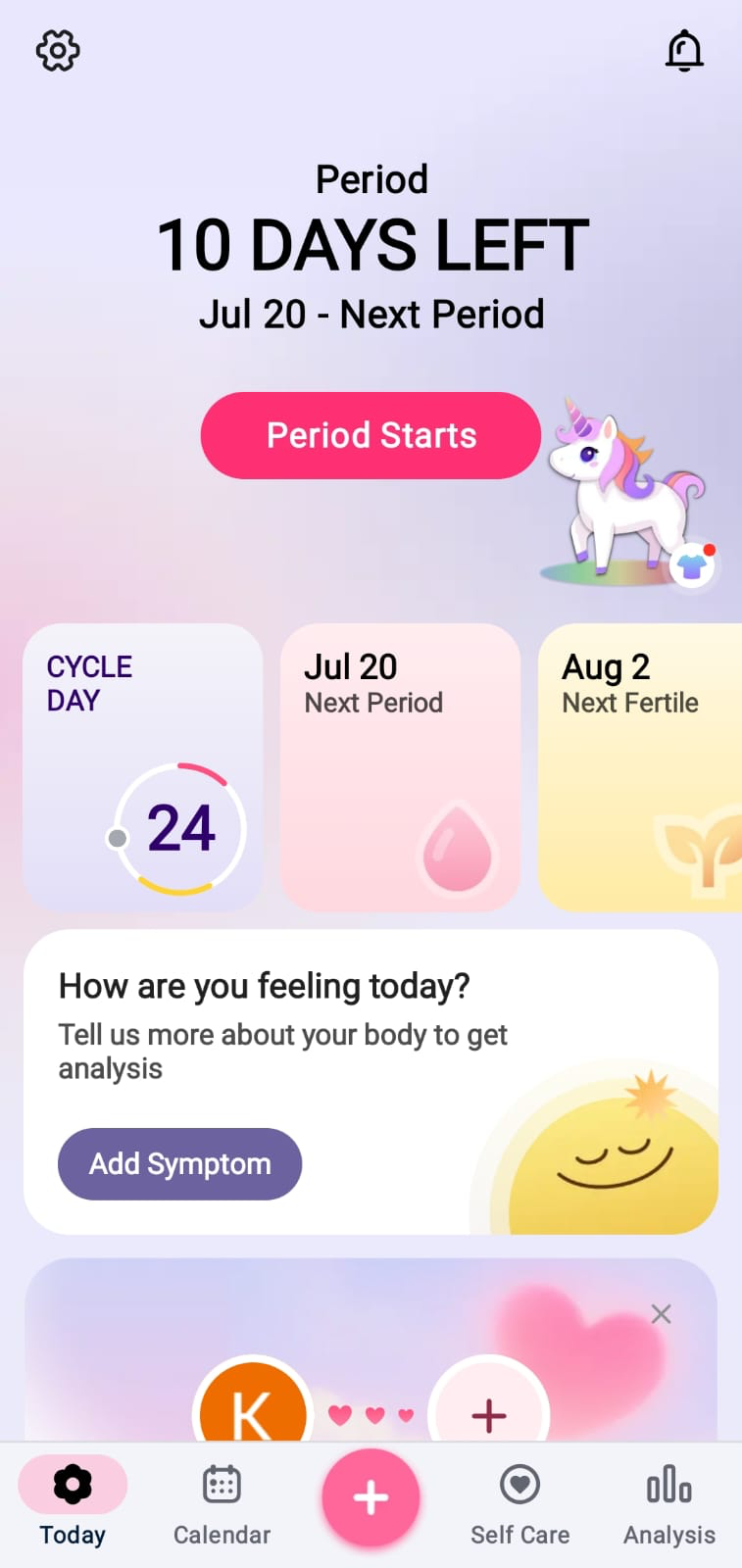
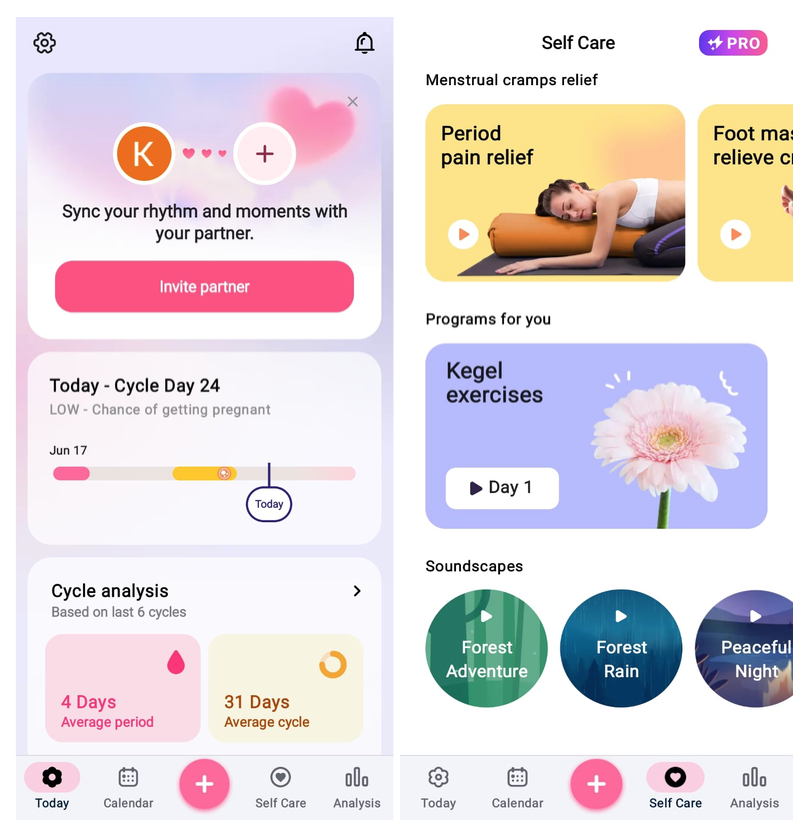
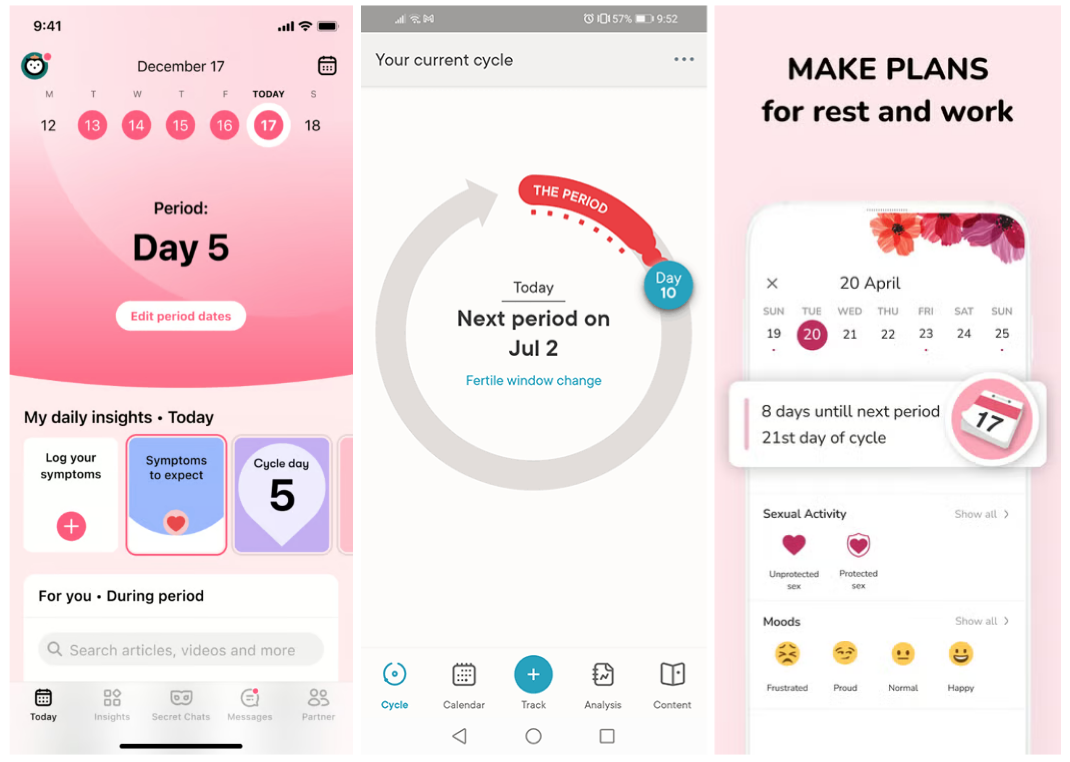
The home screen cuts straight to the point. At the top, a large countdown tells a user how many days remain until their next period, alongside the predicted start date and the next fertile window, with the current cycle day displayed in a circular progress ring below it.
A quick-tap “Add Symptom” prompt sits beneath that, and a scrollable panel below surfaces cycle analysis drawn from the last six recorded cycles, showing average period length and average cycle length as plain figures rather than buried inside a chart.
It is not a flashy interface, and it is not trying to be. Users who come from apps like Flo will notice the aesthetic gap immediately.
What they will also notice is that everything they actually need is visible within two seconds of opening the app, without a single notification asking them to buy something or read an article first.
Logging Data and What the App Tracks
The symptom logging goes considerably deeper than the homepage suggests. The app supports 58 symptoms, 67 moods, and energy levels alongside temperature charts, intimacy logging, and daily health indicators covering weight, hydration, sleep, steps, and more.
A daily chance of conception tracker runs alongside all of this, drawing on basal body temperature (BBT) and ovulation records to give a picture of fertility that goes beyond a simple calendar prediction.
Users can also set reminders for period start and end, fertility windows, cycle phase shifts, and even water intake, covering the practical side of cycle awareness without requiring any additional app.
As one user reviewed by Techweez put it:
“Period Tracker has helped me track my symptoms before and after my periods and provided exercises to reduce cramping. It also sets reminders for when my period starts and ends, fertility reminders, and cycle phase shifts. Unlike the Flo app, it has no endless pop-ups to upgrade to premium features that can distract and delay access to features.”
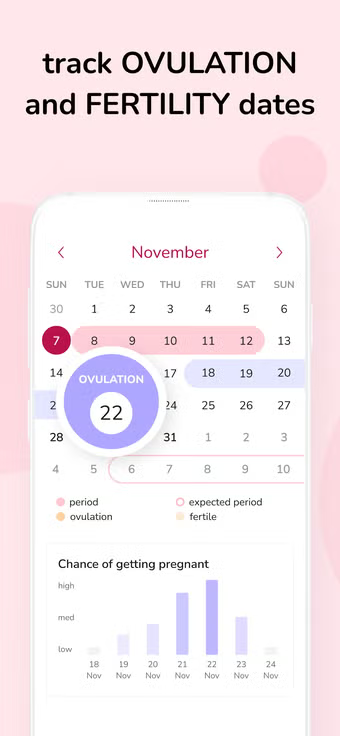
Other users say the app is especially useful for tracking safe days, ovulation, and symptoms in one place. It also includes a pregnancy mode that can be turned on in the settings. Users with regular 28 to 30 day cycles generally report that its predictions are accurate.
Goal-Based Tracking and the Analysis Tab
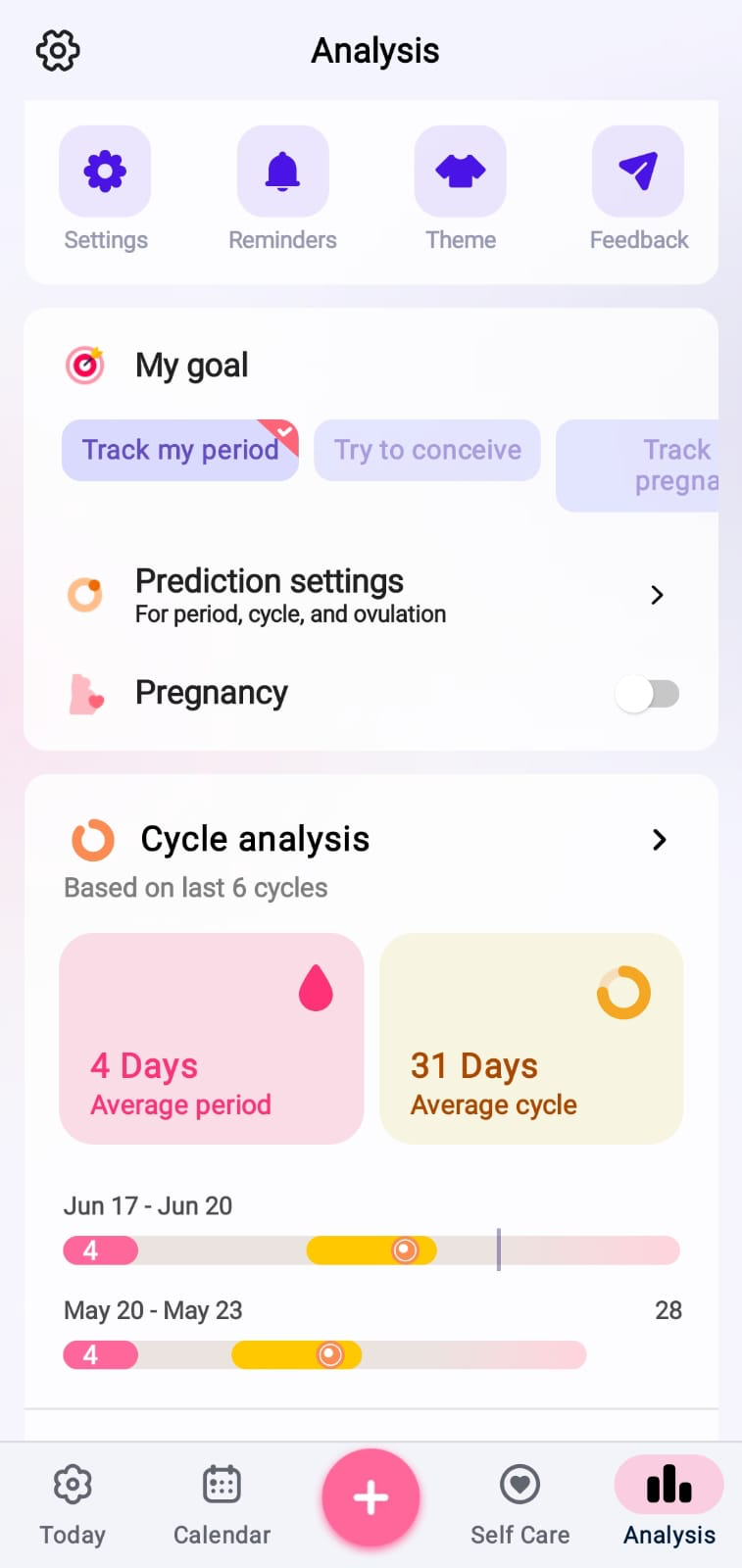
The Analysis tab reveals that My Calendar is built around three distinct user goals: tracking a period, trying to conceive, and tracking pregnancy.
Selecting a goal adjusts the prediction settings for period, cycle, and ovulation accordingly, making the same app serve meaningfully different purposes depending on where a user is in their reproductive life.
Cycle history is displayed as a visual timeline, showing individual cycle lengths across recent months alongside period duration, making it easy to spot irregularities without needing to interpret a complex graph.
The pregnancy mode follows a baby’s growth week by week, includes a due date calculator, and counts down to the estimated birth date.
Partner Sync and the Self-care Tab
Two features stand out as additions beyond the core tracking function. The first is a partner sync feature, accessible from the home screen, that lets the user invite a partner to connect and share cycle data, which can be useful for couples planning around fertility or simply wanting a shared awareness of cycle phases.
The second is the Self-Care tab, which sits behind the Pro subscription and surfaces guided content specifically tied to cycle phase, including period pain relief videos, foot massage guides, Kegel exercise programs, and ambient soundscapes like Forest Rain and Peaceful Night for rest during heavier days.
Premium Costs
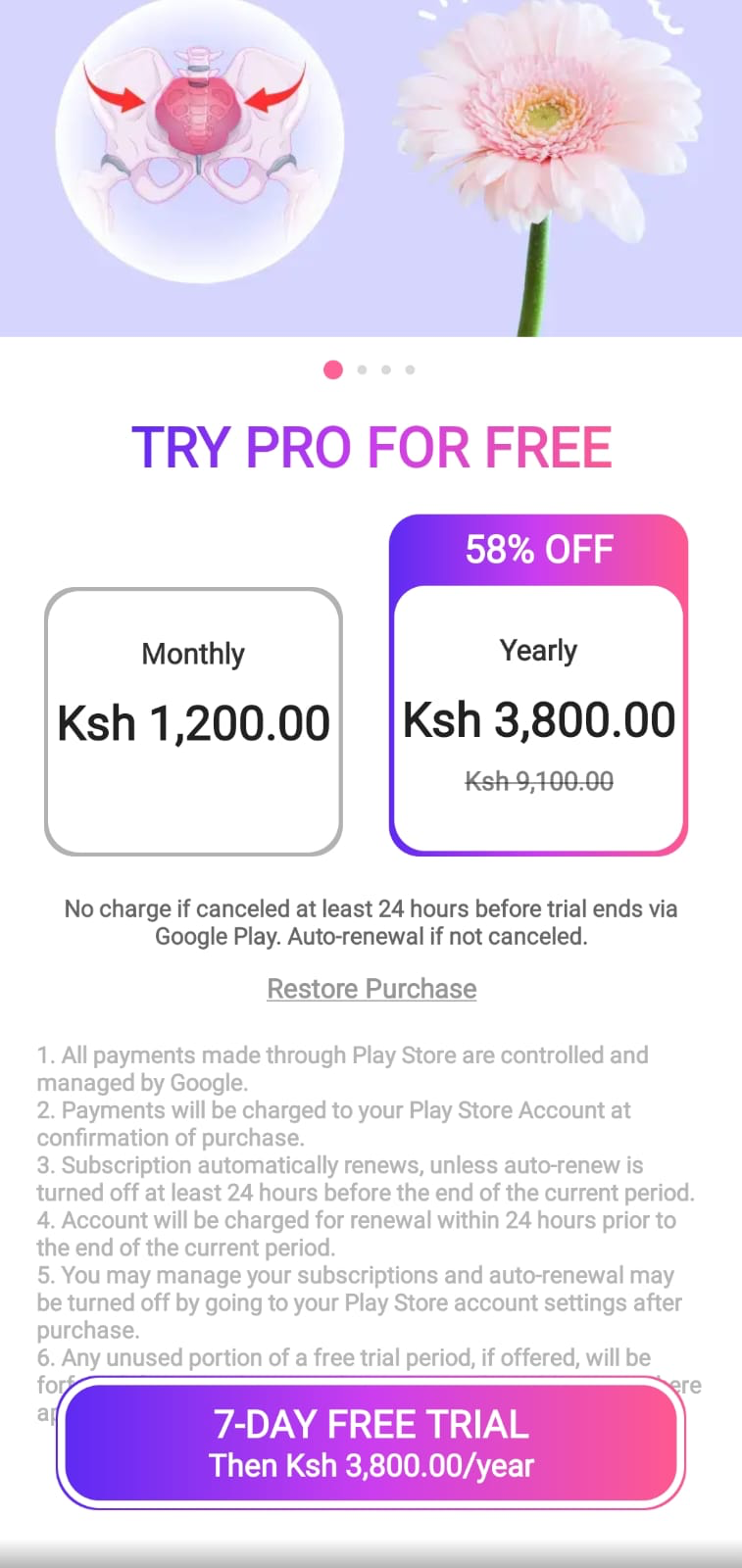
Pricing on the Play Store for Kenyan users sits at KES 1,200 per month (approximately $9.30) or KES 3,800 per year (approximately $29.20), the latter representing a 58% saving on the full monthly rate.
A seven-day free trial is available on the annual plan before any charge is applied. Pricing varies by region, so iOS users and those outside Kenya will see different figures on their respective store listings.
Premium unlocks monthly cycle trends analysis, daily fertility insights, symptom tracking and health insights, Kegel exercises, exclusive self-care courses, and comprehensive pregnancy support.
The Caveats
The interface carries its age visibly, and users switching from other apps flag that manually entering historical cycle data is more tedious than it should be since there is no import mechanism to carry across past records.
The more important caveat is one that applies to every app in this category: prediction accuracy varies by individual cycle regularity, and the app itself notes clearly that it should not be used as a replacement for any form of contraception.
Who Should Use This?
Period Tracker: Period Calendar works best for anyone who wants reliable, detailed cycle tracking without being nudged toward a broader wellness journey they did not ask for.
The goal-based structure keeps the app relevant across different life stages, from basic period monitoring to active fertility planning and pregnancy tracking, and the decision to keep data on-device rather than tied to an account is a meaningful privacy commitment in a category that has had its share of data concerns.
It is not the most visually impressive option on the market, but three hundred million users over a decade is not an accident.