


• Latest
  • All
  • How To
Advanced Protection feature

Google Expands Advanced Protection in Android 16 to Tackle Spyware Threats

May 17, 2025
Marvel Snap

Marvel Snap: Marvel Heroes, Strategy, and Quick Matches Into One Card Game

August 7, 2026
Nikita Bier Steps Down as X Head of Product

Nikita Bier Steps Down as X Head of Product

August 6, 2026
Microsoft’s OpenAI Revenue and Cloud Backlog Dependency

Microsoft’s OpenAI Revenue and Cloud Backlog Dependency

August 6, 2026
8 Things My OneApp Can Do That mySafaricom App Cannot

8 Things My OneApp Can Do That mySafaricom App Cannot

August 6, 2026
DHgate Tablet Cases deals
Paul Russo of KCB, Gideon Muriuki of Co-operative Bank, and John Gachora of NCBA.

KCB, NCBA and Co-op Bank CEOs Charged Over KES 363 Million Fraud Case

August 6, 2026
Telegram App Store

Telegram Takedown Shows How Fast Moderation Can Hurt Legitimate Apps

August 5, 2026
Telegram

Apple Briefly Removed Telegram From the App Store Over Child Abuse Content

August 4, 2026
Maurice Otieno and Eric Kinaga from Baraza Media Lab

Maurice Otieno Steps Down as Baraza Media Lab Executive Director After 6 Years

August 4, 2026
Bizna Wallet vs Pochi La Biashara: Airtel’s Launch Ignites a Mobile Money Price War With Safaricom

Bizna Wallet vs Pochi La Biashara: Airtel’s Launch Ignites a Mobile Money Price War With Safaricom

August 4, 2026
Pochi La Biashara

Pochi La Biashara Now Caps Transaction Fees at KES 50 for Merchants

August 4, 2026
Gmail

How to Stop Google AI From Scanning Your Gmail by Default

August 3, 2026
Market Intelligence: Finding Trends Before They Become Obvious

Market Intelligence: Finding Trends Before They Become Obvious

August 7, 2026
Techweez | Tech News, Reviews, Deals, Tips and How To
  • News
  • Entertainment
  • Reviews
  • Features
  • Editorial
No Result
View All Result
Techweez | Tech News, Reviews, Deals, Tips and How To
  • News
  • Entertainment
  • Reviews
  • Features
  • Editorial
No Result
View All Result
Techweez | Tech News, Reviews, Deals, Tips and How To
No Result
View All Result

Google Expands Advanced Protection in Android 16 to Tackle Spyware Threats

Naftary Thitu by Naftary Thitu
May 17, 2025
in News
Reading Time: 3 mins read
276
0
Advanced Protection feature

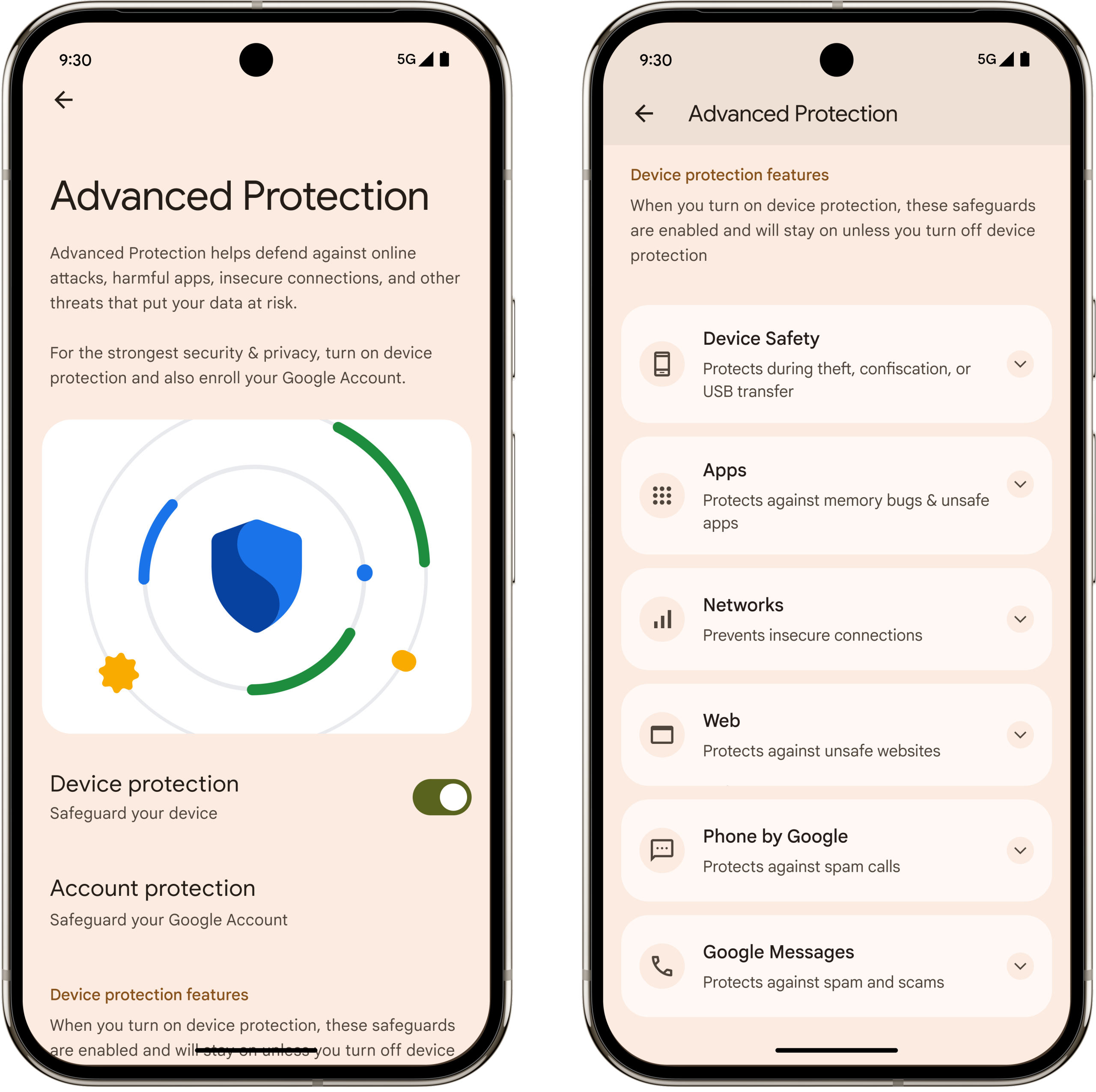
Google has introduced an upgraded version of its Advanced Protection feature in Android 16.

Announced during The Android Show on May 13, these new security enhancements are specifically designed to counter rising spyware threats and surveillance attacks that exploit zero-day vulnerabilities.

Advanced Protection in Android 16 delivers Google’s most robust mobile security, specifically designed for high-risk individuals and anyone vulnerable to targeted cyberattacks. It activates a comprehensive set of security measures to guard against:

  • Zero-click exploits
  • Spyware from commercial surveillance tools
  • USB-based attacks
  • Unauthorized app access

Key Features

Intrusion Logging (Coming Soon)

This innovative Android feature creates a secure, tamper-proof log of device activity, stored privately and accessible only to the user.

If a compromise is suspected, the logs can aid in forensic investigations without revealing any sensitive personal information.

.

Memory Tagging Extension (MTE)

Leveraging hardware-level support, MTE protects your device from memory corruption attacks, an often-used entry point for advanced spyware.

Restricted App & Network Access

Once enabled, Advanced Protection automatically

  • Disables 2G networks
  • Blocks unverified USB data connections
  • Limits sensitive permissions (like sensors and camera access) during calls
  • Prevents sideloading of unknown apps

Security Across Apps

Google apps like Chrome, Messages, and Phone will honor Advanced Protection settings. Third-party developers can also integrate with this framework, ensuring consistent protection across your ecosystem.

Tamper-Resistant Security Mode

Advanced Protection ensures that once activated, its settings can’t be disabled without user authentication, blocking both accidental changes and malicious tampering.

How to Enable It

To activate the new protection mode:

  1. Go to Settings > Google > Personal & device safety
  2. Tap on Advanced Protection.
  3. Toggle it on.

Most features are available immediately, with others like intrusion logging rolling out later in 2025.

With Android increasingly targeted by commercial spyware vendors and attackers leveraging zero-day exploits, these new enhancements are critical.


Tags: AndroidGoogle
SendShare154Tweet97
Naftary Thitu

Naftary Thitu

Tech enthusiast and ICT guru by trade, I simplify digital trends and gadgets into articles everyone can enjoy. Email: [email protected]

Related Posts

Gmail

How to Stop Google AI From Scanning Your Gmail by Default

August 3, 2026
Gmail Logo

How to Change Gmail’s Undo Send Window From 5 Seconds to 30 Seconds

July 29, 2026
Google Street View

How Kenya Became One of Africa’s Best-Mapped Countries on Google Street View

July 27, 2026
Google

You Can Now Sign In to Your Google Account With a Selfie Video

July 24, 2026
African Game Studios Can Now Apply for Google’s New $1 Million Fund

Google Tightens Play Store Terms Around Data, Sharing, and Billing

July 10, 2026
African Game Studios Can Now Apply for Google’s New $1 Million Fund

African Game Studios Can Now Apply for Google’s New $1 Million Fund

July 3, 2026

Latest

Marvel Snap

Marvel Snap: Marvel Heroes, Strategy, and Quick Matches Into One Card Game

August 7, 2026
Nikita Bier Steps Down as X Head of Product

Nikita Bier Steps Down as X Head of Product

August 6, 2026
Microsoft’s OpenAI Revenue and Cloud Backlog Dependency

Microsoft’s OpenAI Revenue and Cloud Backlog Dependency

August 6, 2026
8 Things My OneApp Can Do That mySafaricom App Cannot

8 Things My OneApp Can Do That mySafaricom App Cannot

August 6, 2026
Paul Russo of KCB, Gideon Muriuki of Co-operative Bank, and John Gachora of NCBA.

KCB, NCBA and Co-op Bank CEOs Charged Over KES 363 Million Fraud Case

August 6, 2026
Telegram App Store

Telegram Takedown Shows How Fast Moderation Can Hurt Legitimate Apps

August 5, 2026

Best devices

Best Infinix Phones of 2025

Best Infinix Phones of 2025: Budget Prices With Premium Features

December 31, 2025

The Best Infinix Accessories Worth Buying in 2025

November 26, 2025

Best Budget Wireless Earbuds To Buy in Kenya (2025)

October 8, 2025

Samsung Galaxy A36 5G vs Samsung Galaxy A56 5G: Comparison Review

August 29, 2025

Infinix Hot 60 Pro+ vs Infinix Hot 60i: Comparison Review

August 22, 2025

Best Budget Smartwatches To Buy in Kenya 2025

February 13, 2025

Techweez is where tomorrow’s tech stories break today, thanks to intelligent analysis, real-world insight, and visionary storytelling.

Follow Us

Editorials

Marvel Snap: Marvel Heroes, Strategy, and Quick Matches Into One Card Game

Swooni: The App That Helps Couples Build Stronger Relationships One Minute at a Time

Forest: The App That Kills a Tree Every Time You Check Your Phone

Unsolved Hidden Mystery Games Is Worth Playing If You Can Handle the Wait

Period Tracker: An App That Prioritizes Simplicity and Privacy

Inside Bumble, the Dating App Where Women Call the Shots

More News

Apple Briefly Removed Telegram From the App Store Over Child Abuse Content

Maurice Otieno Steps Down as Baraza Media Lab Executive Director After 6 Years

Bizna Wallet vs Pochi La Biashara: Airtel’s Launch Ignites a Mobile Money Price War With Safaricom

Pochi La Biashara Now Caps Transaction Fees at KES 50 for Merchants

How to Stop Google AI From Scanning Your Gmail by Default

KRA Introduces Blockchain Platform to Reduce Port Delays and Paperwork

  • Terms Of Use
  • Techweez Brand
  • Privacy & Policy
  • Contact Us

© 2024 Techweez - Palahala Media Group may earn a commission when you buy through links on our sites.
A Palahala Media Group Brand. All rights reserved.
.

Welcome Back!

Login to your account below

Forgotten Password?

Retrieve your password

Please enter your username or email address to reset your password.

Log In

Add New Playlist

Techweez | Tech News, Reviews, Deals, Tips and How To
Crunchy Cookies 🍪 Ahead!

Hey there! Just a heads-up: we're big fans of cookies - both the digital and edible kind! 🍪 We use our cookies and some from third parties to ensure your browsing experience on our site is smooth sailing and secure.


But wait, there's more! We also use cookies to gather stats and insights on how you navigate our site. It's like getting a behind-the-scenes peek at your digital adventures!


Don't worry, you're in control. You can adjust your cookie settings anytime to suit your preferences. Feeling curious? Dive into our Privacy Policy for all the juicy details. Happy browsing! 🚀

Functional Always active
Listen, this legal stuff is about as exciting as watching paint dry. But it basically says we only use your stuff for what you asked us to do, and nobody else gets to peek!
Preferences
The technical storage or access is necessary for the legitimate purpose of storing preferences that are not requested by the subscriber or user.
Statistics
It's those sneaky cookie crumbs websites leave behind to count visitors, like counting ants at a picnic! Totally harmless, just for fun facts. The technical storage or access that is used exclusively for anonymous statistical purposes. Without a subpoena, voluntary compliance on the part of your Internet Service Provider, or additional records from a third party, information stored or retrieved for this purpose alone cannot usually be used to identify you.
Marketing
Hey there! Just letting you know we use some fancy gizmos to remember your preferences. This way, we can show you ads that are, well, not completely bananas.
Manage options Manage services Manage {vendor_count} vendors Read more about these purposes
Make cookies
{title} {title} {title}
Techweez | Tech News, Reviews, Deals, Tips and How To
Crunchy Cookies 🍪 Ahead!
To provide the best experiences, we use technologies like cookies to store and/or access device information. Consenting to these technologies will allow us to process data such as browsing behavior or unique IDs on this site. Not consenting or withdrawing consent, may adversely affect certain features and functions.
Functional Always active
Listen, this legal stuff is about as exciting as watching paint dry. But it basically says we only use your stuff for what you asked us to do, and nobody else gets to peek!
Preferences
The technical storage or access is necessary for the legitimate purpose of storing preferences that are not requested by the subscriber or user.
Statistics
It's those sneaky cookie crumbs websites leave behind to count visitors, like counting ants at a picnic! Totally harmless, just for fun facts. The technical storage or access that is used exclusively for anonymous statistical purposes. Without a subpoena, voluntary compliance on the part of your Internet Service Provider, or additional records from a third party, information stored or retrieved for this purpose alone cannot usually be used to identify you.
Marketing
Hey there! Just letting you know we use some fancy gizmos to remember your preferences. This way, we can show you ads that are, well, not completely bananas.
Manage options Manage services Manage {vendor_count} vendors Read more about these purposes
Make cookies
{title} {title} {title}
No Result
View All Result
  • News
  • Reviews
  • Features
  • Editorial
  • Automotive
  • Entertainment

© 2024 Techweez - Palahala Media Group may earn a commission when you buy through links on our sites.
A Palahala Media Group Brand. All rights reserved.
.