• Latest
  • All
  • How To
iSurf Windows Tablet

iSurf Primo IS1834ICT 10 Inch Windows Tablet Review

November 10, 2014
Apple Drags OpenAI to Court Over Stolen Hardware Secrets

Apple Drags OpenAI to Court Over Stolen Hardware Secrets

July 13, 2026
High Court ruling: Safaricom 60% and DTB 40% Liable in KSh 4.42M SIM-swap Fraud Case

Kenyan Court Rules Safaricom, DTB Must Pay Customer KES 4.4M After SIM Swap Fraud

July 13, 2026
Period Tracker

Period Tracker: An App That Prioritizes Simplicity and Privacy

July 11, 2026
How to Block Muse Image From Downloading and Remixing Your Reels

Meta Halts Muse Image After Outcry Over Risks of AI-Generated Content

July 11, 2026
DHgate Tablet Cases deals
Biggest Taxpayers Remain a Small Group of Formal Businesses, KRA Data Shows

Biggest Taxpayers Remain a Small Group of Formal Businesses, KRA Data Shows

July 11, 2026
How to Block Muse Image From Downloading and Remixing Your Reels

Muse Image: How to Block Others From Generating AI Content Using Your Instagram Posts

July 11, 2026
African Game Studios Can Now Apply for Google’s New $1 Million Fund

Google Tightens Play Store Terms Around Data, Sharing, and Billing

July 10, 2026
IEBC Owns Up to Cracks in 2022’s Dispute Resolution Process, Eyes Fixes Before 2027

IEBC Owns Up to Cracks in 2022’s Dispute Resolution Process, Eyes Fixes Before 2027

July 10, 2026
Emissions test

New Bill Would Force Kenyan Motorists to Test Vehicle Emissions Every Year

July 9, 2026
SpaceXAI Grok 4.5

Elon Musk Rebrands xAI as SpaceXAI and Launches Grok 4.5

July 9, 2026
KOKO Networks Puts Its Ethanol Empire Up For Sale

KOKO Networks Puts Its Ethanol Empire Up For Sale

July 8, 2026
Betting

New Betting Rules Let Families Request Gambling Bans for Loved Ones

July 8, 2026
Techweez | Tech News, Reviews, Deals, Tips and How To
  • News
  • Entertainment
  • Reviews
  • Features
  • Editorial
No Result
View All Result
Techweez | Tech News, Reviews, Deals, Tips and How To
  • News
  • Entertainment
  • Reviews
  • Features
  • Editorial
No Result
View All Result
Techweez | Tech News, Reviews, Deals, Tips and How To
No Result
View All Result

iSurf Primo IS1834ICT 10 Inch Windows Tablet Review

Martin Gicheru by Martin Gicheru
November 10, 2014
in Reviews
Reading Time: 5 mins read
320
16
iSurf Windows Tablet

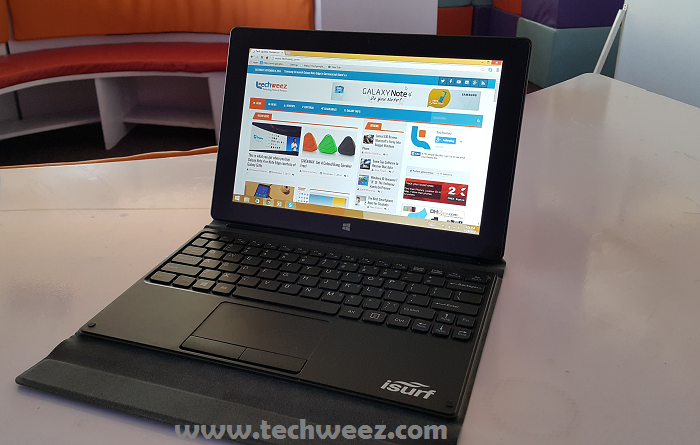
iSurf Windows TabletIsurf is a company that has been selling laptops for enterprise and kids for sometime now, and they have quite a large portfolio of products in the PC and tablets line. These range from Mediatek powered Android devices to Intel powered Windows tablets. We got this Intel powered iSurf Primo review unit from Intel and I have been using it for a while now. The device is on sale in the Kenyan market at a price of Kshs 45,000 from main distributors like Mistumi and Safaricom. Target market is that youthful group especially students who want to be mobile while at the same time experience the whole computing abilities in a device.

It’s time to tell of my experience with it. First things first let’s see what the device got on board.

iSurf Tablet specifications:

  • Windows 8.1 with Bing
  • 10 inch IPS Display, 1280 x 800 pixels
  • Intel Atom Z3735D Quad Core CPU Clocked at 1.8 GHz
  • Intel HD Graphics
  • 32GB Internal Storage, expandable by 32GB via microSD
  • 2GB RAM
  • Windows 8.1 With Bing
  • Full Touch, 10 Touch Points
  • USB, Bluetooth 4.0, G-Sensor
  • 2MP front and 2MP rear cameras, Autofocus
  • 7900mAh battery
  • Keyboard stand.

 What comes inside the box?

Inside the box we got the 10 inch tablet, the keyboard stand, USB On the go cable (you use that to plug in a flash disk or external storage via USB), microUSB cable, pin charger, 1 year Office 356 subscription code for one PC or Mac and 1 tablet.

Tablet design and features

The iSurf Primo comes with a keyboard stand out of the box, that’s one of the guides as to what the device is meant to be used for. Actual computing and a replacement of your average light laptops. Sometime back Netbooks were a thing, but as tablets went on becoming mainstream, netbooks slowly started taking a backseat in computing. Now more and more designs and form factors are coming out to get the tablet more into the productivity side. It has been mainly a media consumption and entertainment device. Tides are shifting.iSurf Primo stand
.

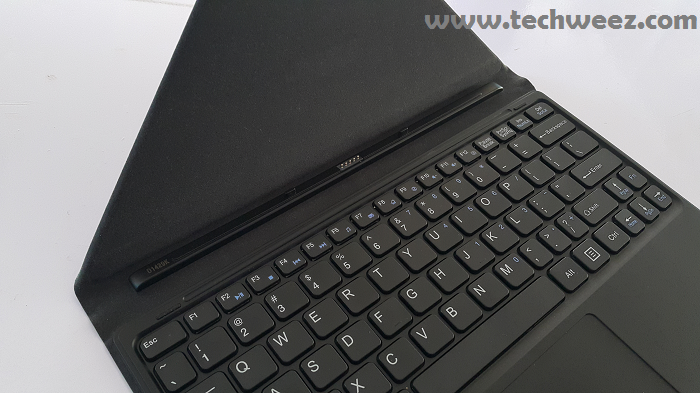
The iSurf, is basically a budget version of Microsoft’s Surface Pro. The whole design of accommodating as much as possible, it does that as compared to the average tablet. The keyboard stand has a chiclet keyboard with a trackpad complete with an armrest. It also snaps on to the tablet via a magnetic strip and gets supported in the back by the stand. This makes it an ideal buy for a mobile tablet/laptop for when you want to be light.iSurf Primo Keyboard Stand
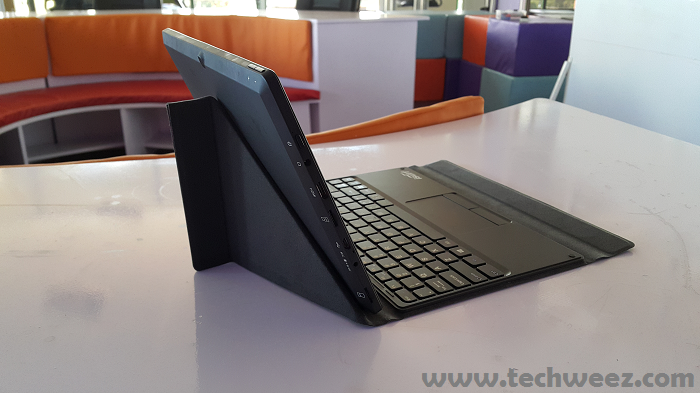
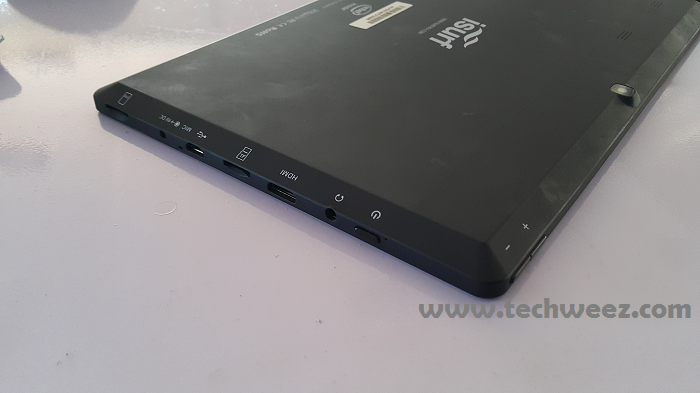
Ports available include SIM card slot, power port, microUSB Slot (doesn’t charge though), microSD slot, mini HDMI slot and a 3.5 mm audio jack slot. Oh, and add the power button to complete the list of elements on the left side of the tablet. The top is where the volume rocker is while the 5MP camera is in the rear, it has a VGA front camera. The back (the review device we got is black) has a black matte finish that looks good but once in a while will pick up finger-print smudges. These can be wiped easily though.
iSurf Primo Tablet
One downside of the tablet is that it doesn’t have sensors to detect when the keyboard dock is on to take the screen to sleep. So if you do not press the power button to get that done manually the keyboard will touch the display and open up or close applications on the screen.

It has the Realtek 802.11n Wireless adapter that does function well but will be limited when there is a 5GHz frequency. This should not bother anyone if you are in most wireless networks, but at events where there is thousands of people like at international conferences they tend to beam the 5GHz frequency and that means you will not be connected.iSurf Primo Windows
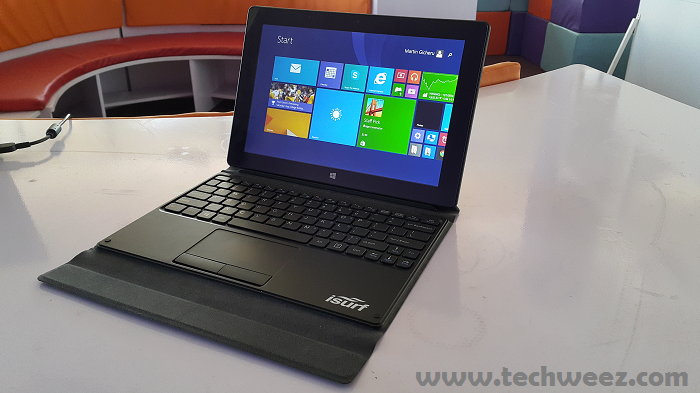
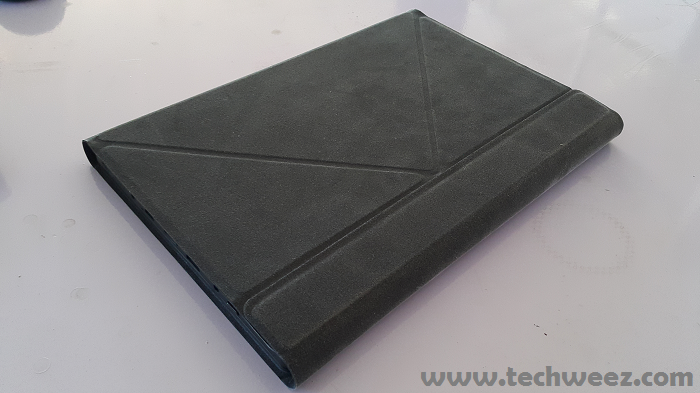
The display has a 1200 x 800 pixels resolution on a 10 inch display, and I cannot complain at all at the output. You will watch 720p HD videos quite comfortably, play games on it, read books off the kindle app and do co much you would on a touch PC. It comes in handy in that you can move with it in your hand, leave the charger at home and have a comfortable 8 hours of work. Reading Kindle e-books is also easy in bed or at a reception when you detatch it from the keyboard dock. It has WiFi and 3G capabilities so it will be self sufficient in terms of internet when you are on the move. Just plug in a microSIM and you will be good to go.iSurf Primo case
The 2 mp cameras front and rear are not much to talk about and in low light you will have quite pixelated images. Tablets are not meant for that though, they are meant for video calls so the camera output is quite sufficient for that purpose. Should you choose to be that person who goes with tablets to weddings make sure you take the photos in good light, otherwise you won’t have good pics at the wedding reception.

Sound output is also quite good for a tablet, so those who work while listening to music can get good sound quality when listening off the tablet’s speakers or via earphones.

Is this 2 in one iSurf Primo Tablet for you?

The positioning of this tablet is on point and it covers all bases. In Africa especially, you won’t have reliable WiFi everywhere, so the 3G card slot will do you good. It was not a good idea to limit charging to the pin charger as should you forget your charger home you cannot have a quick solution with the microUSB slot.

The keyboard experience is good, of course for me coming from a standard keyboard there was a slight learning curve with the more compressed keys, but once you train your fingers where to expect the keys then you can hit record word per minutes with this. It will work well on the desktop, but if you go to an event where you sit in theater mode, you can either use it as the standard tablet or place a magazine on the keyboard stand to position it in the center. This is where the Surface Pro keyboard would come in handy as it gets support from both thighs when seated. This one gets lost in the gap between the thighs.

Outside of that, it’s that tablet you can buy when you have a PC in the office or even another main laptop and feel like it still has a spot on it’s own. In this day and age where we are connected, days of unlimited cloud storage, a 3G and WiFi tablet with a keyboard, running full Windows 8.1 and promising a good day of battery life.

Shoot us a comment down here in the comments section if you have feedback, an opinion or any general question regarding the iSurf Primo. You could even give us feedback on the way we did the review. Did we give you much foundation to know the tablet?


SendShare178Tweet111
Martin Gicheru

Martin Gicheru

Martin is the Managing Editor at Techweez, passionate about personal tech and telling stories of consumer experiences. Talk to me: [email protected]

Related Posts

Apple Drags OpenAI to Court Over Stolen Hardware Secrets

Apple Drags OpenAI to Court Over Stolen Hardware Secrets

July 13, 2026
High Court ruling: Safaricom 60% and DTB 40% Liable in KSh 4.42M SIM-swap Fraud Case

Kenyan Court Rules Safaricom, DTB Must Pay Customer KES 4.4M After SIM Swap Fraud

July 13, 2026
Period Tracker

Period Tracker: An App That Prioritizes Simplicity and Privacy

July 11, 2026
How to Block Muse Image From Downloading and Remixing Your Reels

Meta Halts Muse Image After Outcry Over Risks of AI-Generated Content

July 11, 2026
Biggest Taxpayers Remain a Small Group of Formal Businesses, KRA Data Shows

Biggest Taxpayers Remain a Small Group of Formal Businesses, KRA Data Shows

July 11, 2026
How to Block Muse Image From Downloading and Remixing Your Reels

Muse Image: How to Block Others From Generating AI Content Using Your Instagram Posts

July 11, 2026

Latest

Apple Drags OpenAI to Court Over Stolen Hardware Secrets

Apple Drags OpenAI to Court Over Stolen Hardware Secrets

July 13, 2026
High Court ruling: Safaricom 60% and DTB 40% Liable in KSh 4.42M SIM-swap Fraud Case

Kenyan Court Rules Safaricom, DTB Must Pay Customer KES 4.4M After SIM Swap Fraud

July 13, 2026
Period Tracker

Period Tracker: An App That Prioritizes Simplicity and Privacy

July 11, 2026
How to Block Muse Image From Downloading and Remixing Your Reels

Meta Halts Muse Image After Outcry Over Risks of AI-Generated Content

July 11, 2026
Biggest Taxpayers Remain a Small Group of Formal Businesses, KRA Data Shows

Biggest Taxpayers Remain a Small Group of Formal Businesses, KRA Data Shows

July 11, 2026
How to Block Muse Image From Downloading and Remixing Your Reels

Muse Image: How to Block Others From Generating AI Content Using Your Instagram Posts

July 11, 2026

Best devices

Best Infinix Phones of 2025

Best Infinix Phones of 2025: Budget Prices With Premium Features

December 31, 2025

The Best Infinix Accessories Worth Buying in 2025

November 26, 2025

Best Budget Wireless Earbuds To Buy in Kenya (2025)

October 8, 2025

Samsung Galaxy A36 5G vs Samsung Galaxy A56 5G: Comparison Review

August 29, 2025

Infinix Hot 60 Pro+ vs Infinix Hot 60i: Comparison Review

August 22, 2025

Best Budget Smartwatches To Buy in Kenya 2025

February 13, 2025

Techweez is where tomorrow’s tech stories break today, thanks to intelligent analysis, real-world insight, and visionary storytelling.

Follow Us

Editorials

Period Tracker: An App That Prioritizes Simplicity and Privacy

Inside Bumble, the Dating App Where Women Call the Shots

Locket: Photo Sharing App With No Feed, No Likes, and No Algorithms

Couple Joy: A Long-Distance Dating App That Builds Intimacy in Small Daily Acts

Airbuds: The App That Turns Your Music Into a Social Feed

Kenya Might Need to Crack Down on Wealth Porn Like China

More News

Google Tightens Play Store Terms Around Data, Sharing, and Billing

IEBC Owns Up to Cracks in 2022’s Dispute Resolution Process, Eyes Fixes Before 2027

New Bill Would Force Kenyan Motorists to Test Vehicle Emissions Every Year

Elon Musk Rebrands xAI as SpaceXAI and Launches Grok 4.5

KOKO Networks Puts Its Ethanol Empire Up For Sale

New Betting Rules Let Families Request Gambling Bans for Loved Ones

  • Terms Of Use
  • Techweez Brand
  • Privacy & Policy
  • Contact Us

© 2024 Techweez - Palahala Media Group may earn a commission when you buy through links on our sites.
A Palahala Media Group Brand. All rights reserved.
.

Welcome Back!

Login to your account below

Forgotten Password?

Retrieve your password

Please enter your username or email address to reset your password.

Log In

Add New Playlist

Techweez | Tech News, Reviews, Deals, Tips and How To
Crunchy Cookies 🍪 Ahead!

Hey there! Just a heads-up: we're big fans of cookies - both the digital and edible kind! 🍪 We use our cookies and some from third parties to ensure your browsing experience on our site is smooth sailing and secure.


But wait, there's more! We also use cookies to gather stats and insights on how you navigate our site. It's like getting a behind-the-scenes peek at your digital adventures!


Don't worry, you're in control. You can adjust your cookie settings anytime to suit your preferences. Feeling curious? Dive into our Privacy Policy for all the juicy details. Happy browsing! 🚀

Functional Always active
Listen, this legal stuff is about as exciting as watching paint dry. But it basically says we only use your stuff for what you asked us to do, and nobody else gets to peek!
Preferences
The technical storage or access is necessary for the legitimate purpose of storing preferences that are not requested by the subscriber or user.
Statistics
It's those sneaky cookie crumbs websites leave behind to count visitors, like counting ants at a picnic! Totally harmless, just for fun facts. The technical storage or access that is used exclusively for anonymous statistical purposes. Without a subpoena, voluntary compliance on the part of your Internet Service Provider, or additional records from a third party, information stored or retrieved for this purpose alone cannot usually be used to identify you.
Marketing
Hey there! Just letting you know we use some fancy gizmos to remember your preferences. This way, we can show you ads that are, well, not completely bananas.
Manage options Manage services Manage {vendor_count} vendors Read more about these purposes
Make cookies
{title} {title} {title}
Techweez | Tech News, Reviews, Deals, Tips and How To
Crunchy Cookies 🍪 Ahead!
To provide the best experiences, we use technologies like cookies to store and/or access device information. Consenting to these technologies will allow us to process data such as browsing behavior or unique IDs on this site. Not consenting or withdrawing consent, may adversely affect certain features and functions.
Functional Always active
Listen, this legal stuff is about as exciting as watching paint dry. But it basically says we only use your stuff for what you asked us to do, and nobody else gets to peek!
Preferences
The technical storage or access is necessary for the legitimate purpose of storing preferences that are not requested by the subscriber or user.
Statistics
It's those sneaky cookie crumbs websites leave behind to count visitors, like counting ants at a picnic! Totally harmless, just for fun facts. The technical storage or access that is used exclusively for anonymous statistical purposes. Without a subpoena, voluntary compliance on the part of your Internet Service Provider, or additional records from a third party, information stored or retrieved for this purpose alone cannot usually be used to identify you.
Marketing
Hey there! Just letting you know we use some fancy gizmos to remember your preferences. This way, we can show you ads that are, well, not completely bananas.
Manage options Manage services Manage {vendor_count} vendors Read more about these purposes
Make cookies
{title} {title} {title}
No Result
View All Result
  • News
  • Reviews
  • Features
  • Editorial
  • Automotive
  • Entertainment

© 2024 Techweez - Palahala Media Group may earn a commission when you buy through links on our sites.
A Palahala Media Group Brand. All rights reserved.
.