



• Latest
  • All
  • How To
Gmail Logo

How to Change Gmail’s Undo Send Window From 5 Seconds to 30 Seconds

July 29, 2026
Apple Upgrade

Apple Wants You to Stop Buying iPhones and Start Renting Them

July 28, 2026
Bingo E2

Bingo Unveils E2 Electric Vehicle With Swappable Batteries and 440 km Range

July 28, 2026
AI

Kenya AI Policy Draft Released for Public Consultation

July 28, 2026
X Money Launches in the US as X Takes First Step Toward an “Everything App”

X Money Launches in the US as X Takes First Step Toward an “Everything App”

July 28, 2026
DHgate Tablet Cases deals
Anne Kinuthia-Otieno

Anne Kinuthia-Otieno Steps Down as Airtel Money Kenya MD After 5 Years

July 28, 2026
CXMT

Chinese RAM Chip Giant CXMT Raises $8.5 Billion in Record IPO

July 27, 2026
Google Street View

How Kenya Became One of Africa’s Best-Mapped Countries on Google Street View

July 27, 2026
Anthropic Claude

Anthropic Ordered to Pay $1.5 Billion in Largest AI Copyright Settlement

July 27, 2026
SportPesa Founders Lose Control as UAE Firms Take Majority Ownership

SportPesa Founders Lose Control as UAE Firms Take Majority Ownership

July 27, 2026
iHUB Cohort 4

iHUB Unveils 12 Startups Joining Mastercard Foundation EdTech Fellowship

July 24, 2026
Forest: The App That Kills a Tree Every Time You Check Your Phone

Forest: The App That Kills a Tree Every Time You Check Your Phone

July 24, 2026
Google

You Can Now Sign In to Your Google Account With a Selfie Video

July 24, 2026
Techweez | Tech News, Reviews, Deals, Tips and How To
  • News
  • Entertainment
  • Reviews
  • Features
  • Editorial
No Result
View All Result
Techweez | Tech News, Reviews, Deals, Tips and How To
  • News
  • Entertainment
  • Reviews
  • Features
  • Editorial
No Result
View All Result
Techweez | Tech News, Reviews, Deals, Tips and How To
No Result
View All Result

How to Change Gmail’s Undo Send Window From 5 Seconds to 30 Seconds

Techweez by Techweez
July 29, 2026
in How To
Reading Time: 3 mins read
256
0
Gmail Logo

After drafting an email, Gmail gives you a short grace period after hitting send in case you spot a mistake. By default it’s only 5 seconds, but you can stretch that up to 30 seconds. Here’s how to change it and why it’s worth doing.

What Undo Send Actually Does

When you send an email, Gmail holds it for a few seconds before it actually leaves your outbox. During that window, a small “Undo” prompt appears on your screen. If you tap or click it, the email gets pulled back as a draft so you can fix it before resending.

It’s not magic. If the window closes before you click “undo,” the email is gone, and there’s no recall option after that. So the length of that window matters more than people realize.

How to Change It on Desktop

  • Go to mail.google.com and log in
  • Click the gear icon in the top right corner
  • Click “See all settings”
  • Find the “Undo Send” option under the General tab
  • Open the dropdown menu and pick 10, 20, or 30 seconds
  • Scroll to the bottom and click “Save Changes”

That’s it. The new setting applies immediately to any email you send afterward.
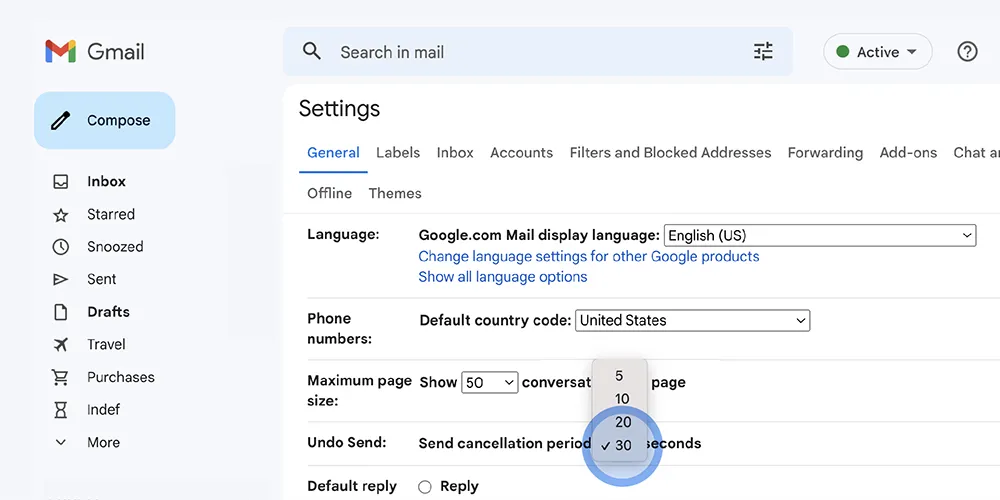
Extend your undo send window for up to 30 seconds.
Extend your undo send window for up to 30 seconds

How to Change It on Mobile

Here’s the catch: the Gmail app on Android and iPhone doesn’t have a setting for this. The Undo Send option only exists in the desktop version of Gmail.

.

If you want to change it from your phone, you can still do it through a browser:

  • Open Chrome (or another browser) on your phone
  • Go to mail.google.com
  • Tap the three dots in the top right corner
  • Select “Desktop site”
  • Once the desktop version loads, follow the same steps as above (gear icon, See all settings, Undo Send, pick your time, save)

After that, the new setting will apply across the Gmail app too, since it’s tied to your account, not the device.
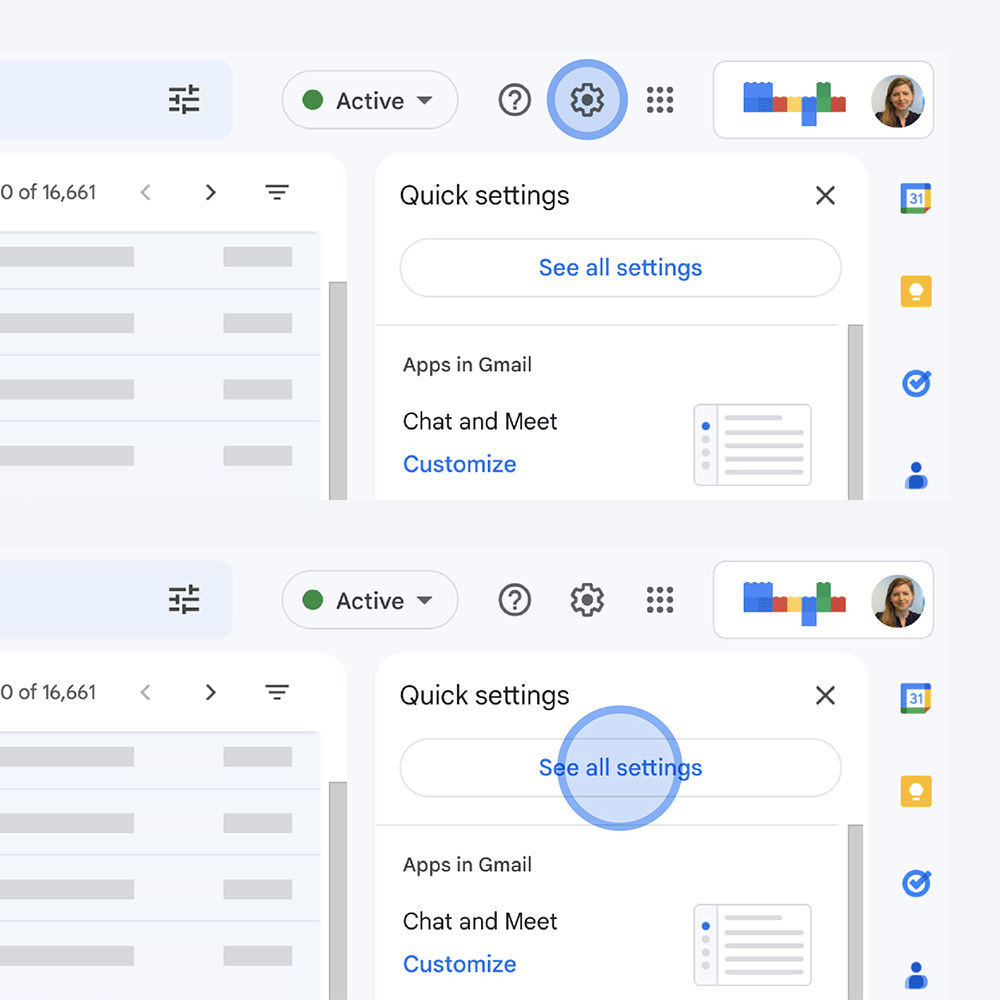
Navigate to settings in Gmail to extend your undo send window

Why Should You Bother Extending It?

Five seconds isn’t much time to notice you attached the wrong file, forgot to CC someone, or sent a message to the wrong person entirely. Bumping it up to 20 or 30 seconds gives you an actual chance to catch those mistakes instead of relying on reflexes.

READ: Hate Your Gmail Address? You Can Now Change It

It’s a small setting, but it’s one of those things that only matters the one time you really need it.


Tags: EmailGmailGoogle
SendShare146Tweet92
Techweez

Techweez

Techweez is where tomorrow’s tech stories break today, thanks to intelligent analysis, real-world insight, and visionary storytelling. Follow us for exclusive interviews and authoritative stories on world Technology. Talk to us at [email protected]

Related Posts

Google Street View

How Kenya Became One of Africa’s Best-Mapped Countries on Google Street View

July 27, 2026
Google

You Can Now Sign In to Your Google Account With a Selfie Video

July 24, 2026
African Game Studios Can Now Apply for Google’s New $1 Million Fund

Google Tightens Play Store Terms Around Data, Sharing, and Billing

July 10, 2026
African Game Studios Can Now Apply for Google’s New $1 Million Fund

African Game Studios Can Now Apply for Google’s New $1 Million Fund

July 3, 2026
Outside Enterprise Allegedly Used Gemini to Build Massive Phishing Operation

Google Sues Scammers Using Gemini to Build Fake Government and Brand Sites

July 13, 2026
How a Remote IMEI Kill Switch Is Shaking Up the Stolen iPhone Market Worldwide

Following London Success, Apple Deploys Global Killswitch Feature to Eliminate Stolen iPhones Market

June 16, 2026

Latest

Gmail Logo

How to Change Gmail’s Undo Send Window From 5 Seconds to 30 Seconds

July 29, 2026
Apple Upgrade

Apple Wants You to Stop Buying iPhones and Start Renting Them

July 28, 2026
Bingo E2

Bingo Unveils E2 Electric Vehicle With Swappable Batteries and 440 km Range

July 28, 2026
AI

Kenya AI Policy Draft Released for Public Consultation

July 28, 2026
X Money Launches in the US as X Takes First Step Toward an “Everything App”

X Money Launches in the US as X Takes First Step Toward an “Everything App”

July 28, 2026
Anne Kinuthia-Otieno

Anne Kinuthia-Otieno Steps Down as Airtel Money Kenya MD After 5 Years

July 28, 2026

Best devices

Best Infinix Phones of 2025

Best Infinix Phones of 2025: Budget Prices With Premium Features

December 31, 2025

The Best Infinix Accessories Worth Buying in 2025

November 26, 2025

Best Budget Wireless Earbuds To Buy in Kenya (2025)

October 8, 2025

Samsung Galaxy A36 5G vs Samsung Galaxy A56 5G: Comparison Review

August 29, 2025

Infinix Hot 60 Pro+ vs Infinix Hot 60i: Comparison Review

August 22, 2025

Best Budget Smartwatches To Buy in Kenya 2025

February 13, 2025

Techweez is where tomorrow’s tech stories break today, thanks to intelligent analysis, real-world insight, and visionary storytelling.

Follow Us

Editorials

Forest: The App That Kills a Tree Every Time You Check Your Phone

Unsolved Hidden Mystery Games Is Worth Playing If You Can Handle the Wait

Period Tracker: An App That Prioritizes Simplicity and Privacy

Inside Bumble, the Dating App Where Women Call the Shots

Locket: Photo Sharing App With No Feed, No Likes, and No Algorithms

Couple Joy: A Long-Distance Dating App That Builds Intimacy in Small Daily Acts

More News

Chinese RAM Chip Giant CXMT Raises $8.5 Billion in Record IPO

How Kenya Became One of Africa’s Best-Mapped Countries on Google Street View

Anthropic Ordered to Pay $1.5 Billion in Largest AI Copyright Settlement

SportPesa Founders Lose Control as UAE Firms Take Majority Ownership

iHUB Unveils 12 Startups Joining Mastercard Foundation EdTech Fellowship

Forest: The App That Kills a Tree Every Time You Check Your Phone

  • Terms Of Use
  • Techweez Brand
  • Privacy & Policy
  • Contact Us

© 2024 Techweez - Palahala Media Group may earn a commission when you buy through links on our sites.
A Palahala Media Group Brand. All rights reserved.
.

Welcome Back!

Login to your account below

Forgotten Password?

Retrieve your password

Please enter your username or email address to reset your password.

Log In

Add New Playlist

Techweez | Tech News, Reviews, Deals, Tips and How To
Crunchy Cookies 🍪 Ahead!

Hey there! Just a heads-up: we're big fans of cookies - both the digital and edible kind! 🍪 We use our cookies and some from third parties to ensure your browsing experience on our site is smooth sailing and secure.


But wait, there's more! We also use cookies to gather stats and insights on how you navigate our site. It's like getting a behind-the-scenes peek at your digital adventures!


Don't worry, you're in control. You can adjust your cookie settings anytime to suit your preferences. Feeling curious? Dive into our Privacy Policy for all the juicy details. Happy browsing! 🚀

Functional Always active
Listen, this legal stuff is about as exciting as watching paint dry. But it basically says we only use your stuff for what you asked us to do, and nobody else gets to peek!
Preferences
The technical storage or access is necessary for the legitimate purpose of storing preferences that are not requested by the subscriber or user.
Statistics
It's those sneaky cookie crumbs websites leave behind to count visitors, like counting ants at a picnic! Totally harmless, just for fun facts. The technical storage or access that is used exclusively for anonymous statistical purposes. Without a subpoena, voluntary compliance on the part of your Internet Service Provider, or additional records from a third party, information stored or retrieved for this purpose alone cannot usually be used to identify you.
Marketing
Hey there! Just letting you know we use some fancy gizmos to remember your preferences. This way, we can show you ads that are, well, not completely bananas.
Manage options Manage services Manage {vendor_count} vendors Read more about these purposes
Make cookies
{title} {title} {title}
Techweez | Tech News, Reviews, Deals, Tips and How To
Crunchy Cookies 🍪 Ahead!
To provide the best experiences, we use technologies like cookies to store and/or access device information. Consenting to these technologies will allow us to process data such as browsing behavior or unique IDs on this site. Not consenting or withdrawing consent, may adversely affect certain features and functions.
Functional Always active
Listen, this legal stuff is about as exciting as watching paint dry. But it basically says we only use your stuff for what you asked us to do, and nobody else gets to peek!
Preferences
The technical storage or access is necessary for the legitimate purpose of storing preferences that are not requested by the subscriber or user.
Statistics
It's those sneaky cookie crumbs websites leave behind to count visitors, like counting ants at a picnic! Totally harmless, just for fun facts. The technical storage or access that is used exclusively for anonymous statistical purposes. Without a subpoena, voluntary compliance on the part of your Internet Service Provider, or additional records from a third party, information stored or retrieved for this purpose alone cannot usually be used to identify you.
Marketing
Hey there! Just letting you know we use some fancy gizmos to remember your preferences. This way, we can show you ads that are, well, not completely bananas.
Manage options Manage services Manage {vendor_count} vendors Read more about these purposes
Make cookies
{title} {title} {title}
No Result
View All Result
  • News
  • Reviews
  • Features
  • Editorial
  • Automotive
  • Entertainment

© 2024 Techweez - Palahala Media Group may earn a commission when you buy through links on our sites.
A Palahala Media Group Brand. All rights reserved.
.