



• Latest
  • All
  • How To
Chrome Can Fill Up to 4GB of Your Storage With an AI Model You Never Chose

Chrome Can Fill Up to 4GB of Your Storage With an AI Model You Never Chose

October 19, 2026
Xbox Nintendo Switch Emulator

Xbox Series X Can Now Boot Nintendo Switch Games Through Emulation

October 19, 2026
Forex

8 Forex Brokers That Could Save African Traders Money in 2027

October 19, 2026
Sofa Time Lets You Track Movies and Shows Across Streaming Services

Sofa Time Lets You Track Movies and Shows Across Streaming Services

October 19, 2026
Senate Committee Rejects AI Bill, Sending It Back to the Drawing Board

Senate Committee Rejects AI Bill, Sending It Back to the Drawing Board

October 16, 2026
DHgate Tablet Cases deals
Murang’a Governor Accuses Government of Shutting Down AfyaKE Hospital System

Murang’a Governor Accuses Government of Shutting Down AfyaKE Hospital System

October 15, 2026
Netflix catalogue

Netflix Cuts Nearly 1,000 Jobs in Biggest Layoff Round Since 2022

October 14, 2026
CMA chief executive Wycliffe Shamiah

CMA Proposes Risk Ratings for Kenya’s Money Market Funds

October 14, 2026
KEPSA Urges Parliament to Reject Internet Metering Bill Over Privacy and Cost Concerns

KEPSA Urges Parliament to Reject Internet Metering Bill Over Privacy and Cost Concerns

October 14, 2026
Google Play Android

Google AI Studio Makes It Easier to Install Vibe-Coded Apps on Android

October 14, 2026
OpenAI

FBI Arrests OpenAI Engineer Over Alleged Plot to Record Executives

October 14, 2026
Satellite Licensing Framework

CA Seeks Public Feedback on New Satellite Licensing Rules by November 6

October 13, 2026
Getty Images

Getty Images Files for Bankruptcy as AI Disrupts Stock Photography

October 13, 2026
Techweez | Tech News, Reviews, Deals, Tips and How To
  • News
  • Entertainment
  • Reviews
  • Features
  • Editorial
No Result
View All Result
Techweez | Tech News, Reviews, Deals, Tips and How To
  • News
  • Entertainment
  • Reviews
  • Features
  • Editorial
No Result
View All Result
Techweez | Tech News, Reviews, Deals, Tips and How To
No Result
View All Result

Chrome Can Fill Up to 4GB of Your Storage With an AI Model You Never Chose

Kevin Ngugi by Kevin Ngugi
October 19, 2026
in News
Reading Time: 5 mins read
264
0

If your laptop suddenly has less free storage space than you remember, your browser could be the reason.

Google Chrome can download an AI model onto your computer without a separate app to install, and reporting by Engadget puts the file at more than 4GB, with no prompt asking users whether they want it.

The download is triggered automatically once Chrome decides your device meets the hardware requirements.

The downloads belong to Google’s push to build AI into the browser itself, powering tools that rewrite text, summarize web pages, organize tabs, and flag likely scams.

Google says the models go to eligible devices so these features can run locally instead of leaning entirely on remote servers.

The trouble starts for people on laptops with limited space, who may only learn about the model when their free storage shrinks, even if they never touched the features it supports.

Why Chrome Wants A Model on Your Machine

An AI model is the software that processes information and produces responses.

Keeping one on your device lets Chrome handle certain tasks without sending each request to Google’s servers, and once the model is installed, supported features can keep working offline, although the first download needs a decent connection.

Gemini Nano is one such model, and Chrome can use it for summaries and writing help, while other on-device capabilities cover scam detection and tab organization.

Whether your computer supports it depends on its hardware and available disk space. Google sets minimum requirements, and the model’s size may change with updates. For this reason, 4GB is best treated as an approximate upper limit.

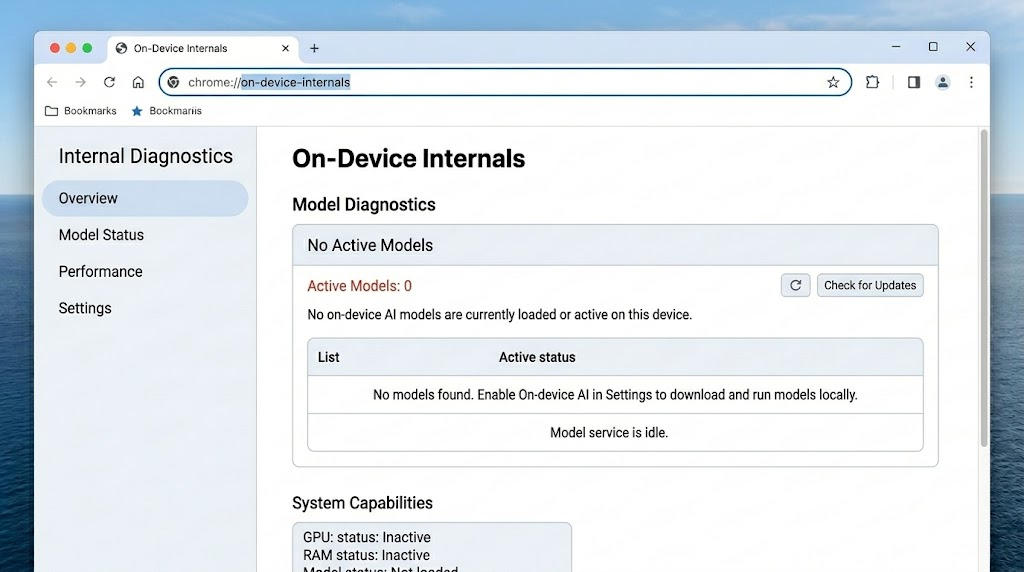
You can see what is installed by typing chrome://on-device-internals into the address bar.

A large file does not mean Chrome is keeping a copy of everything you have browsed, because the model is the tool that processes information, not a store of your history.

The Model May Not Be Spying on You, But the Silence Is the Problem

Google says the AI model on your computer works there, so what you ask it to do isn’t sent to Google, and having the file on your drive doesn’t mean Chrome is watching you. 

Some of Chrome’s other AI features run on Google’s servers instead, and what gets shared there depends on the feature you use and its privacy rules, while your browsing history has its own separate settings, so turning off the model will not change how those are handled.

The real complaint is about disclosure, since apps store resources locally all the time and nobody objects to that in principle.

What users want to know is whether they are told when a file of up to 4GB lands on their drive, what it is for, and whether they can refuse it without losing unrelated parts of the browser.

The impact is greatest for people with older computers or limited storage. Slow internet connections can also make things worse, especially for users who rely on mobile hotspots or have limited data plans.

Downloading large files in the background can use up data and lead to extra costs. Google’s documentation confirms that Chrome can download these models in the background and provides a setting to manage them, although availability depends on the device and Chrome version.

How to Remove Chrome’s AI model

It takes a few minutes on the desktop version of Chrome, and if a menu name looks slightly different on your screen, pick the closest match.

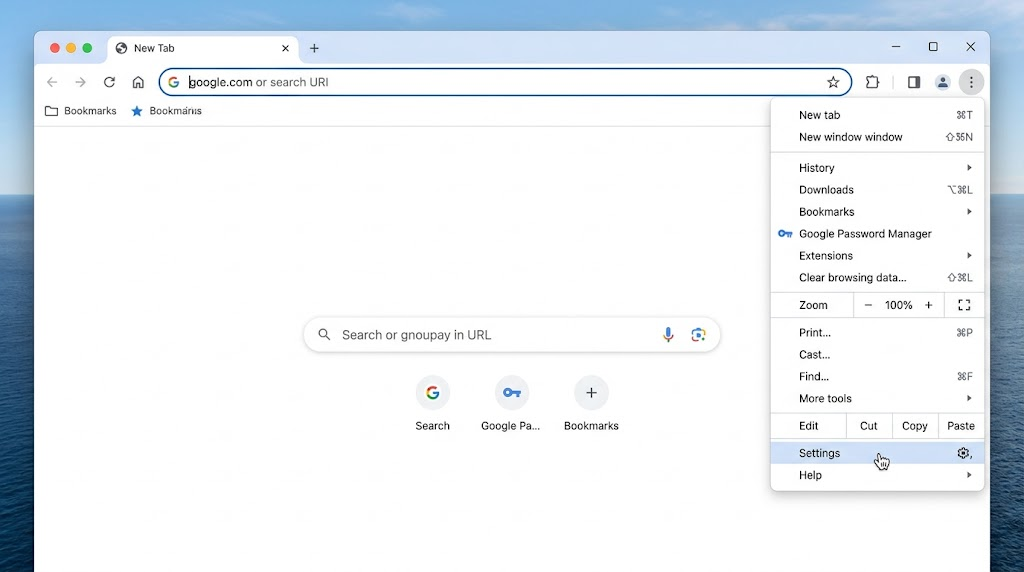
  1. Open Chrome’s settings. Click the three dots in the top right corner and choose Settings.
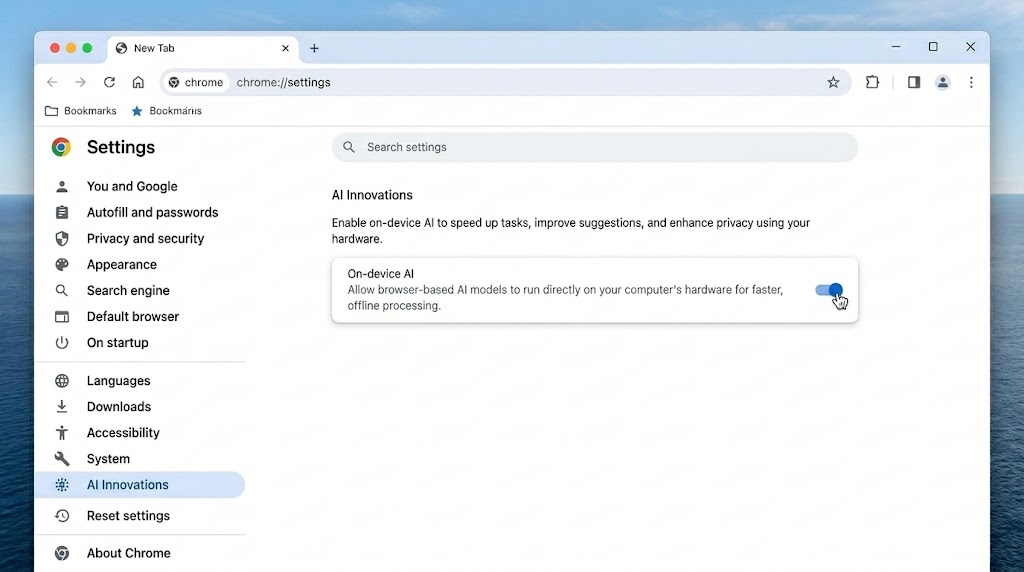
  1. Find the AI switch. Click System on the left, where a toggle turns off on-device AI features. In some versions it sits under AI Innovations instead.
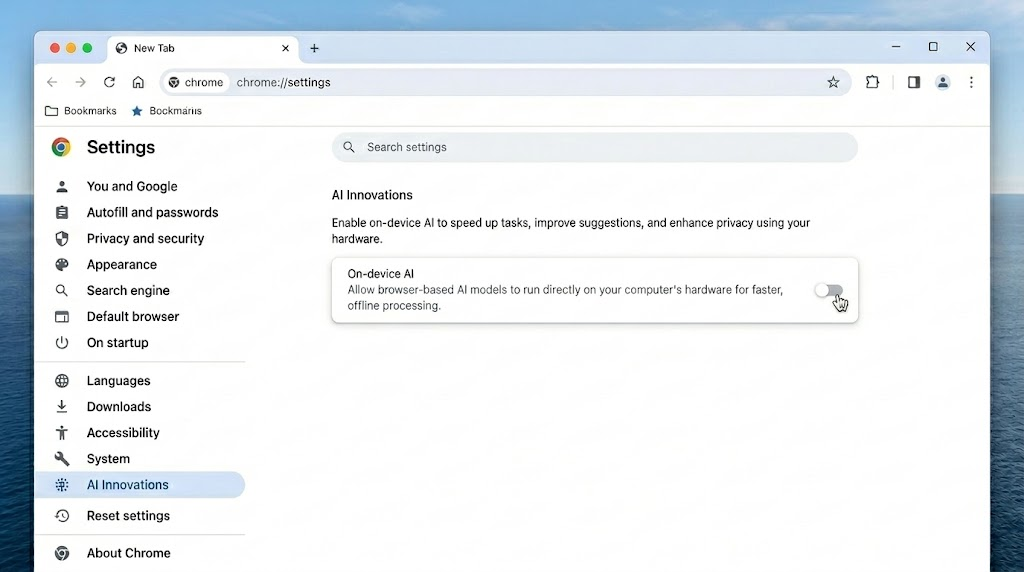
  1. Turn it off. Google says that once it is off, the model will no longer download or update. Features that rely on it, such as the writing helper, will stop working.
  1. Verify it worked. Type chrome://on-device-internals into the address bar to see whether the model is gone, then look at your free storage.
Deleting the model’s folder is not a fix, because in testing, the file returned within several minutes. Turn off the on-device AI setting first, then remove any leftover files if you wish.

If it keeps returning after updates, type chrome://flags into the address bar, search for the optimization guide on the device, set it to Disabled, and click Relaunch.

It is also worth checking the setting again every month or so, since a big update can bring it back.


Tags: AIChromeGeminiGoogle
SendShare146Tweet92
Kevin Ngugi

Kevin Ngugi

A serial online rambler with an eye for spotting trends and the stories behind the headlines. Just give him enough coffee and a fully charged phone. Contact him on mail via: [email protected]

Related Posts

Senate Committee Rejects AI Bill, Sending It Back to the Drawing Board

Senate Committee Rejects AI Bill, Sending It Back to the Drawing Board

October 16, 2026
Google Play Android

Google AI Studio Makes It Easier to Install Vibe-Coded Apps on Android

October 14, 2026
OpenAI

FBI Arrests OpenAI Engineer Over Alleged Plot to Record Executives

October 14, 2026
Getty Images

Getty Images Files for Bankruptcy as AI Disrupts Stock Photography

October 13, 2026
PS5

Your PS5 Can Now Play PS2 Games, If You Jailbreak It First

October 19, 2026
X Is Preparing One Subscription for X, Grok, and Cursor

X Is Preparing One Subscription for X, Grok, and Cursor

October 9, 2026

Latest

Chrome Can Fill Up to 4GB of Your Storage With an AI Model You Never Chose

Chrome Can Fill Up to 4GB of Your Storage With an AI Model You Never Chose

October 19, 2026
Xbox Nintendo Switch Emulator

Xbox Series X Can Now Boot Nintendo Switch Games Through Emulation

October 19, 2026
Forex

8 Forex Brokers That Could Save African Traders Money in 2027

October 19, 2026
Sofa Time Lets You Track Movies and Shows Across Streaming Services

Sofa Time Lets You Track Movies and Shows Across Streaming Services

October 19, 2026
Senate Committee Rejects AI Bill, Sending It Back to the Drawing Board

Senate Committee Rejects AI Bill, Sending It Back to the Drawing Board

October 16, 2026
Murang’a Governor Accuses Government of Shutting Down AfyaKE Hospital System

Murang’a Governor Accuses Government of Shutting Down AfyaKE Hospital System

October 15, 2026

Top stories

Copia Global

Copia Kenya Ordered Into Liquidation After Two-Year Rescue Effort

September 30, 2026

CBK Licenses 29 New Digital Lenders, Bringing Total to 281

September 30, 2026

New Bill Could Let M-Pesa and Airtel Money Invest Customer Funds

September 30, 2026

Kenya Has 22,000 Digital Services but Still Face a Manual Backend

September 23, 2026

WSO2 Says Kenyan Businesses Must Make Systems Ready for AI Agents

September 23, 2026

New Payment Bill Wants to Force Banks and M-PESA to Open Up Their Data

September 22, 2026

Techweez is where tomorrow’s tech stories break today, thanks to intelligent analysis, real-world insight, and visionary storytelling.

Follow Us

Editorials

Sofa Time Lets You Track Movies and Shows Across Streaming Services

Albo: The App That Turns Saved Social Media Posts Into a Library

ADaM: The Outbreak Tracking Tool That Could Help Contain Ebola in Kenya

The World May Not Be Desperate for AI Agents, Yet

AppBlock: The App That Blocks Apps, Including the One You Use to Uninstall It

Yubo: The App That Went From Tinder for Teens to 60 Million Users

More News

Netflix Cuts Nearly 1,000 Jobs in Biggest Layoff Round Since 2022

CMA Proposes Risk Ratings for Kenya’s Money Market Funds

KEPSA Urges Parliament to Reject Internet Metering Bill Over Privacy and Cost Concerns

Google AI Studio Makes It Easier to Install Vibe-Coded Apps on Android

FBI Arrests OpenAI Engineer Over Alleged Plot to Record Executives

CA Seeks Public Feedback on New Satellite Licensing Rules by November 6

  • Terms Of Use
  • Techweez Brand
  • Privacy & Policy
  • Contact Us

© 2024 Techweez - Palahala Media Group may earn a commission when you buy through links on our sites.
A Palahala Media Group Brand. All rights reserved.
.

Welcome Back!

Login to your account below

Forgotten Password?

Retrieve your password

Please enter your username or email address to reset your password.

Log In

Add New Playlist

Techweez | Tech News, Reviews, Deals, Tips and How To
Crunchy Cookies 🍪 Ahead!

Hey there! Just a heads-up: we're big fans of cookies - both the digital and edible kind! 🍪 We use our cookies and some from third parties to ensure your browsing experience on our site is smooth sailing and secure.


But wait, there's more! We also use cookies to gather stats and insights on how you navigate our site. It's like getting a behind-the-scenes peek at your digital adventures!


Don't worry, you're in control. You can adjust your cookie settings anytime to suit your preferences. Feeling curious? Dive into our Privacy Policy for all the juicy details. Happy browsing! 🚀

Functional Always active
Listen, this legal stuff is about as exciting as watching paint dry. But it basically says we only use your stuff for what you asked us to do, and nobody else gets to peek!
Preferences
The technical storage or access is necessary for the legitimate purpose of storing preferences that are not requested by the subscriber or user.
Statistics
It's those sneaky cookie crumbs websites leave behind to count visitors, like counting ants at a picnic! Totally harmless, just for fun facts. The technical storage or access that is used exclusively for anonymous statistical purposes. Without a subpoena, voluntary compliance on the part of your Internet Service Provider, or additional records from a third party, information stored or retrieved for this purpose alone cannot usually be used to identify you.
Marketing
Hey there! Just letting you know we use some fancy gizmos to remember your preferences. This way, we can show you ads that are, well, not completely bananas.
Manage options Manage services Manage {vendor_count} vendors Read more about these purposes
Make cookies
{title} {title} {title}
Techweez | Tech News, Reviews, Deals, Tips and How To
Crunchy Cookies 🍪 Ahead!
To provide the best experiences, we use technologies like cookies to store and/or access device information. Consenting to these technologies will allow us to process data such as browsing behavior or unique IDs on this site. Not consenting or withdrawing consent, may adversely affect certain features and functions.
Functional Always active
Listen, this legal stuff is about as exciting as watching paint dry. But it basically says we only use your stuff for what you asked us to do, and nobody else gets to peek!
Preferences
The technical storage or access is necessary for the legitimate purpose of storing preferences that are not requested by the subscriber or user.
Statistics
It's those sneaky cookie crumbs websites leave behind to count visitors, like counting ants at a picnic! Totally harmless, just for fun facts. The technical storage or access that is used exclusively for anonymous statistical purposes. Without a subpoena, voluntary compliance on the part of your Internet Service Provider, or additional records from a third party, information stored or retrieved for this purpose alone cannot usually be used to identify you.
Marketing
Hey there! Just letting you know we use some fancy gizmos to remember your preferences. This way, we can show you ads that are, well, not completely bananas.
Manage options Manage services Manage {vendor_count} vendors Read more about these purposes
Make cookies
{title} {title} {title}
No Result
View All Result
  • News
  • Reviews
  • Features
  • Editorial
  • Automotive
  • Entertainment

© 2024 Techweez - Palahala Media Group may earn a commission when you buy through links on our sites.
A Palahala Media Group Brand. All rights reserved.
.