




If you have ever asked an AI to build you a small app and then discovered that actually using it on your Android phone meant either publishing it to Google Play or dealing with sideloaded files, Google has a fix.
It announced a set of Play Store changes this week, and the biggest one is a private route from Google AI Studio straight to your own devices.
How the Personal App Route Works
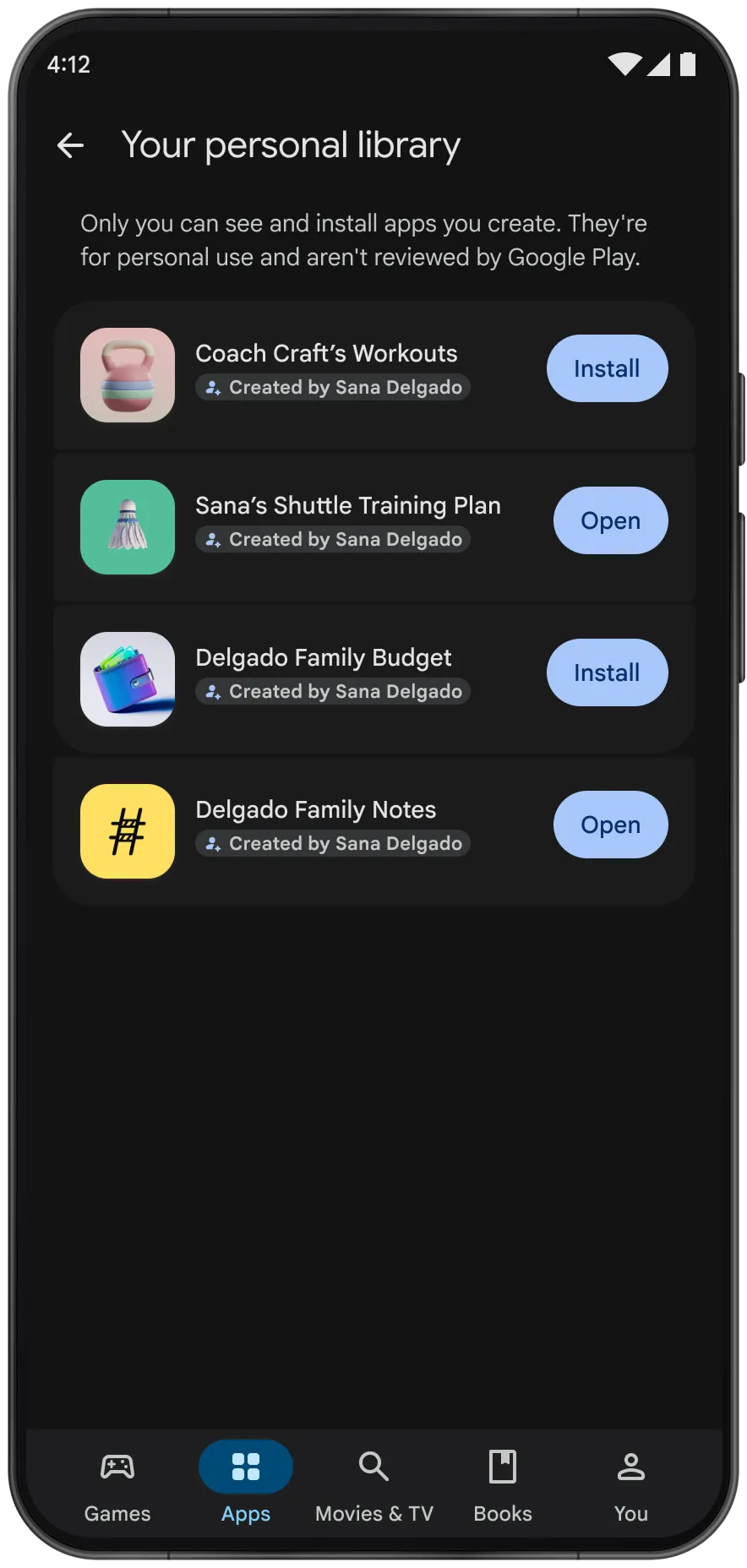
You build an app in Google AI Studio, where a written prompt to Gemini generates the app and you can keep refining it with more prompts or by editing the code yourself. From there, you can send it to Google Play and install it using nothing more than a regular Google account.
No paid developer account is needed, and you do not have to download APK files or deal with a developer console.
The app lands in a new “personal library” section of the Play Store on your devices. That includes tablets and computers that have access to Play. It does not show up in search or on listing pages, and by default nobody but you can see it.
Until now, the options for personal Android apps were awkward. Publishing publicly exposes your app to the Play Store’s roughly 3 billion users, which is a lot of exposure for something you built to track your own gym sets.
Sideloading works but Google has made it more complicated over the past year. Many people ended up building web apps instead, since those run anywhere, even when a native Android app would have suited them better.
The Catch
The feature starts in the US for people aged 18 and up, with a handful of other markets also getting it. Your app still has to follow Google Play’s existing policies. It also does not get reviewed by Google while it stays private, so the safety checks only come into play if you decide to go public.
What Is Coming Next
Sharing is planned but not available yet. In the coming months, you should be able to share a personal app with a small group of friends and family. Google has not said how many people count as a small group. Sharing at that scale will not require a developer account.
If an app takes off and you want to release it widely, Google plans an onboarding process that sets you up with a professional developer profile.
After that, the app goes through the same trust and safety review as any other app on the store. That migration option is expected in the coming months as well.
Everything Else in the Update
Ask Play, the Play Store’s AI assistant, launched in 2025 as a small chatbot on app listings that answered questions about a specific app or game. It is now being expanded into a general search tool.
You ask it questions and it generates recommendations, including comparison charts that show the key differences between similar apps. Gemini is getting something similar, including the ability to surface direct links to Play Store apps inside chats.
Game Finder is a new recommendation system built on data from the 1.2 billion people who play games on Android. It builds a taste profile called Gamer DNA, which you can tune by rating games you have played, adding or removing tags, and picking favorite genres.
It also offers playlists, including contextual ones such as relaxing games or trending titles. Google says it hopes to make filters more granular over time, for example to find games with controller support, and eventually to let you prompt it with specific preferences.
It is unclear how much of that will exist at launch.
A few more gaming features on the way include:
- Sprints are 48-hour challenges that match you with players of similar skill to compete for the top score.
- Community Posts adds a Q&A section to store pages so players can ask and answer questions about games.
- Quests, which let developers reward players with Play Points, can now also hand out in-game rewards.
The Sidekick overlay can record 30-second gameplay clips, and users can build their own game lists to recommend to others.
Elsewhere, the Play Store’s sports topic pages, which appear during live matches, now cover soccer games from the Premier League. The Play Store layout is also being adjusted for cars with Google built-in and for Android XR so it fits those screens better.
Alongside all of this, Google Play is adding support for an age-range feature. Parents can share their child’s age range with developers, though not an exact birthdate, so apps can adjust the experience accordingly.