


• Latest
  • All
  • How To
Blue Screen of Death

The Blue Screen of Death Gets a Modern Makeover in Windows 11

April 2, 2025
iHUB Cohort 4

iHUB Unveils 12 Startups Joining Mastercard Foundation EdTech Fellowship

July 24, 2026
Forest: The App That Kills a Tree Every Time You Check Your Phone

Forest: The App That Kills a Tree Every Time You Check Your Phone

July 24, 2026
Google

You Can Now Sign In to Your Google Account With a Selfie Video

July 24, 2026
DCI explicit content: 30 Women Found at Rimpa House; 18 Rescued in Kiserian Recruitment Sting explicit content

DCI Raids Kajiado Premises, Rescues 48 Women in Explicit-Content Probe

July 24, 2026
DHgate Tablet Cases deals
Uber and Bolt

Competition Bill Targets Uber, Bolt and Other Powerful Digital Platforms

July 24, 2026
Samsung Galaxy Fold8

Samsung Opens Kenya Pre-Orders for Galaxy Z Fold8 Ultra, Fold8 and Flip8

July 23, 2026
DCI Kenya

DCI Gets Faster Biometric System to Speed Up Good Conduct Certificates

July 23, 2026
TikTok Pulled Nearly 900,000 Videos From Kenya in Three Months

TikTok Pulled Nearly 900,000 Videos From Kenya in Three Months

July 23, 2026
Hustler Fund on MPESA app

How to Pay Hustler Fund Loan Using Bonga Points

July 23, 2026
Phone Warranty

Devices Sold in Kenya Must Now Have 1-Year Warranties and Labels for Refurbished Electronics

July 23, 2026
Zoho

Zoho and KNCCI Launch KES 65,000 Software Support for Kenyan Small Businesses

July 22, 2026
NTSA inspection

Senate Scraps New NTSA Traffic Rules After Motorist Backlash

July 22, 2026
Techweez | Tech News, Reviews, Deals, Tips and How To
  • News
  • Entertainment
  • Reviews
  • Features
  • Editorial
No Result
View All Result
Techweez | Tech News, Reviews, Deals, Tips and How To
  • News
  • Entertainment
  • Reviews
  • Features
  • Editorial
No Result
View All Result
Techweez | Tech News, Reviews, Deals, Tips and How To
No Result
View All Result

The Blue Screen of Death Gets a Modern Makeover in Windows 11

Naftary Thitu by Naftary Thitu
April 2, 2025
in News
Reading Time: 2 mins read
303
0
Blue Screen of Death

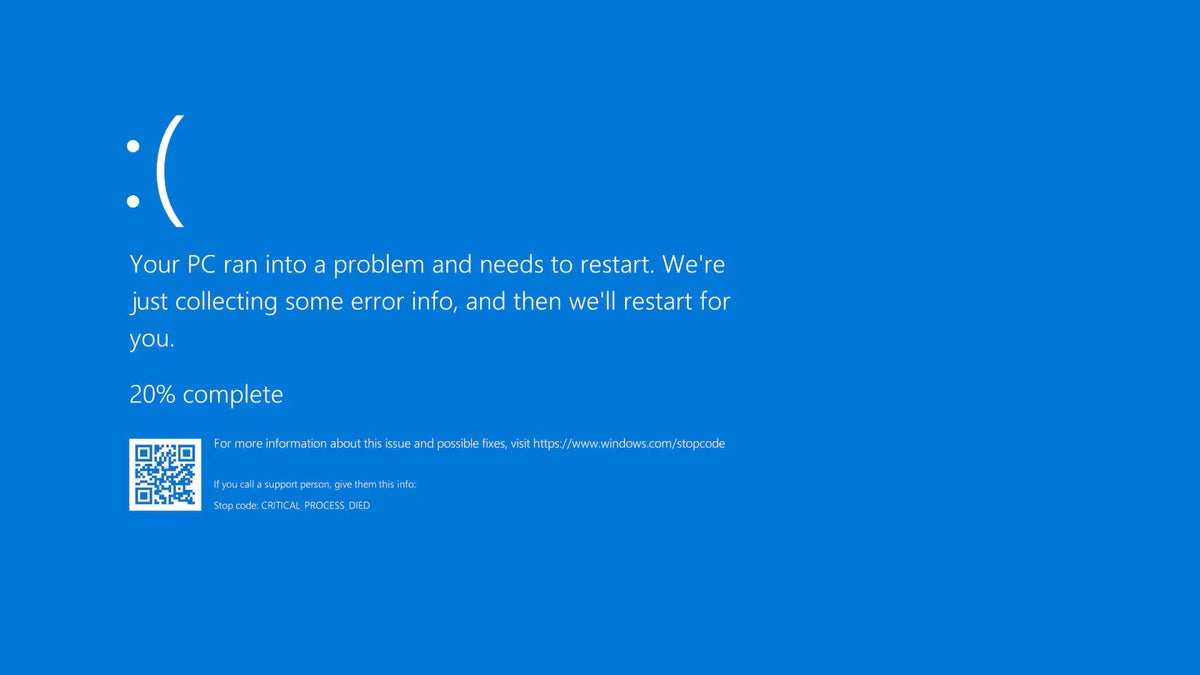
For decades, the Blue Screen of Death (BSOD) has been the universal symbol of a crashed Windows PC. But now, Microsoft is reimagining its iconic Blue Screen of Death with the introduction of Windows 11 Insider Preview Build 26120.3653 (KB5053658).

This update brings a more streamlined and less intimidating interface to system error messages, aligning with Windows 11’s modern design principles.

The traditional BSOD, long recognized by its stark blue background and technical jargon, is undergoing transformation.

In the latest Insider Preview build, Microsoft introduces a minimalist design for unexpected restarts, aiming to reduce user anxiety and facilitate a quicker return to productivity.

This new interface simplifies the error message while retaining essential technical information necessary for troubleshooting.

.

Green Screen for Insiders (Or Maybe Black)

For participants in the Windows Insider Program, this revamped error screen appears with a green background, a distinctive feature for preview builds.

This color differentiation helps Microsoft identify and address issues specific to these test versions before a broader rollout.
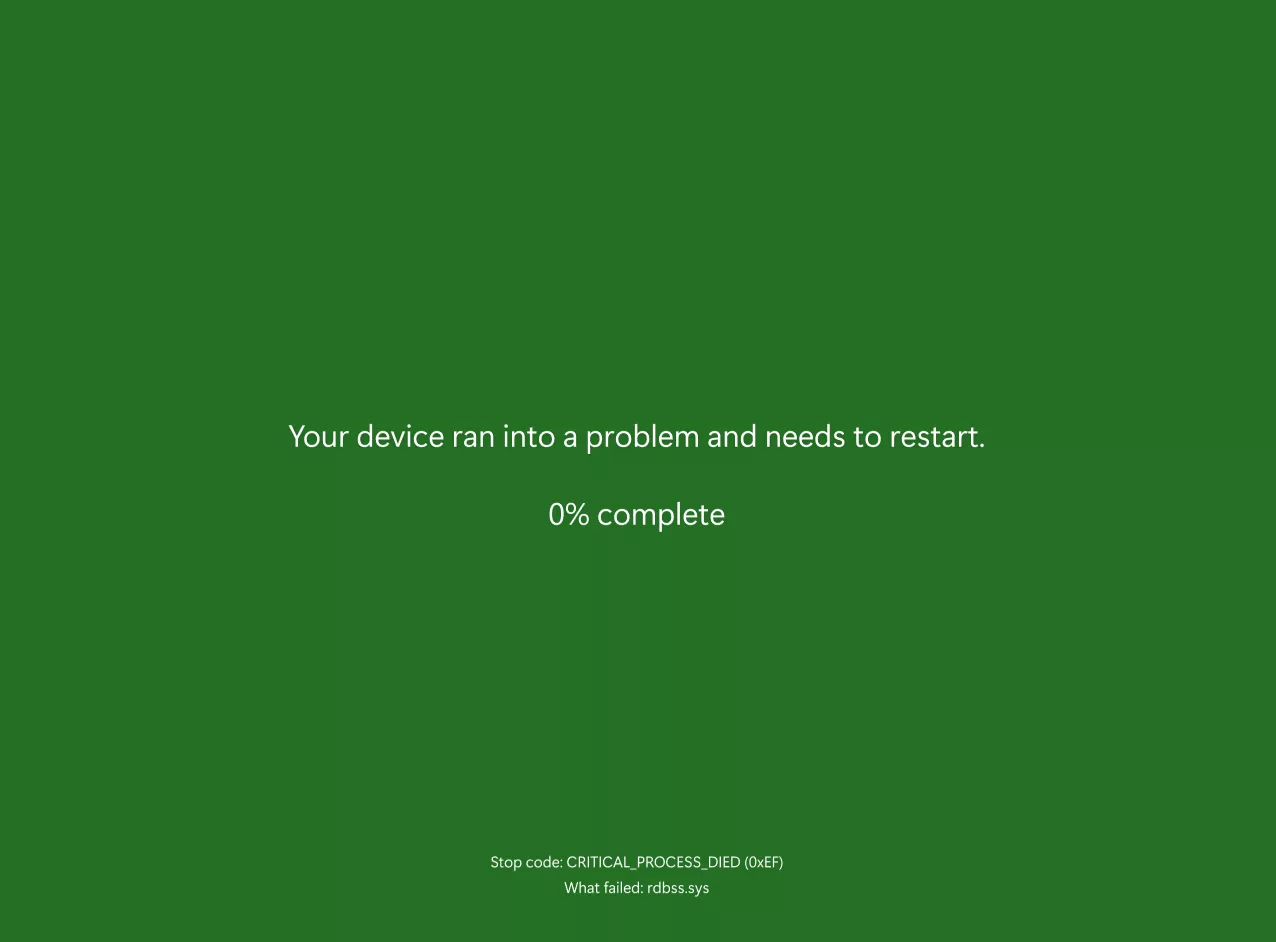
The updated error screen eliminates previous elements such as the sad face emoticon and QR code, opting instead for a cleaner presentation.

Users are now greeted with a concise message indicating that the device has encountered a problem and needs to restart, accompanied by pertinent technical details like the stop code and error origin.

This approach not only modernizes the interface but also focuses on delivering critical information without unnecessary distractions.

Community Feedback

The introduction of this redesigned error screen has sparked discussions within the tech community. While some users appreciate the modernized approach and reduced clutter, others express nostalgia for the traditional BSOD.

Additionally, there are concerns that the new design’s resemblance to Windows update dialogs might cause confusion during system errors. Microsoft is actively monitoring feedback from Windows Insiders to refine this feature before its official release.

The Blue Screen of Death is one of the most recognizable parts of Windows, but Microsoft is slowly modernizing it. While some users may miss the classic blue error screen, this new version aims to make system crashes less stressful and easier to troubleshoot.


Tags: MicrosoftWindowsWindows 11
SendShare171Tweet107
Naftary Thitu

Naftary Thitu

Tech enthusiast and ICT guru by trade, I simplify digital trends and gadgets into articles everyone can enjoy. Email: [email protected]

Related Posts

Windows 11

Microsoft Blocks July Windows 11 Update on Some Dell PCs Over Driver Conflict

July 15, 2026
Microsoft

Microsoft Cuts 4,800 Jobs With Xbox Losing 20% of Its Staff

July 7, 2026
Software

Finance Act 2026 Increases Software and Cloud Service Costs by 25%

July 6, 2026
Sony PlayStation

Sony to End Physical PlayStation Game Discs Starting January 2028

July 1, 2026
Windows 10

Microsoft Quietly Extends Windows 10 Security Updates to 2027

June 26, 2026
Apple raises base MacBook Air to $1,299 and MacBook Pro to $1,999

Apple Hikes Prices for Core Products by Upto 54% With Xbox Following Suit

June 26, 2026

Latest

iHUB Cohort 4

iHUB Unveils 12 Startups Joining Mastercard Foundation EdTech Fellowship

July 24, 2026
Forest: The App That Kills a Tree Every Time You Check Your Phone

Forest: The App That Kills a Tree Every Time You Check Your Phone

July 24, 2026
Google

You Can Now Sign In to Your Google Account With a Selfie Video

July 24, 2026
DCI explicit content: 30 Women Found at Rimpa House; 18 Rescued in Kiserian Recruitment Sting explicit content

DCI Raids Kajiado Premises, Rescues 48 Women in Explicit-Content Probe

July 24, 2026
Uber and Bolt

Competition Bill Targets Uber, Bolt and Other Powerful Digital Platforms

July 24, 2026
Samsung Galaxy Fold8

Samsung Opens Kenya Pre-Orders for Galaxy Z Fold8 Ultra, Fold8 and Flip8

July 23, 2026

Best devices

Best Infinix Phones of 2025

Best Infinix Phones of 2025: Budget Prices With Premium Features

December 31, 2025

The Best Infinix Accessories Worth Buying in 2025

November 26, 2025

Best Budget Wireless Earbuds To Buy in Kenya (2025)

October 8, 2025

Samsung Galaxy A36 5G vs Samsung Galaxy A56 5G: Comparison Review

August 29, 2025

Infinix Hot 60 Pro+ vs Infinix Hot 60i: Comparison Review

August 22, 2025

Best Budget Smartwatches To Buy in Kenya 2025

February 13, 2025

Techweez is where tomorrow’s tech stories break today, thanks to intelligent analysis, real-world insight, and visionary storytelling.

Follow Us

Editorials

Forest: The App That Kills a Tree Every Time You Check Your Phone

Unsolved Hidden Mystery Games Is Worth Playing If You Can Handle the Wait

Period Tracker: An App That Prioritizes Simplicity and Privacy

Inside Bumble, the Dating App Where Women Call the Shots

Locket: Photo Sharing App With No Feed, No Likes, and No Algorithms

Couple Joy: A Long-Distance Dating App That Builds Intimacy in Small Daily Acts

More News

DCI Gets Faster Biometric System to Speed Up Good Conduct Certificates

TikTok Pulled Nearly 900,000 Videos From Kenya in Three Months

How to Pay Hustler Fund Loan Using Bonga Points

Devices Sold in Kenya Must Now Have 1-Year Warranties and Labels for Refurbished Electronics

Zoho and KNCCI Launch KES 65,000 Software Support for Kenyan Small Businesses

Senate Scraps New NTSA Traffic Rules After Motorist Backlash

  • Terms Of Use
  • Techweez Brand
  • Privacy & Policy
  • Contact Us

© 2024 Techweez - Palahala Media Group may earn a commission when you buy through links on our sites.
A Palahala Media Group Brand. All rights reserved.
.

Welcome Back!

Login to your account below

Forgotten Password?

Retrieve your password

Please enter your username or email address to reset your password.

Log In

Add New Playlist

Techweez | Tech News, Reviews, Deals, Tips and How To
Crunchy Cookies 🍪 Ahead!

Hey there! Just a heads-up: we're big fans of cookies - both the digital and edible kind! 🍪 We use our cookies and some from third parties to ensure your browsing experience on our site is smooth sailing and secure.


But wait, there's more! We also use cookies to gather stats and insights on how you navigate our site. It's like getting a behind-the-scenes peek at your digital adventures!


Don't worry, you're in control. You can adjust your cookie settings anytime to suit your preferences. Feeling curious? Dive into our Privacy Policy for all the juicy details. Happy browsing! 🚀

Functional Always active
Listen, this legal stuff is about as exciting as watching paint dry. But it basically says we only use your stuff for what you asked us to do, and nobody else gets to peek!
Preferences
The technical storage or access is necessary for the legitimate purpose of storing preferences that are not requested by the subscriber or user.
Statistics
It's those sneaky cookie crumbs websites leave behind to count visitors, like counting ants at a picnic! Totally harmless, just for fun facts. The technical storage or access that is used exclusively for anonymous statistical purposes. Without a subpoena, voluntary compliance on the part of your Internet Service Provider, or additional records from a third party, information stored or retrieved for this purpose alone cannot usually be used to identify you.
Marketing
Hey there! Just letting you know we use some fancy gizmos to remember your preferences. This way, we can show you ads that are, well, not completely bananas.
Manage options Manage services Manage {vendor_count} vendors Read more about these purposes
Make cookies
{title} {title} {title}
Techweez | Tech News, Reviews, Deals, Tips and How To
Crunchy Cookies 🍪 Ahead!
To provide the best experiences, we use technologies like cookies to store and/or access device information. Consenting to these technologies will allow us to process data such as browsing behavior or unique IDs on this site. Not consenting or withdrawing consent, may adversely affect certain features and functions.
Functional Always active
Listen, this legal stuff is about as exciting as watching paint dry. But it basically says we only use your stuff for what you asked us to do, and nobody else gets to peek!
Preferences
The technical storage or access is necessary for the legitimate purpose of storing preferences that are not requested by the subscriber or user.
Statistics
It's those sneaky cookie crumbs websites leave behind to count visitors, like counting ants at a picnic! Totally harmless, just for fun facts. The technical storage or access that is used exclusively for anonymous statistical purposes. Without a subpoena, voluntary compliance on the part of your Internet Service Provider, or additional records from a third party, information stored or retrieved for this purpose alone cannot usually be used to identify you.
Marketing
Hey there! Just letting you know we use some fancy gizmos to remember your preferences. This way, we can show you ads that are, well, not completely bananas.
Manage options Manage services Manage {vendor_count} vendors Read more about these purposes
Make cookies
{title} {title} {title}
No Result
View All Result
  • News
  • Reviews
  • Features
  • Editorial
  • Automotive
  • Entertainment

© 2024 Techweez - Palahala Media Group may earn a commission when you buy through links on our sites.
A Palahala Media Group Brand. All rights reserved.
.