

• Latest
  • All
  • How To
How to Update Everything Once on Windows Laptop or PC

How to Update Everything Once on Windows Laptop or PC

November 10, 2026
Apple Overtakes Nvidia as the World’s Most Valuable Company After a 12% Share Slide

Apple Overtakes Nvidia as the World’s Most Valuable Company After a 12% Share Slide

November 10, 2026
Lydia Chelagat Nominated as Kenya’s Data Commissioner to Succeed Immaculate Kassait

Lydia Chelagat Nominated as Kenya’s Data Commissioner to Succeed Immaculate Kassait

November 9, 2026
Kenya’s Crypto Rules Put It Among Africa’s Most Regulated Markets as the Continent Stays a Patchwork

Kenya’s Crypto Rules Put It Among Africa’s Most Regulated Markets as the Continent Stays a Patchwork

November 9, 2026
Commerce and Adult Content Dominate as TikTok Takes Down 750,185 Kenyan Content

Commerce and Adult Content Dominate as TikTok Takes Down 750,185 Kenyan Content

November 9, 2026
DHgate Tablet Cases deals
How to Connect WhatsApp to Your Laptop or Computer: A Step-by-Step Guide

How to Connect WhatsApp to Your Laptop or Computer: A Step-by-Step Guide

November 9, 2026
Nvidia Board Opens Independent Investigation Into Jensen Huang Over China Spy Claims

Nvidia Board Opens Independent Investigation Into Jensen Huang Over China Spy Claims

November 9, 2026
Hustler Fund loan limit

How to Increase Your Hustler Fund Loan Limit Before 2026 Ends

November 9, 2026
Epomaker TH80 V2 keyboard

Epomaker TH80 V2 Review: A Good Entry Point Into Mechanical Keyboards

Redtech Plans a Kenya-Nigeria Payments Corridor With Kenyan Launch in 2027

Redtech Plans a Kenya-Nigeria Payments Corridor With Kenyan Launch in 2027

November 7, 2026
Safaricom Is Becoming a Financial Services Company With a Telco Attached

Safaricom Is Becoming a Financial Services Company With a Telco Attached

November 7, 2026
KRA Passes KES 1 Trillion a Month Early, but the Harder Months Lie Ahead

KRA Passes KES 1 Trillion a Month Early, but the Harder Months Lie Ahead

November 5, 2026
KNEC Digital Exams Face Questions After System Failure at Kigari College

KNEC Digital Exams Face Questions After System Failure at Kigari College

November 5, 2026
Techweez | Tech News, Reviews, Deals, Tips and How To
  • News
  • Entertainment
  • Reviews
  • Features
  • Editorial
No Result
View All Result
Techweez | Tech News, Reviews, Deals, Tips and How To
  • News
  • Entertainment
  • Reviews
  • Features
  • Editorial
No Result
View All Result
Techweez | Tech News, Reviews, Deals, Tips and How To
No Result
View All Result

How to Update Everything Once on Windows Laptop or PC

Justus Kiprono by Justus Kiprono
November 10, 2026
in How To
Reading Time: 4 mins read
262
0

You sit down to work. The laptop sighs. A little pop-up appears. Update available. Restart now? You click Later. Tomorrow becomes next week. Next week becomes next month.

Many computer users are unaware that Windows has a command that can help update several applications installed on a laptop or desktop without opening each programme individually.

Think of it as a centralised way of checking for available updates to supported applications and installing them in one operation. However, it is important to understand what it does — and what it does not do.

First, What Does “Update Everything” Actually Mean?

When people say “update my computer,” they usually mean four different things happening at once:

  • Windows itself: Security patches, bug fixes, and new features from Microsoft. This is the most important one.
  • Microsoft Store Apps: Things like Photos, Calculator, WhatsApp, Spotify if you installed it from the Store.
  • Your Other Apps: Chrome, Zoom, VLC, WhatsApp Desktop, Adobe Reader; the apps you downloaded from the internet. Windows Update does not touch these by default.
  • Drivers: The small pieces of software that make your Wi-Fi, sound, and graphics work.

The trick is to update all four in one move.

How to Update Your Windows With One Command

Follow these steps:

  1. Connect your laptop or desktop to the internet.
  2. Click the Windows Start button.
  3. Search for Command Prompt or Windows Terminal.
  4. Right-click it and select Run as administrator.
  5. Type the following command: winget upgrade –all
  6. Press Enter and allow the process to run.

Windows will check supported applications for available updates and attempt to install them. Depending on the applications installed, you may encounter prompts asking you to accept agreements or close running programs.
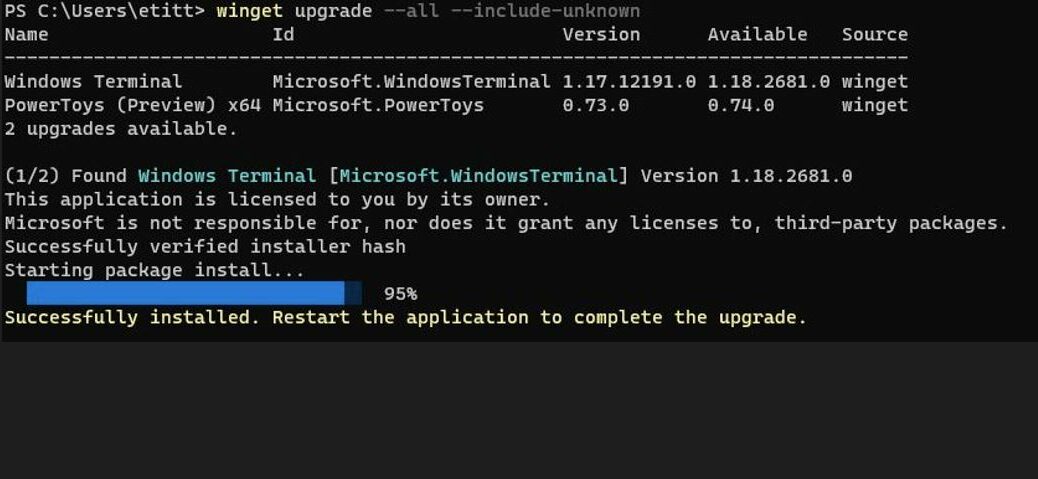
Third-Party vs. Windows System Files: winget upgrade –all updates the vast majority of installed software and programs managed through the package manager (such as browsers, runtimes, and utilities). If this declines, try to run winget upgrade –all –accept-package-agreements –accept-source-agreements

To see which applications have updates available before installing them, run: winget upgrade

This is particularly useful because it allows you to review what will be updated before proceeding.

WinGet is Microsoft’s free, open-source command-line package manager for Windows 10, Windows 11, and Windows Server.

Is Wi-Fi Required, and How Much Data Does It Consume?

Yes, an internet connection is necessary to download updates. It does not have to be Wi-Fi; mobile data through a hotspot or another internet connection will also work.

There is no fixed data consumption figure. It depends on the number of applications, their sizes and how outdated they are.

On average, budget 2 GB to 8 GB for a full “update everything” session if you have not updated in months. If you do it every month, it will be under 1 GB.

Windows system updates can require considerably more data, particularly when downloading major feature upgrades.

What About Windows 10 in 2026?

This is particularly important. Microsoft officially ended standard Windows 10 support on 14 October 2025. Computers running it will continue working, but ordinary security and feature updates have stopped.

Your laptop or PC will still turn on. Your apps will still open. But every month you stay on Windows 10, you are becoming more exposed to viruses, hacking, and banking fraud. It is like living in a house where the landlord has stopped fixing the locks.

If your computer can run it, Microsoft wants you on Windows 11 — and the upgrade is still free for most genuine Windows 10 users. Go to Settings > Windows Update and look for Upgrade to Windows 11.

Microsoft offers an Extended Security Updates (ESU) program for eligible Windows 10 devices, providing critical security updates until 12 October 2027.


Tags: Windows
SendShare147Tweet92
Justus Kiprono

Justus Kiprono

Justus Kiprono Is a Journalist in Kenya. He reports and writes about business, technology, immigration, and Guides.

Related Posts

Windows 11

Microsoft Blocks July Windows 11 Update on Some Dell PCs Over Driver Conflict

July 15, 2026
Software

Finance Act 2026 Increases Software and Cloud Service Costs by 25%

July 6, 2026
Windows 10

Microsoft Quietly Extends Windows 10 Security Updates to 2027

June 26, 2026
Nvidia RTX laptop

Nvidia Wants to Sell You a PC Again

June 2, 2026
cyberthreats

31.5% of Kenyan Users Hit by Malware in New Cyber Report

December 9, 2025
Windows 11

Microsoft Fixes Decade-Old “Update and Shut Down” Bug

November 4, 2025

Latest

Apple Overtakes Nvidia as the World’s Most Valuable Company After a 12% Share Slide

Apple Overtakes Nvidia as the World’s Most Valuable Company After a 12% Share Slide

November 10, 2026
How to Update Everything Once on Windows Laptop or PC

How to Update Everything Once on Windows Laptop or PC

November 10, 2026
Lydia Chelagat Nominated as Kenya’s Data Commissioner to Succeed Immaculate Kassait

Lydia Chelagat Nominated as Kenya’s Data Commissioner to Succeed Immaculate Kassait

November 9, 2026
Kenya’s Crypto Rules Put It Among Africa’s Most Regulated Markets as the Continent Stays a Patchwork

Kenya’s Crypto Rules Put It Among Africa’s Most Regulated Markets as the Continent Stays a Patchwork

November 9, 2026
Commerce and Adult Content Dominate as TikTok Takes Down 750,185 Kenyan Content

Commerce and Adult Content Dominate as TikTok Takes Down 750,185 Kenyan Content

November 9, 2026
How to Connect WhatsApp to Your Laptop or Computer: A Step-by-Step Guide

How to Connect WhatsApp to Your Laptop or Computer: A Step-by-Step Guide

November 9, 2026

Top stories

Copia Global

Copia Kenya Ordered Into Liquidation After Two-Year Rescue Effort

September 30, 2026

CBK Licenses 29 New Digital Lenders, Bringing Total to 281

September 30, 2026

New Bill Could Let M-Pesa and Airtel Money Invest Customer Funds

September 30, 2026

Kenya Has 22,000 Digital Services but Still Face a Manual Backend

September 23, 2026

WSO2 Says Kenyan Businesses Must Make Systems Ready for AI Agents

September 23, 2026

New Payment Bill Wants to Force Banks and M-PESA to Open Up Their Data

September 22, 2026

Techweez is where tomorrow’s tech stories break today, thanks to intelligent analysis, real-world insight, and visionary storytelling.

Follow Us

Editorials

Safaricom Is Becoming a Financial Services Company With a Telco Attached

ThingsBook Turns Social Media Into a Museum of Your Own Life

Meet Pressed Petals: A Botanical Journal App

Sofa Time Lets You Track Movies and Shows Across Streaming Services

Albo: The App That Turns Saved Social Media Posts Into a Library

ADaM: The Outbreak Tracking Tool That Could Help Contain Ebola in Kenya

More News

Nvidia Board Opens Independent Investigation Into Jensen Huang Over China Spy Claims

How to Increase Your Hustler Fund Loan Limit Before 2026 Ends

Epomaker TH80 V2 Review: A Good Entry Point Into Mechanical Keyboards

Redtech Plans a Kenya-Nigeria Payments Corridor With Kenyan Launch in 2027

Safaricom Is Becoming a Financial Services Company With a Telco Attached

KRA Passes KES 1 Trillion a Month Early, but the Harder Months Lie Ahead

  • Terms Of Use
  • Techweez Brand
  • Privacy & Policy
  • Contact Us

© 2024 Techweez - Palahala Media Group may earn a commission when you buy through links on our sites.
A Palahala Media Group Brand. All rights reserved.
.

Welcome Back!

Login to your account below

Forgotten Password?

Retrieve your password

Please enter your username or email address to reset your password.

Log In

Add New Playlist

Techweez | Tech News, Reviews, Deals, Tips and How To
Crunchy Cookies 🍪 Ahead!

Hey there! Just a heads-up: we're big fans of cookies - both the digital and edible kind! 🍪 We use our cookies and some from third parties to ensure your browsing experience on our site is smooth sailing and secure.


But wait, there's more! We also use cookies to gather stats and insights on how you navigate our site. It's like getting a behind-the-scenes peek at your digital adventures!


Don't worry, you're in control. You can adjust your cookie settings anytime to suit your preferences. Feeling curious? Dive into our Privacy Policy for all the juicy details. Happy browsing! 🚀

Functional Always active
Listen, this legal stuff is about as exciting as watching paint dry. But it basically says we only use your stuff for what you asked us to do, and nobody else gets to peek!
Preferences
The technical storage or access is necessary for the legitimate purpose of storing preferences that are not requested by the subscriber or user.
Statistics
It's those sneaky cookie crumbs websites leave behind to count visitors, like counting ants at a picnic! Totally harmless, just for fun facts. The technical storage or access that is used exclusively for anonymous statistical purposes. Without a subpoena, voluntary compliance on the part of your Internet Service Provider, or additional records from a third party, information stored or retrieved for this purpose alone cannot usually be used to identify you.
Marketing
Hey there! Just letting you know we use some fancy gizmos to remember your preferences. This way, we can show you ads that are, well, not completely bananas.
Manage options Manage services Manage {vendor_count} vendors Read more about these purposes
Make cookies
{title} {title} {title}
Techweez | Tech News, Reviews, Deals, Tips and How To
Crunchy Cookies 🍪 Ahead!
To provide the best experiences, we use technologies like cookies to store and/or access device information. Consenting to these technologies will allow us to process data such as browsing behavior or unique IDs on this site. Not consenting or withdrawing consent, may adversely affect certain features and functions.
Functional Always active
Listen, this legal stuff is about as exciting as watching paint dry. But it basically says we only use your stuff for what you asked us to do, and nobody else gets to peek!
Preferences
The technical storage or access is necessary for the legitimate purpose of storing preferences that are not requested by the subscriber or user.
Statistics
It's those sneaky cookie crumbs websites leave behind to count visitors, like counting ants at a picnic! Totally harmless, just for fun facts. The technical storage or access that is used exclusively for anonymous statistical purposes. Without a subpoena, voluntary compliance on the part of your Internet Service Provider, or additional records from a third party, information stored or retrieved for this purpose alone cannot usually be used to identify you.
Marketing
Hey there! Just letting you know we use some fancy gizmos to remember your preferences. This way, we can show you ads that are, well, not completely bananas.
Manage options Manage services Manage {vendor_count} vendors Read more about these purposes
Make cookies
{title} {title} {title}
No Result
View All Result
  • News
  • Reviews
  • Features
  • Editorial
  • Automotive
  • Entertainment

© 2024 Techweez - Palahala Media Group may earn a commission when you buy through links on our sites.
A Palahala Media Group Brand. All rights reserved.
.