

• Latest
  • All
  • How To
Gmail

How to Add Your Company Email to Gmail

August 2, 2025
The AI Gold Rush Goes Public

The AI Gold Rush Goes Public

June 17, 2026
NTSA Pilots Smart Driving License Enrollment at Huduma Center in Kimilili

NTSA Pilots Smart Driving License Enrollment at Huduma Center in Kimilili

June 17, 2026
bZ4X

Toyota Enters Kenya’s EV Market With New bZ4X Electric Crossover

June 17, 2026
Visa

Visa and ChatGPT Team Up to Let AI Shop for You

June 17, 2026
DHgate Tablet Cases deals
China Kills Meta’s $2 Billion Manus Deal: How The Deal Unravelled

China Kills Meta’s $2 Billion Manus Deal: How The Deal Unravelled

June 16, 2026
UK Bans Social Media For Under-16s, Joining a Growing Global Push

UK Bans Social Media For Under-16s, Joining a Growing Global Push

June 16, 2026
Huduma Kenya call centre open till 9 Pm

New: Huduma Center Services Halted After Data Center Loses Power

June 16, 2026
Big Brother is Watching as Kenya Joins the CCTV Surveillance Club

Big Brother is Watching as Kenya Joins the CCTV Surveillance Club

June 16, 2026
How to Download and Verify Your NTSA eLogbook

How to Verify Your NTSA eLogbook Is Not Fake

June 16, 2026
Outside Enterprise Allegedly Used Gemini to Build Massive Phishing Operation

Google Sues Scammers Using Gemini to Build Fake Government and Brand Sites

June 13, 2026
SpaceX

SpaceX Debuts at $2.1 Trillion Valuation in Largest IPO Ever

June 13, 2026
Elon Musk

Elon Musk Becomes World’s First Trillionaire

June 13, 2026
Techweez | Tech News, Reviews, Deals, Tips and How To
  • News
  • Entertainment
  • Reviews
  • Features
  • Editorial
No Result
View All Result
Techweez | Tech News, Reviews, Deals, Tips and How To
  • News
  • Entertainment
  • Reviews
  • Features
  • Editorial
No Result
View All Result
Techweez | Tech News, Reviews, Deals, Tips and How To
No Result
View All Result

How to Add Your Company Email to Gmail

Naftary Thitu by Naftary Thitu
August 2, 2025
in How To
Reading Time: 5 mins read
362
0
Gmail

Managing multiple inboxes is a productivity killer, especially when you’re juggling your personal Gmail and a company email hosted elsewhere.

Fortunately, Gmail allows you to link your work email so you can receive and send messages from a single interface. In this guide, I will walk you through how to link your company email to Gmail using POP3/IMAP and SMTP settings.

Before you begin, gather the following:

  • Your company email address and password
  • Your incoming (POP3/IMAP) and outgoing (SMTP) server details (ask your IT admin if you’re unsure).
  • Recommended: Access to your Gmail account via desktop for full settings

Step 1: Open Gmail Settings

  • Go to mail.google.com on desktop.
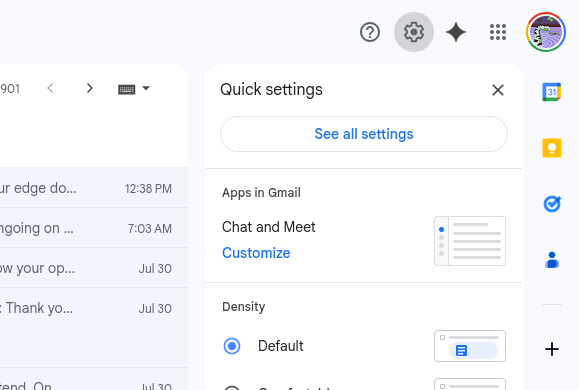
  • Click the gear icon in the top right.
  • Select “See all settings.”
  • Navigate to the Accounts and Import tab.

Step 2: Import Your Company Email (POP3 Setup)

  • Scroll to “Check mail from other accounts” and click “Add a mail account.”
  • Enter your company email address, then click Next.
  • Select “Import emails from my other account (POP3)” and continue.

Fill in the required fields:
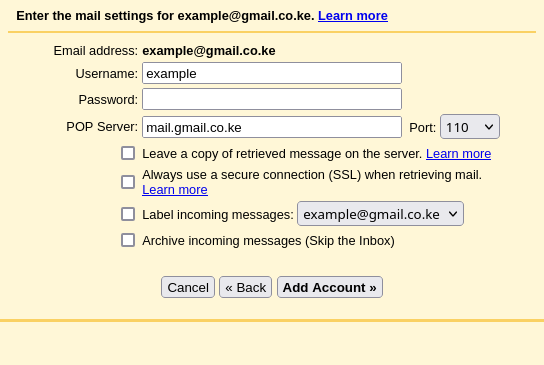
  • Username: your full work email (e.g., [email protected])
  • Password: your company email password.
  • POP Server: e.g., mail.yourcompany.com
  • Port: usually 995 (with SSL)

Check these options:

.
  • Leave a copy of retrieved messages on the server (optional)
  • Always use a secure connection (SSL).
  • Label incoming messages for easy sorting

Click Add Account to proceed.

Step 3: Set Up “Send As” for Outgoing Emails (SMTP)

Once Gmail confirms your POP settings, you’ll be asked if you want to send mail from this account.

  • Choose Yes.
  • Enter your name as you’d like it to appear.
  • Select “Send through yourcompany.com SMTP servers.”

Fill in:

  • SMTP Server: e.g., smtp.yourcompany.com
  • Username & Password: same as above
  • Port: usually 587 with TLS enabled (or 465 with SSL)

Gmail will send a verification email to your company address; click the confirmation link to complete the setup.

Step 4: Organize with Labels & Filters (Optional)

To prevent clutter and make work emails easy to spot:

  • Go to Settings > Labels and create a label like “Work Inbox.”
  • Create a filter to apply that label to all emails from your work account

You can even use colors to differentiate between personal and professional messages.

After completing the setup, the final step is to ensure everything functions as expected. Start by sending a test email from Gmail using your company address.

Ask a colleague to reply, and confirm that their response arrives in your Gmail inbox.

Finally, double-check that it’s sent from your company email and not your personal Gmail account; this helps maintain a consistent and professional communication thread.

Common Setup Issues (and Fixes)

Even with the right setup, you might encounter a few common issues. Here’s how to address them:

  • Email not syncing properly? Gmail checks for new messages using POP at scheduled intervals, which means emails might not appear instantly. For real-time delivery, consider using IMAP instead or set up email forwarding from your company server.
  • Unable to send emails? This is often due to incorrect SMTP settings. Double-check the server address and port number, and ensure authentication is enabled.
  • Seeing a “sent on behalf of” message? This usually happens when Gmail’s SMTP server is used to send messages. To prevent this, configure Gmail to send emails through your company’s SMTP server for a more professional appearance.


Tags: GmailGoogle
SendShare200Tweet125
Naftary Thitu

Naftary Thitu

Tech enthusiast and ICT guru by trade, I simplify digital trends and gadgets into articles everyone can enjoy. Email: [email protected]

Related Posts

Outside Enterprise Allegedly Used Gemini to Build Massive Phishing Operation

Google Sues Scammers Using Gemini to Build Fake Government and Brand Sites

June 13, 2026
How a Remote IMEI Kill Switch Is Shaking Up the Stolen iPhone Market Worldwide

Following London Success, Apple Deploys Global Killswitch Feature to Eliminate Stolen iPhones Market

June 16, 2026
Gemini AI Debuts at World Cup with Argentina Partnership

Argentina to Deploy Gemini for Tactical Analysis as AI Makes World Cup Debut

June 16, 2026
Google I/O 2026

Google Rebuilds Search Around AI as Gemini Usage Crosses 3.2 Quadrillion Tokens

May 21, 2026
After 22 Years of Social Media Builds Up, Arsenal Finally Give Fans a Champion Moment to Share

First Gmail, First TikTok, First Status: Arsenal Claim Their First Ever Social‑Media Era EPL Title

May 20, 2026
Android

Android Storage Hacks: How to Recover Space Your Phone Is Hiding

May 18, 2026

Latest

The AI Gold Rush Goes Public

The AI Gold Rush Goes Public

June 17, 2026
NTSA Pilots Smart Driving License Enrollment at Huduma Center in Kimilili

NTSA Pilots Smart Driving License Enrollment at Huduma Center in Kimilili

June 17, 2026
bZ4X

Toyota Enters Kenya’s EV Market With New bZ4X Electric Crossover

June 17, 2026
Visa

Visa and ChatGPT Team Up to Let AI Shop for You

June 17, 2026
China Kills Meta’s $2 Billion Manus Deal: How The Deal Unravelled

China Kills Meta’s $2 Billion Manus Deal: How The Deal Unravelled

June 16, 2026
UK Bans Social Media For Under-16s, Joining a Growing Global Push

UK Bans Social Media For Under-16s, Joining a Growing Global Push

June 16, 2026

Best devices

Best Infinix Phones of 2025

Best Infinix Phones of 2025: Budget Prices With Premium Features

December 31, 2025

The Best Infinix Accessories Worth Buying in 2025

November 26, 2025

Best Budget Wireless Earbuds To Buy in Kenya (2025)

October 8, 2025

Samsung Galaxy A36 5G vs Samsung Galaxy A56 5G: Comparison Review

August 29, 2025

Infinix Hot 60 Pro+ vs Infinix Hot 60i: Comparison Review

August 22, 2025

Best Budget Smartwatches To Buy in Kenya 2025

February 13, 2025

Techweez is where tomorrow’s tech stories break today, thanks to intelligent analysis, real-world insight, and visionary storytelling.

Follow Us

Editorials

Airbuds: The App That Turns Your Music Into a Social Feed

Kenya Might Need to Crack Down on Wealth Porn Like China

Techweez and Gearhaus Score BAKE Awards 2026 Nominations

Death by AI: Opportunities That Were Disrupted by Automation

CBK Approved 200+ Digital Lenders, But That’s Not the Real Story

Data Centers, Petrodollars and the Price of Building the AI Age

More News

New: Huduma Center Services Halted After Data Center Loses Power

Big Brother is Watching as Kenya Joins the CCTV Surveillance Club

How to Verify Your NTSA eLogbook Is Not Fake

Google Sues Scammers Using Gemini to Build Fake Government and Brand Sites

SpaceX Debuts at $2.1 Trillion Valuation in Largest IPO Ever

Elon Musk Becomes World’s First Trillionaire

  • Terms Of Use
  • Techweez Brand
  • Privacy & Policy
  • Contact Us

© 2024 Techweez - Palahala Media Group may earn a commission when you buy through links on our sites.
A Palahala Media Group Brand. All rights reserved.
.

Welcome Back!

Login to your account below

Forgotten Password?

Retrieve your password

Please enter your username or email address to reset your password.

Log In

Add New Playlist

Techweez | Tech News, Reviews, Deals, Tips and How To
Crunchy Cookies 🍪 Ahead!

Hey there! Just a heads-up: we're big fans of cookies - both the digital and edible kind! 🍪 We use our cookies and some from third parties to ensure your browsing experience on our site is smooth sailing and secure.


But wait, there's more! We also use cookies to gather stats and insights on how you navigate our site. It's like getting a behind-the-scenes peek at your digital adventures!


Don't worry, you're in control. You can adjust your cookie settings anytime to suit your preferences. Feeling curious? Dive into our Privacy Policy for all the juicy details. Happy browsing! 🚀

Functional Always active
Listen, this legal stuff is about as exciting as watching paint dry. But it basically says we only use your stuff for what you asked us to do, and nobody else gets to peek!
Preferences
The technical storage or access is necessary for the legitimate purpose of storing preferences that are not requested by the subscriber or user.
Statistics
It's those sneaky cookie crumbs websites leave behind to count visitors, like counting ants at a picnic! Totally harmless, just for fun facts. The technical storage or access that is used exclusively for anonymous statistical purposes. Without a subpoena, voluntary compliance on the part of your Internet Service Provider, or additional records from a third party, information stored or retrieved for this purpose alone cannot usually be used to identify you.
Marketing
Hey there! Just letting you know we use some fancy gizmos to remember your preferences. This way, we can show you ads that are, well, not completely bananas.
Manage options Manage services Manage {vendor_count} vendors Read more about these purposes
Make cookies
{title} {title} {title}
Techweez | Tech News, Reviews, Deals, Tips and How To
Crunchy Cookies 🍪 Ahead!
To provide the best experiences, we use technologies like cookies to store and/or access device information. Consenting to these technologies will allow us to process data such as browsing behavior or unique IDs on this site. Not consenting or withdrawing consent, may adversely affect certain features and functions.
Functional Always active
Listen, this legal stuff is about as exciting as watching paint dry. But it basically says we only use your stuff for what you asked us to do, and nobody else gets to peek!
Preferences
The technical storage or access is necessary for the legitimate purpose of storing preferences that are not requested by the subscriber or user.
Statistics
It's those sneaky cookie crumbs websites leave behind to count visitors, like counting ants at a picnic! Totally harmless, just for fun facts. The technical storage or access that is used exclusively for anonymous statistical purposes. Without a subpoena, voluntary compliance on the part of your Internet Service Provider, or additional records from a third party, information stored or retrieved for this purpose alone cannot usually be used to identify you.
Marketing
Hey there! Just letting you know we use some fancy gizmos to remember your preferences. This way, we can show you ads that are, well, not completely bananas.
Manage options Manage services Manage {vendor_count} vendors Read more about these purposes
Make cookies
{title} {title} {title}
No Result
View All Result
  • News
  • Reviews
  • Features
  • Editorial
  • Automotive
  • Entertainment

© 2024 Techweez - Palahala Media Group may earn a commission when you buy through links on our sites.
A Palahala Media Group Brand. All rights reserved.
.