


• Latest
  • All
  • How To
eTIMS WhatsApp

How to Use KRA’s WhatsApp eTIMS to Generate Invoices and File Returns

April 2, 2026
Google Cloud Takes Gemini AI Into Banking and Law

Google Cloud Takes Gemini AI Into Banking and Law

August 28, 2026
Microsoft East Africa Country Lead Angela Ng'ang'a

Microsoft Names Angela Ng’ang’a as East Africa Country Lead

August 28, 2026
Absa Next Is Building Something Different From a Banking App

Absa Next Is Building Something Different From a Banking App

August 28, 2026
Netflix GTA 6 Extended Look

Netflix Crashes as ‘GTA 6 Extended Look’ Premieres

August 28, 2026
DHgate Tablet Cases deals
GTA 6 Netflix Extended Look

GTA 6 Netflix Extended Look: Everything We Learned

August 28, 2026
Kenya Moves Closer to Joining Budapest Convention on Cybercrime

Kenya Moves Closer to Joining Budapest Convention on Cybercrime

August 27, 2026
Why Disclosing AI Use May Not Save Your Content

Why Disclosing AI Use May Not Save Your Content

August 28, 2026
Xbox

Xbox Will Let Players Convert Physical Games to Digital

August 27, 2026
John Ternus to Lead First Apple Event as CEO on September 9

John Ternus to Lead First Apple Event as CEO on September 9

August 27, 2026
Facebook ban

How to Recover a Disabled Facebook or Instagram Account

August 26, 2026
Apple Mac Mini

Apple Unveils New Mac Mini With M6 and M5 Pro Chips

August 26, 2026
Inside Taifa Care, Kenya’s Plan to Track Pregnancy, Birth and Child Health With AI

Inside Taifa Care, Kenya’s Plan to Track Pregnancy, Birth and Child Health With AI

August 25, 2026
Techweez | Tech News, Reviews, Deals, Tips and How To
  • News
  • Entertainment
  • Reviews
  • Features
  • Editorial
No Result
View All Result
Techweez | Tech News, Reviews, Deals, Tips and How To
  • News
  • Entertainment
  • Reviews
  • Features
  • Editorial
No Result
View All Result
Techweez | Tech News, Reviews, Deals, Tips and How To
No Result
View All Result

How to Use KRA’s WhatsApp eTIMS to Generate Invoices and File Returns

Kevin Ngugi by Kevin Ngugi
April 2, 2026
in How To, News
Reading Time: 7 mins read
346
0
eTIMS WhatsApp

Tax season is nigh upon us, and this year there is a meaningfully different option for the millions of Kenyan traders who have long found eTIMS too technical, too slow, or simply too much to deal with.

KRA launched a WhatsApp chatbot in January 2026 that lets you generate a compliant eTIMS invoice and get return filing assistance without opening a browser, visiting an office, or using the iTax portal.

We’ve created a plain walkthrough of exactly how it works, from the first message to the PDF in your hands.

Before you start, make sure you have a KRA PIN and are already registered on the iTax system. If you have never done either, you will need to visit itax.kra.go.ke first.

The WhatsApp service handles invoice generation and return assistance; it does not replace the initial PIN registration process.

What You Need 

  • A registered KRA PIN
  • A WhatsApp account (any smartphone)
  • Your buyer’s KRA PIN or name
  • Basic details of what you sold and at what price

Add KRA to Your Contacts: Save the Number and Say Hello

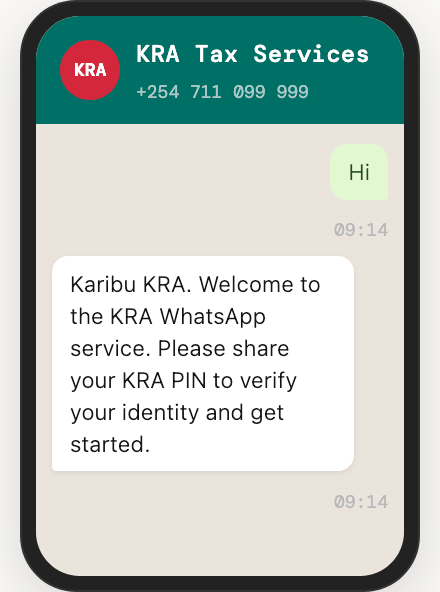
Save +254 711 099 999 in your phone as KRA Tax Services or anything you will recognize. Once you’re done, open WhatsApp, find the contact, and send either “Hi” or “Menu” to begin the session.

The bot is live 24/7, and any WhatsApp connection will do, including WhatsApp Lite on a basic smartphone.

You can send “Menu” at any point during the session to return to the main services list.
Verify Your Identity: Prove You Are Who You Say You Are

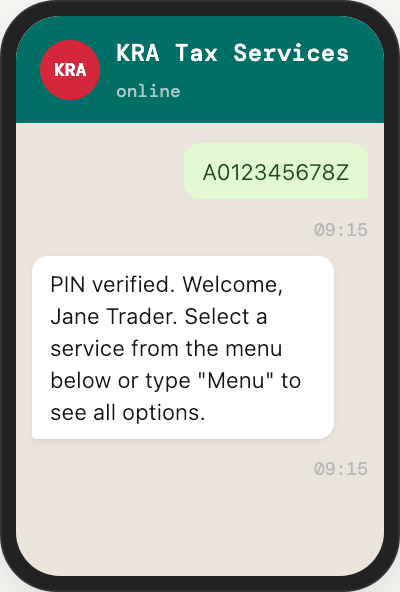
Next, reply with your KRA PIN (for example, A012345678Z). The system checks it against the iTax database and confirms your registered business name. This links the entire session to your taxpayer record.

Every invoice you generate from here will be filed under your PIN in real time, which is exactly what KRA needs when it cross-checks your annual returns.

Your PIN is not sensitive in the way a password is, but keep it to legitimate KRA channels. Never share your iTax password with the bot; it will, however, never ask for it.
Select eTIMS Invoice From the Menu: Pick Your Service

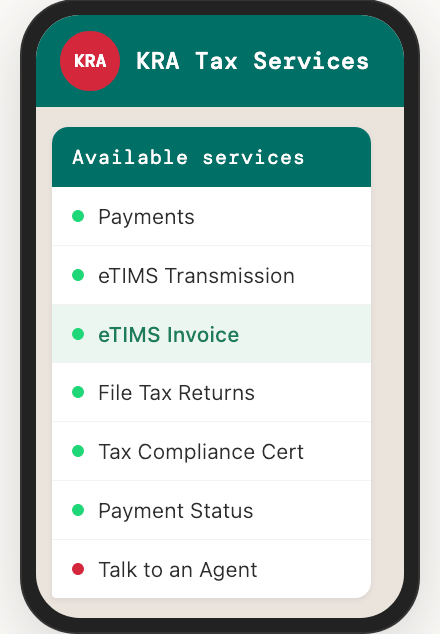
The bot displays a list of 15 services. Pick the one you want for invoice generation, eTIMS Invoice. The menu also includes eTIMS Transmission (for filing pre-populated eTIMS data), File Tax Returns, Tax Compliance Certificates, Payments, and more.

Reply with the number or name corresponding to the eTIMS invoice. The bot immediately prompts you for your buyer’s details.
Enter Your Buyer’s Details: Tell the Bot Who You Are Selling To

The bot asks for your customer’s KRA PIN. Enter it and the system validates it in real time against KRA records. If the buyer is a registered business, their name will appear for you to confirm.

If your buyer has no KRA PIN, which is common with individual customers or informal buyers, you can enter their name manually.

The invoice will still be generated and transmitted, but you will not be able to claim the transaction as a deductible expense on your own return without a valid buyer PIN.

For business-to-business transactions, always ask your buyer for their KRA PIN before invoicing. Expenses with a missing buyer PIN may be queried during return validation.
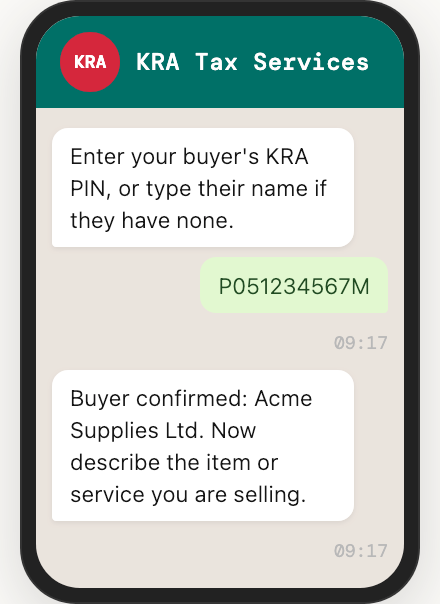
Add Item, Quantity and Price: Log What You Sold

Describe the product or service in plain text. Then enter the quantity and the unit price when prompted. The bot calculates the total and applies the correct tax type based on your registration status.

Traders not registered for VAT are billed as non-VAT, while those who are pay the standard 16% rate.

A summary of the invoice details is then displayed. Check that the buyer name, item, and amount are correct before confirming. Once confirmed, the invoice cannot be edited; you would need to issue a credit note to make corrections.

Take a moment to verify the summary carefully. An incorrect invoice transmitted to KRA requires a formal credit note to reverse, which adds paperwork.
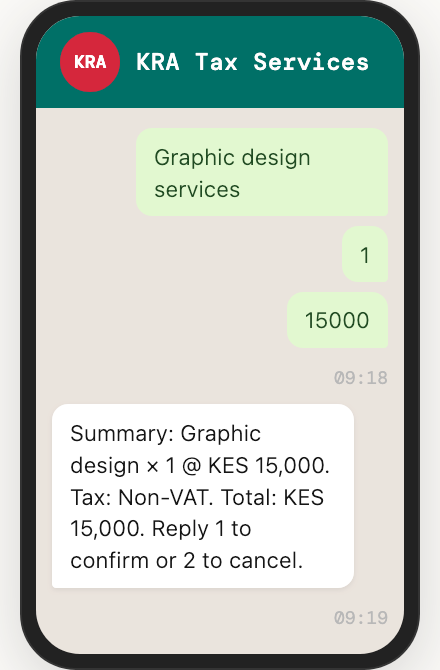
Invoice Generated and Transmitted: Confirm and Collect Your Invoice

Reply 1 to confirm. Within seconds, the invoice is transmitted to KRA’s eTIMS system in real time and logged against your PIN. You receive an SMS notification with the invoice number and a link to download the PDF.

The PDF includes a unique eTIMS Control Unit invoice number and a QR code which you can share directly with your buyer via WhatsApp, email, or print it out. It is fully compliant from the moment it is generated.

Save all invoice PDFs in a dedicated folder. When filing season arrives, they form the paper trail that supports your declared income and expenses.
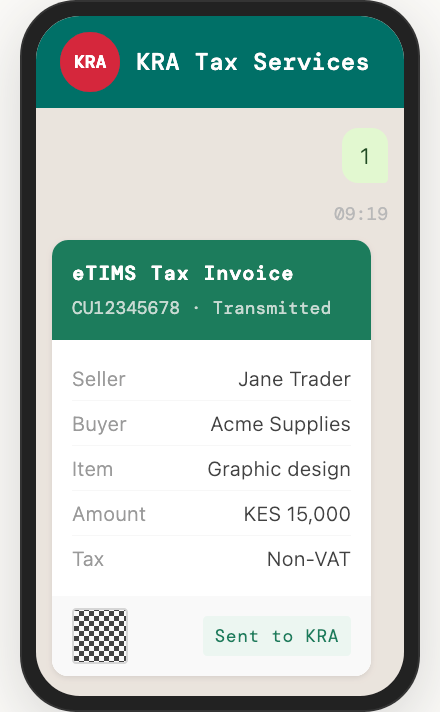
Your Invoices Feed into Your Return: Close the Loop at Filing Time

Every invoice generated through the WhatsApp bot is stored in KRA’s eTIMS database under your PIN. When you sit down to file your annual income tax return, KRA’s system has already pulled all of your transmitted invoices.

Your declared income and expenses are automatically cross-checked against them.

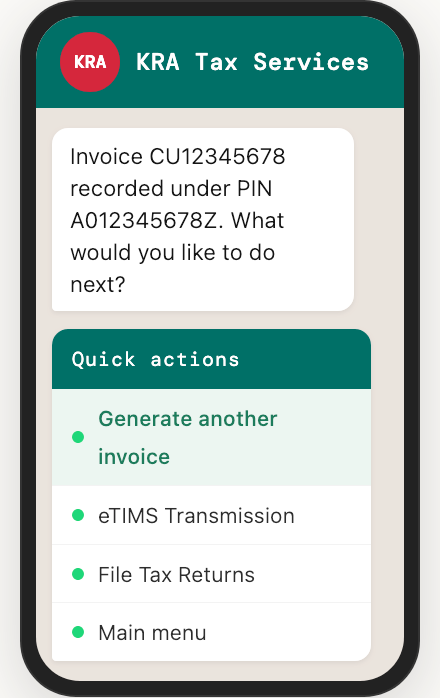
The WhatsApp channel also offers File Tax Returns and eTIMS Transmission as separate menu options. The returns service walks you through the filing process step by step on iTax, while eTIMS Transmission lets you file returns pre-populated from your eTIMS records.

If you have been generating invoices all year through WhatsApp, most of your income data will already be pre-populated when you open your iTax return. Filing becomes a matter of reviewing, not rebuilding.
Also Available: USSD on *222#

For traders without a smartphone or reliable internet, the eCitizen USSD service on *222# offers the same eTIMS invoice generation through feature phone menus.

Select option 5 for KRA Services, then choose eTIMS Invoice, and follow the prompts. You will receive an SMS with the invoice number and a link to the PDF. The functionality is identical but the interface is simpler.

One thing worth underlining for anyone who has been putting off eTIMS compliance: from January 2026, KRA began validating all declared expenses against eTIMS records at the point of return filing.

Any expense not backed by a transmitted invoice can be disallowed, increasing your taxable income. The WhatsApp channel does not change that requirement, but it does make meeting it considerably less painful.


Tags: eTIMSiTaxKRAWhatsApp
SendShare200Tweet125
Kevin Ngugi

Kevin Ngugi

A serial online rambler with an eye for spotting trends and the stories behind the headlines. Just give him enough coffee and a fully charged phone. Contact him on mail via: [email protected]

Related Posts

KRA Containerized Cargo

KRA Raises Customs Benchmark for Consolidated Cargo to KES 3.2M

August 25, 2026
Convos Wants to Be the First Messaging App Built for the Age of AI

Convos Wants to Be the First Messaging App Built for the Age of AI

August 16, 2026
Kenyan Court Awards KES 2.5 Million Over Leaked Intimate Photos

Kenyan Court Awards KES 2.5 Million Over Leaked Intimate Photos

August 12, 2026
TikTok Pulled Nearly 900,000 Videos From Kenya in Three Months

TikTok Quietly Adds Voice and Video Calls Inside Direct Messages

August 12, 2026
KRA Customs

KRA Introduces Blockchain Platform to Reduce Port Delays and Paperwork

July 31, 2026
X Money Launches in the US as X Takes First Step Toward an “Everything App”

X Money Launches in the US as X Takes First Step Toward an “Everything App”

July 28, 2026

Latest

Google Cloud Takes Gemini AI Into Banking and Law

Google Cloud Takes Gemini AI Into Banking and Law

August 28, 2026
Microsoft East Africa Country Lead Angela Ng'ang'a

Microsoft Names Angela Ng’ang’a as East Africa Country Lead

August 28, 2026
Absa Next Is Building Something Different From a Banking App

Absa Next Is Building Something Different From a Banking App

August 28, 2026
Netflix GTA 6 Extended Look

Netflix Crashes as ‘GTA 6 Extended Look’ Premieres

August 28, 2026
GTA 6 Netflix Extended Look

GTA 6 Netflix Extended Look: Everything We Learned

August 28, 2026
Kenya Moves Closer to Joining Budapest Convention on Cybercrime

Kenya Moves Closer to Joining Budapest Convention on Cybercrime

August 27, 2026

Best devices

Best Infinix Phones of 2025

Best Infinix Phones of 2025: Budget Prices With Premium Features

December 31, 2025

The Best Infinix Accessories Worth Buying in 2025

November 26, 2025

Best Budget Wireless Earbuds To Buy in Kenya (2025)

October 8, 2025

Samsung Galaxy A36 5G vs Samsung Galaxy A56 5G: Comparison Review

August 29, 2025

Infinix Hot 60 Pro+ vs Infinix Hot 60i: Comparison Review

August 22, 2025

Best Budget Smartwatches To Buy in Kenya 2025

February 13, 2025

Techweez is where tomorrow’s tech stories break today, thanks to intelligent analysis, real-world insight, and visionary storytelling.

Follow Us

Editorials

Absa Next Is Building Something Different From a Banking App

Flighty App: A Flight Tracker With an Early Warning System

Convos Wants to Be the First Messaging App Built for the Age of AI

Marvel Snap: Marvel Heroes, Strategy, and Quick Matches Into One Card Game

Swooni: The App That Helps Couples Build Stronger Relationships One Minute at a Time

Forest: The App That Kills a Tree Every Time You Check Your Phone

More News

Why Disclosing AI Use May Not Save Your Content

Xbox Will Let Players Convert Physical Games to Digital

John Ternus to Lead First Apple Event as CEO on September 9

How to Recover a Disabled Facebook or Instagram Account

Apple Unveils New Mac Mini With M6 and M5 Pro Chips

Inside Taifa Care, Kenya’s Plan to Track Pregnancy, Birth and Child Health With AI

  • Terms Of Use
  • Techweez Brand
  • Privacy & Policy
  • Contact Us

© 2024 Techweez - Palahala Media Group may earn a commission when you buy through links on our sites.
A Palahala Media Group Brand. All rights reserved.
.

Welcome Back!

Login to your account below

Forgotten Password?

Retrieve your password

Please enter your username or email address to reset your password.

Log In

Add New Playlist

Techweez | Tech News, Reviews, Deals, Tips and How To
Crunchy Cookies 🍪 Ahead!

Hey there! Just a heads-up: we're big fans of cookies - both the digital and edible kind! 🍪 We use our cookies and some from third parties to ensure your browsing experience on our site is smooth sailing and secure.


But wait, there's more! We also use cookies to gather stats and insights on how you navigate our site. It's like getting a behind-the-scenes peek at your digital adventures!


Don't worry, you're in control. You can adjust your cookie settings anytime to suit your preferences. Feeling curious? Dive into our Privacy Policy for all the juicy details. Happy browsing! 🚀

Functional Always active
Listen, this legal stuff is about as exciting as watching paint dry. But it basically says we only use your stuff for what you asked us to do, and nobody else gets to peek!
Preferences
The technical storage or access is necessary for the legitimate purpose of storing preferences that are not requested by the subscriber or user.
Statistics
It's those sneaky cookie crumbs websites leave behind to count visitors, like counting ants at a picnic! Totally harmless, just for fun facts. The technical storage or access that is used exclusively for anonymous statistical purposes. Without a subpoena, voluntary compliance on the part of your Internet Service Provider, or additional records from a third party, information stored or retrieved for this purpose alone cannot usually be used to identify you.
Marketing
Hey there! Just letting you know we use some fancy gizmos to remember your preferences. This way, we can show you ads that are, well, not completely bananas.
Manage options Manage services Manage {vendor_count} vendors Read more about these purposes
Make cookies
{title} {title} {title}
Techweez | Tech News, Reviews, Deals, Tips and How To
Crunchy Cookies 🍪 Ahead!
To provide the best experiences, we use technologies like cookies to store and/or access device information. Consenting to these technologies will allow us to process data such as browsing behavior or unique IDs on this site. Not consenting or withdrawing consent, may adversely affect certain features and functions.
Functional Always active
Listen, this legal stuff is about as exciting as watching paint dry. But it basically says we only use your stuff for what you asked us to do, and nobody else gets to peek!
Preferences
The technical storage or access is necessary for the legitimate purpose of storing preferences that are not requested by the subscriber or user.
Statistics
It's those sneaky cookie crumbs websites leave behind to count visitors, like counting ants at a picnic! Totally harmless, just for fun facts. The technical storage or access that is used exclusively for anonymous statistical purposes. Without a subpoena, voluntary compliance on the part of your Internet Service Provider, or additional records from a third party, information stored or retrieved for this purpose alone cannot usually be used to identify you.
Marketing
Hey there! Just letting you know we use some fancy gizmos to remember your preferences. This way, we can show you ads that are, well, not completely bananas.
Manage options Manage services Manage {vendor_count} vendors Read more about these purposes
Make cookies
{title} {title} {title}
No Result
View All Result
  • News
  • Reviews
  • Features
  • Editorial
  • Automotive
  • Entertainment

© 2024 Techweez - Palahala Media Group may earn a commission when you buy through links on our sites.
A Palahala Media Group Brand. All rights reserved.
.