



• Latest
  • All
  • How To
How to Connect WhatsApp to Your Laptop or Computer: A Step-by-Step Guide

How to Connect WhatsApp to Your Laptop or Computer: A Step-by-Step Guide

November 9, 2026
Nvidia Board Opens Independent Investigation Into Jensen Huang Over China Spy Claims

Nvidia Board Opens Independent Investigation Into Jensen Huang Over China Spy Claims

November 9, 2026
Hustler Fund loan limit

How to Increase Your Hustler Fund Loan Limit Before 2026 Ends

November 9, 2026
Epomaker TH80 V2 keyboard

Epomaker TH80 V2 Review: A Good Entry Point Into Mechanical Keyboards

Redtech Plans a Kenya-Nigeria Payments Corridor With Kenyan Launch in 2027

Redtech Plans a Kenya-Nigeria Payments Corridor With Kenyan Launch in 2027

November 7, 2026
DHgate Tablet Cases deals
Safaricom Is Becoming a Financial Services Company With a Telco Attached

Safaricom Is Becoming a Financial Services Company With a Telco Attached

November 7, 2026
KRA Passes KES 1 Trillion a Month Early, but the Harder Months Lie Ahead

KRA Passes KES 1 Trillion a Month Early, but the Harder Months Lie Ahead

November 5, 2026
KNEC Digital Exams Face Questions After System Failure at Kigari College

KNEC Digital Exams Face Questions After System Failure at Kigari College

November 5, 2026
Safaricom CEO, Dr. Peter Ndegwa

Safaricom Ethiopia Cuts Losses by 96.5% as Revenue Grows 72%

November 5, 2026
US Democrats Flip House and Senate in Blow to President Trump

US Democrats Flip House and Senate in Blow to President Trump

November 4, 2026
Social Media Companies Face KES 500 Million Fines Under Kenya’s Proposed Law

Social Media Companies Face KES 500 Million Fines Under Kenya’s Proposed Law

November 4, 2026
How Much Does it Cost to Install CCTV in Kenya? (2026)

How Much Does it Cost to Install CCTV in Kenya? (2026)

November 3, 2026
How to Apply for a TSC Number in Kenya in 2026

How to Apply for a TSC Number in Kenya in 2026

November 3, 2026
Techweez | Tech News, Reviews, Deals, Tips and How To
  • News
  • Entertainment
  • Reviews
  • Features
  • Editorial
No Result
View All Result
Techweez | Tech News, Reviews, Deals, Tips and How To
  • News
  • Entertainment
  • Reviews
  • Features
  • Editorial
No Result
View All Result
Techweez | Tech News, Reviews, Deals, Tips and How To
No Result
View All Result

How to Connect WhatsApp to Your Laptop or Computer: A Step-by-Step Guide

Justus Kiprono by Justus Kiprono
November 9, 2026
in How To
Reading Time: 4 mins read
256
0

You are working on your laptop. Your phone is charging across the room. A WhatsApp message lands — and you have to get up to reply.

You do not have to live like that anymore.

WhatsApp is not limited to smartphones. Users can connect their accounts to laptops and desktop computers, allowing them to send messages, share files, make calls and manage conversations without constantly reaching for their phones.

Here is how to connect WhatsApp to your computer, step by step.

Option 1: WhatsApp Web (No Download)

This is the fastest way.

Step 1: On your laptop, open Google Chrome, Edge, or Firefox. Go to web.whatsapp.com. You will see a big QR code.
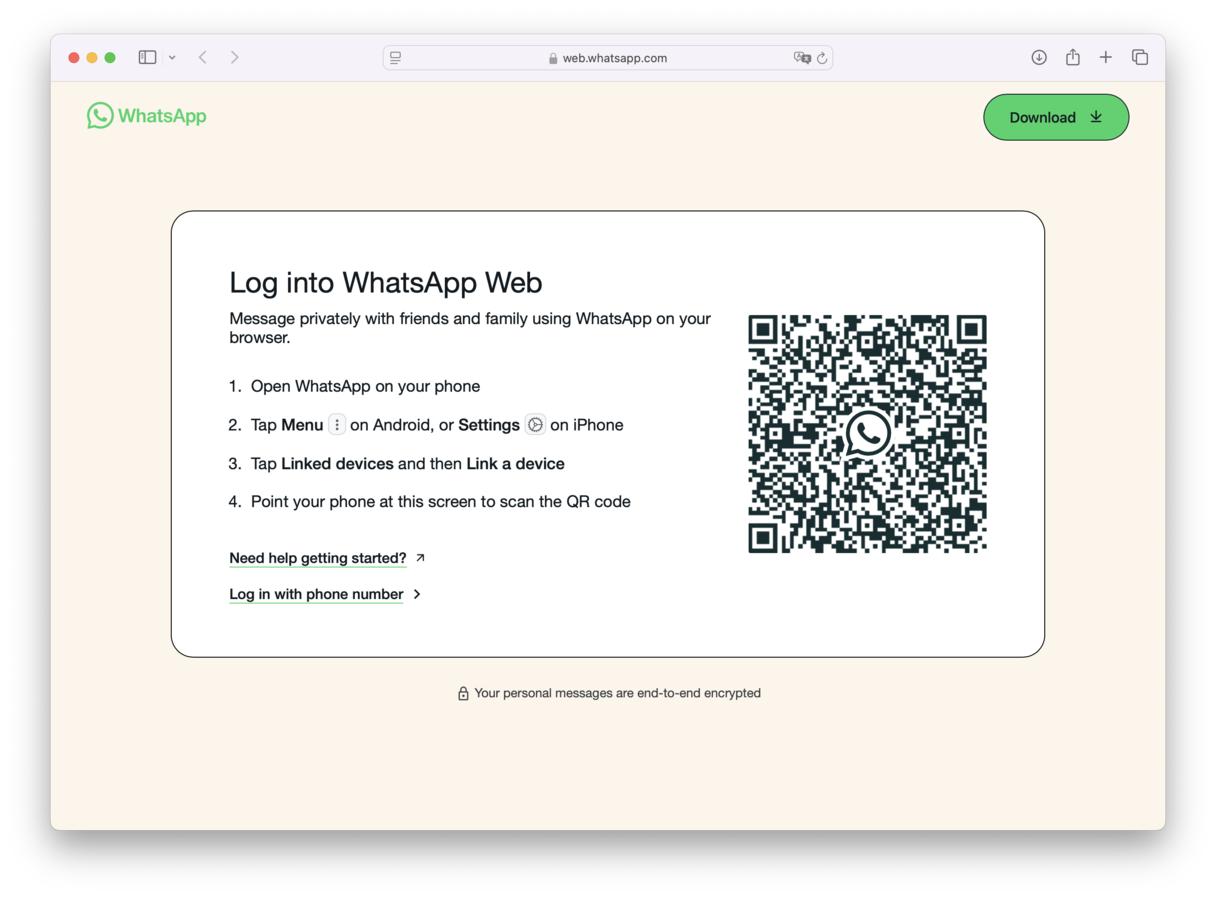
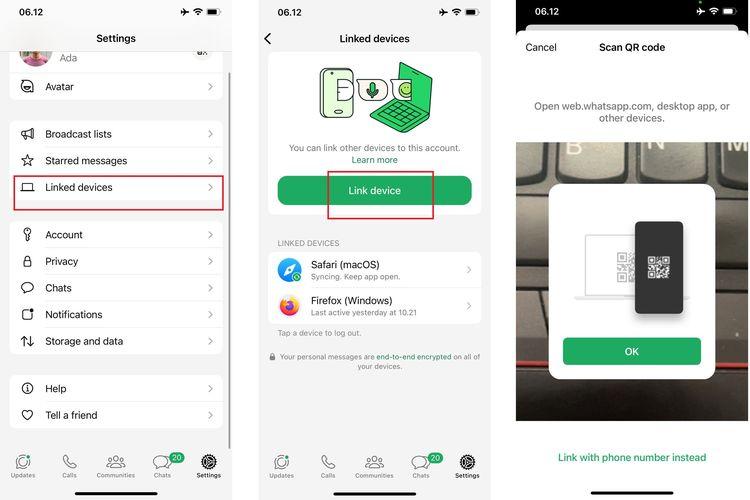
Step 2: Pick up your phone. Open WhatsApp. Tap the three dots (⋮) on Android at the top right to open the menu, or Settings on iPhone at the bottom right.

Step 3: Tap ‘Linked Devices’.

Step 4: Tap `Link a Device’. Unlock your phone with fingerprint, face, or PIN.

Step 5: Point your phone camera at the QR code on your laptop screen. In seconds, your chats will appear.
Done.

What can WhatsApp Web do?

Almost everything you do on your phone: send and receive messages, send photos, videos, documents, voice notes, view Status, create groups, search chats, and archive conversations.

Can it make a phone call? Yes. WhatsApp has expanded its calling capabilities to WhatsApp Web, allowing users to make and receive voice and video calls directly from their browsers without downloading the desktop application.

Meta announced WhatsApp Web calling on July 2026. Users can also access call history, screen sharing and reactions, although availability of some features may depend on the rollout phases.

To make a call, open an individual conversation and click the telephone icon for a voice call or the video camera icon for a video call. Your computer must have an internet connection, microphone and, for video calls, a camera.

Option 2: The WhatsApp Desktop App

Go to whatsapp.com/download, download for Windows or Mac, install it, and link it the same way by scanning the QR code.

The App is better because it can make stable voice and video calls, gives stronger notifications, and works faster when you have many chats. Its disadvantage is that it takes storage and needs updating.

WhatsApp Web’s advantage is speed: no download, works on any computer, even a cyber café computer. Its disadvantage is no calls, and it logs you out if you clear your browser.

How Many Devices Can You Link?

WhatsApp allows up to 4 linked devices at the same time, plus your main phone. So you can have your laptop, your office computer, your tablet, and one more device all working together.

And yes, your phone does not need to stay online anymore. Once linked, your laptop works on its own.

However, remember you must log into WhatsApp on your primary phone at least once every 14 days to keep linked devices connected.


Tags: WhatsAppWhatsapp Web
SendShare146Tweet92
Justus Kiprono

Justus Kiprono

Justus Kiprono Is a Journalist in Kenya. He reports and writes about business, technology, immigration, and Guides.

Related Posts

WhatsApp Users Are Deleting Their Usernames and Going Back to Phone Numbers

WhatsApp Users Are Deleting Their Usernames and Going Back to Phone Numbers

October 12, 2026
WhatsApp Business to Charge for Service Messages Above 1,000

WhatsApp Business to Charge for Service Messages Above 1,000

September 28, 2026
How CA Proposes to Fix Kenya’s Mobile Number Shortage

How CA Proposes to Fix Kenya’s Mobile Number Shortage

September 2, 2026
Convos Wants to Be the First Messaging App Built for the Age of AI

Convos Wants to Be the First Messaging App Built for the Age of AI

August 16, 2026
Kenyan Court Awards KES 2.5 Million Over Leaked Intimate Photos

Kenyan Court Awards KES 2.5 Million Over Leaked Intimate Photos

August 12, 2026
TikTok Pulled Nearly 900,000 Videos From Kenya in Three Months

TikTok Quietly Adds Voice and Video Calls Inside Direct Messages

August 12, 2026

Latest

How to Connect WhatsApp to Your Laptop or Computer: A Step-by-Step Guide

How to Connect WhatsApp to Your Laptop or Computer: A Step-by-Step Guide

November 9, 2026
Nvidia Board Opens Independent Investigation Into Jensen Huang Over China Spy Claims

Nvidia Board Opens Independent Investigation Into Jensen Huang Over China Spy Claims

November 9, 2026
Hustler Fund loan limit

How to Increase Your Hustler Fund Loan Limit Before 2026 Ends

November 9, 2026
Epomaker TH80 V2 keyboard

Epomaker TH80 V2 Review: A Good Entry Point Into Mechanical Keyboards

Redtech Plans a Kenya-Nigeria Payments Corridor With Kenyan Launch in 2027

Redtech Plans a Kenya-Nigeria Payments Corridor With Kenyan Launch in 2027

November 7, 2026
Safaricom Is Becoming a Financial Services Company With a Telco Attached

Safaricom Is Becoming a Financial Services Company With a Telco Attached

November 7, 2026

Top stories

Copia Global

Copia Kenya Ordered Into Liquidation After Two-Year Rescue Effort

September 30, 2026

CBK Licenses 29 New Digital Lenders, Bringing Total to 281

September 30, 2026

New Bill Could Let M-Pesa and Airtel Money Invest Customer Funds

September 30, 2026

Kenya Has 22,000 Digital Services but Still Face a Manual Backend

September 23, 2026

WSO2 Says Kenyan Businesses Must Make Systems Ready for AI Agents

September 23, 2026

New Payment Bill Wants to Force Banks and M-PESA to Open Up Their Data

September 22, 2026

Techweez is where tomorrow’s tech stories break today, thanks to intelligent analysis, real-world insight, and visionary storytelling.

Follow Us

Editorials

Safaricom Is Becoming a Financial Services Company With a Telco Attached

ThingsBook Turns Social Media Into a Museum of Your Own Life

Meet Pressed Petals: A Botanical Journal App

Sofa Time Lets You Track Movies and Shows Across Streaming Services

Albo: The App That Turns Saved Social Media Posts Into a Library

ADaM: The Outbreak Tracking Tool That Could Help Contain Ebola in Kenya

More News

KRA Passes KES 1 Trillion a Month Early, but the Harder Months Lie Ahead

KNEC Digital Exams Face Questions After System Failure at Kigari College

Safaricom Ethiopia Cuts Losses by 96.5% as Revenue Grows 72%

US Democrats Flip House and Senate in Blow to President Trump

Social Media Companies Face KES 500 Million Fines Under Kenya’s Proposed Law

How Much Does it Cost to Install CCTV in Kenya? (2026)

  • Terms Of Use
  • Techweez Brand
  • Privacy & Policy
  • Contact Us

© 2024 Techweez - Palahala Media Group may earn a commission when you buy through links on our sites.
A Palahala Media Group Brand. All rights reserved.
.

Welcome Back!

Login to your account below

Forgotten Password?

Retrieve your password

Please enter your username or email address to reset your password.

Log In

Add New Playlist

Techweez | Tech News, Reviews, Deals, Tips and How To
Crunchy Cookies 🍪 Ahead!

Hey there! Just a heads-up: we're big fans of cookies - both the digital and edible kind! 🍪 We use our cookies and some from third parties to ensure your browsing experience on our site is smooth sailing and secure.


But wait, there's more! We also use cookies to gather stats and insights on how you navigate our site. It's like getting a behind-the-scenes peek at your digital adventures!


Don't worry, you're in control. You can adjust your cookie settings anytime to suit your preferences. Feeling curious? Dive into our Privacy Policy for all the juicy details. Happy browsing! 🚀

Functional Always active
Listen, this legal stuff is about as exciting as watching paint dry. But it basically says we only use your stuff for what you asked us to do, and nobody else gets to peek!
Preferences
The technical storage or access is necessary for the legitimate purpose of storing preferences that are not requested by the subscriber or user.
Statistics
It's those sneaky cookie crumbs websites leave behind to count visitors, like counting ants at a picnic! Totally harmless, just for fun facts. The technical storage or access that is used exclusively for anonymous statistical purposes. Without a subpoena, voluntary compliance on the part of your Internet Service Provider, or additional records from a third party, information stored or retrieved for this purpose alone cannot usually be used to identify you.
Marketing
Hey there! Just letting you know we use some fancy gizmos to remember your preferences. This way, we can show you ads that are, well, not completely bananas.
Manage options Manage services Manage {vendor_count} vendors Read more about these purposes
Make cookies
{title} {title} {title}
Techweez | Tech News, Reviews, Deals, Tips and How To
Crunchy Cookies 🍪 Ahead!
To provide the best experiences, we use technologies like cookies to store and/or access device information. Consenting to these technologies will allow us to process data such as browsing behavior or unique IDs on this site. Not consenting or withdrawing consent, may adversely affect certain features and functions.
Functional Always active
Listen, this legal stuff is about as exciting as watching paint dry. But it basically says we only use your stuff for what you asked us to do, and nobody else gets to peek!
Preferences
The technical storage or access is necessary for the legitimate purpose of storing preferences that are not requested by the subscriber or user.
Statistics
It's those sneaky cookie crumbs websites leave behind to count visitors, like counting ants at a picnic! Totally harmless, just for fun facts. The technical storage or access that is used exclusively for anonymous statistical purposes. Without a subpoena, voluntary compliance on the part of your Internet Service Provider, or additional records from a third party, information stored or retrieved for this purpose alone cannot usually be used to identify you.
Marketing
Hey there! Just letting you know we use some fancy gizmos to remember your preferences. This way, we can show you ads that are, well, not completely bananas.
Manage options Manage services Manage {vendor_count} vendors Read more about these purposes
Make cookies
{title} {title} {title}
No Result
View All Result
  • News
  • Reviews
  • Features
  • Editorial
  • Automotive
  • Entertainment

© 2024 Techweez - Palahala Media Group may earn a commission when you buy through links on our sites.
A Palahala Media Group Brand. All rights reserved.
.