



• Latest
  • All
  • How To
eTIMS WhatsApp

How to File Nil Returns on WhatsApp in 2026

April 22, 2026
Fiber Internet

Fixed Internet Subscriptions Surge 32%, Thanks to Fiber and Starlink

September 18, 2026
Pay TV

GOtv and DStv Grow as Kenya’s Pay TV Market Slips

September 18, 2026
Postal Corporation of Kenya

Kenya’s Postal Service Is Dying, but Couriers and E-Commerce Are Picking up the Slack

September 18, 2026
Mobile Subscriptions

Mobile Subscriptions Rise to 88 Million as Mobile Penetration Hits 165%

September 18, 2026
DHgate Tablet Cases deals
Mobile Money

Mobile Money Accounts Hit 54 Million as M-Pesa Holds 88.8% Share

September 18, 2026
Cybersecurity

Kenya Records 29% Rise in Cyber Threats to 11.12 Billion

September 18, 2026
Claude Cowork

Claude Adds Docs and Slides to Compete With Google Workspace

September 17, 2026
Apple TV on Android TV

How to Install Apple TV on Android TV in Kenya

September 17, 2026
WSO2 Agent Manager

WSO2 Launches Agent Manager to Help Companies Control Their Growing Army of AI Agents

September 17, 2026
How to Recover a Terminated YouTube Channel

How to Recover a Terminated YouTube Channel

September 17, 2026
High Court Declares Safaricom Stake Sale to Vodacom Unlawful

High Court Declares Safaricom Stake Sale to Vodacom Unlawful

September 16, 2026
Apple TV

Apple TV Is Now Free With iCloud+ in Kenya

September 15, 2026
Techweez | Tech News, Reviews, Deals, Tips and How To
  • News
  • Entertainment
  • Reviews
  • Features
  • Editorial
No Result
View All Result
Techweez | Tech News, Reviews, Deals, Tips and How To
  • News
  • Entertainment
  • Reviews
  • Features
  • Editorial
No Result
View All Result
Techweez | Tech News, Reviews, Deals, Tips and How To
No Result
View All Result

How to File Nil Returns on WhatsApp in 2026

Kevin Ngugi by Kevin Ngugi
April 22, 2026
in How To
Reading Time: 6 mins read
438
0
eTIMS WhatsApp

Nil returns is a tax filing you submit to the Kenya Revenue Authority (KRA) to declare that you had no taxable income during a given year. It is a declaration rather than a payment.

KRA requires PIN holders to file annually, even if they earned nothing. Failing to file, or filing incorrectly, can result in penalties. 

The WhatsApp channel makes the process significantly faster than logging into the iTax portal, which is still a daunting task to most taxpayers.

Who Should File Nil Returns

You should file a nil return if you hold a KRA PIN and had no employment income, no business income, and no other taxable earnings in the previous year. This typically applies to:

  • Students who are not employed
  • Unemployed individuals actively looking for work
  • Dependants with no independent income
  • Individuals on sabbatical or career breaks

If you had any income during the year, including part-time work, freelance payments, rental income, or business earnings, you should file the appropriate income return instead of a nil return.

In 2026, KRA’s automated system cross-checks your PIN against financial records, so an incorrect nil return will be flagged.

How to File Nil Returns on WhatsApp: A Step-by-Step Guide

The KRA WhatsApp channel handles the full nil returns process in a few minutes. You do not need to log in to iTax or visit a KRA office.

Before you begin, make sure you have your KRA PIN or national ID number ready and access to your registered phone number for the OTP.

KRA WhatsApp Number – 0711 099 999

No need to save the number to your contacts. Just open WhatsApp, start a new chat, and type the number directly.

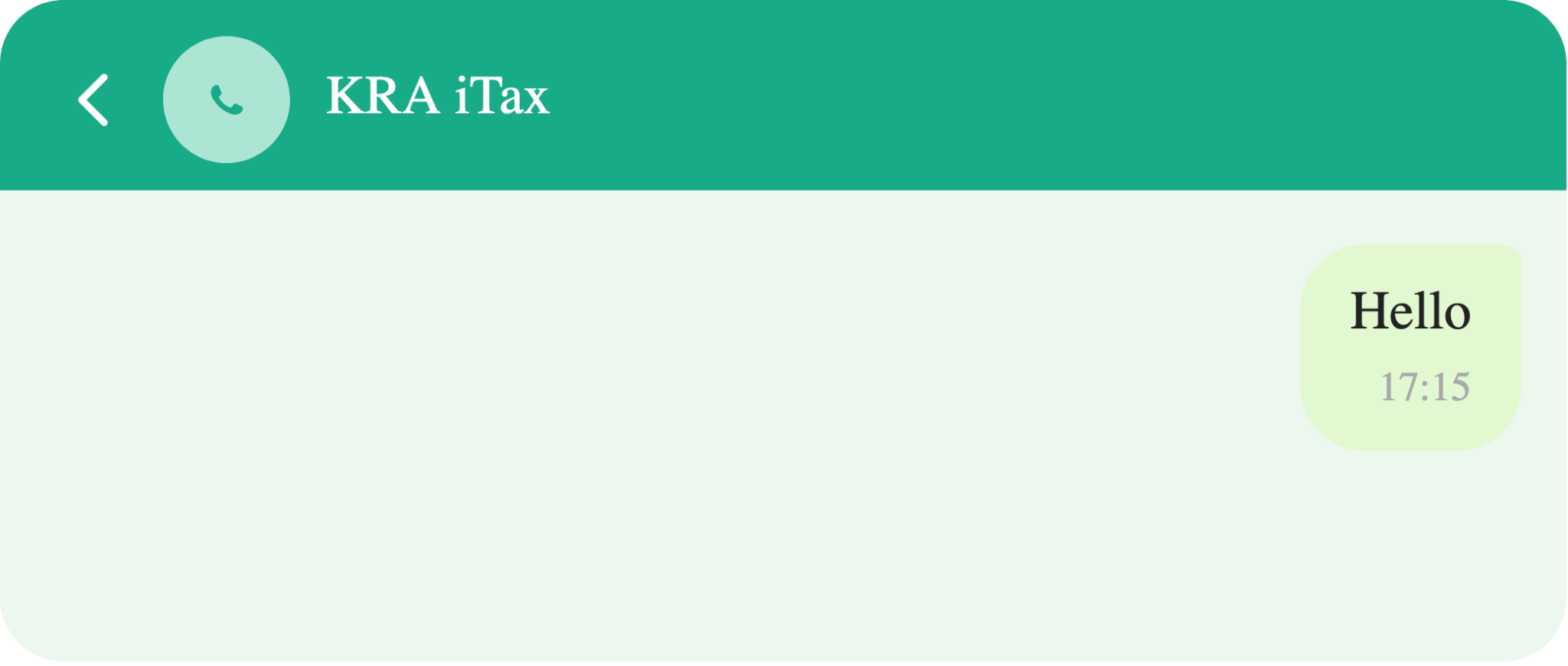
Send a Greeting

Type “Hello”, “Good morning”, “Good afternoon”, or “Good evening” to start the conversation.
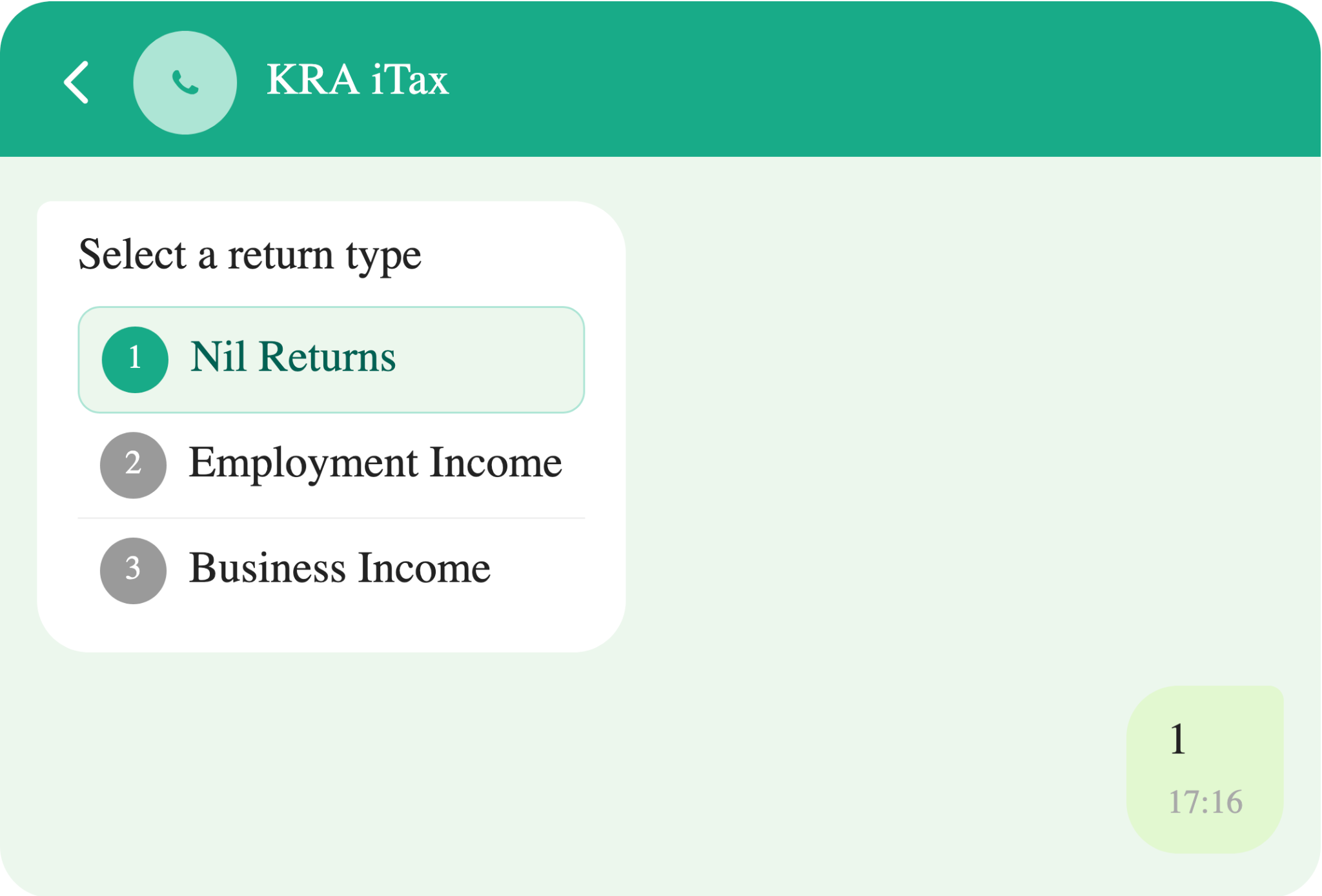
Tap View Services

A menu will appear after your greeting. Select “View Services” from the options provided.

Select Nil Returns

Choose “Nil Returns” from the service list. If you had employment income, select “Employment Income” instead.
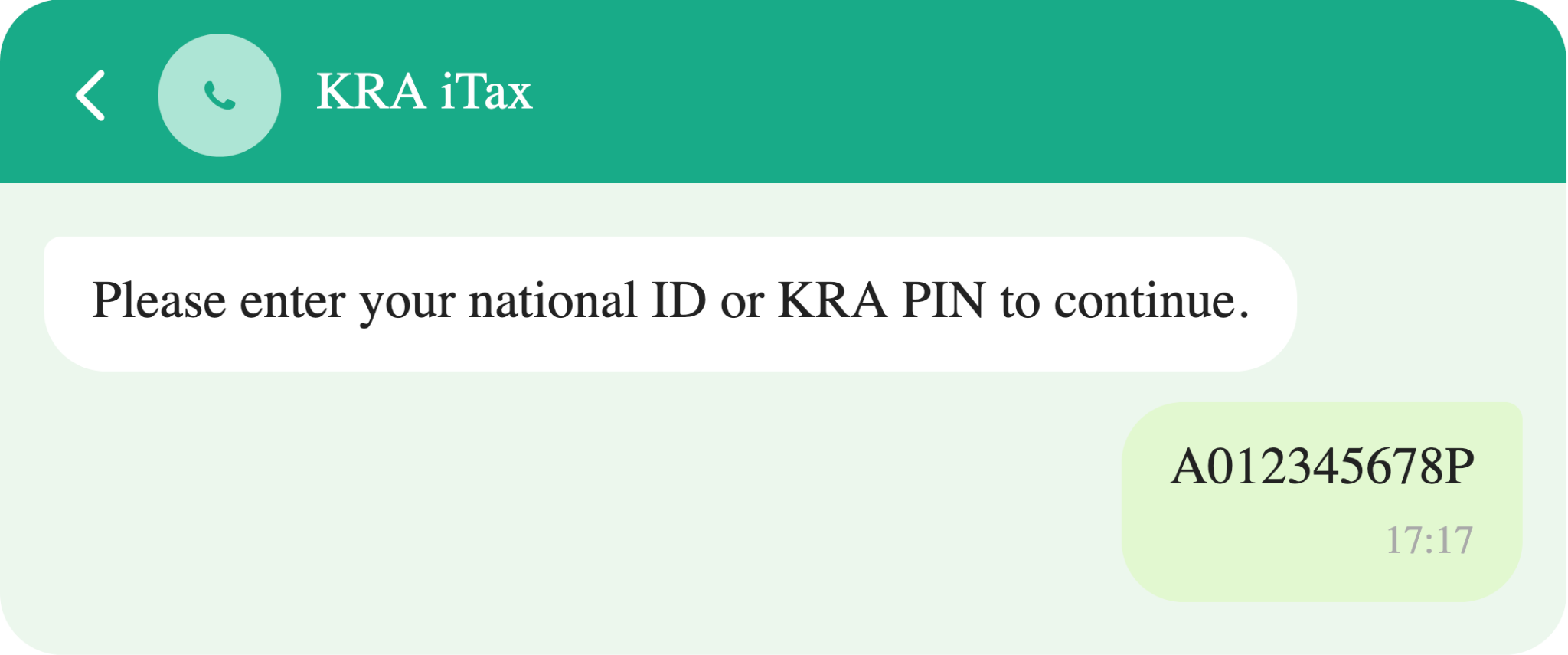
Enter your ID or KRA PIN

Provide your national ID number or KRA PIN when prompted. The system uses this to pull your existing tax records.
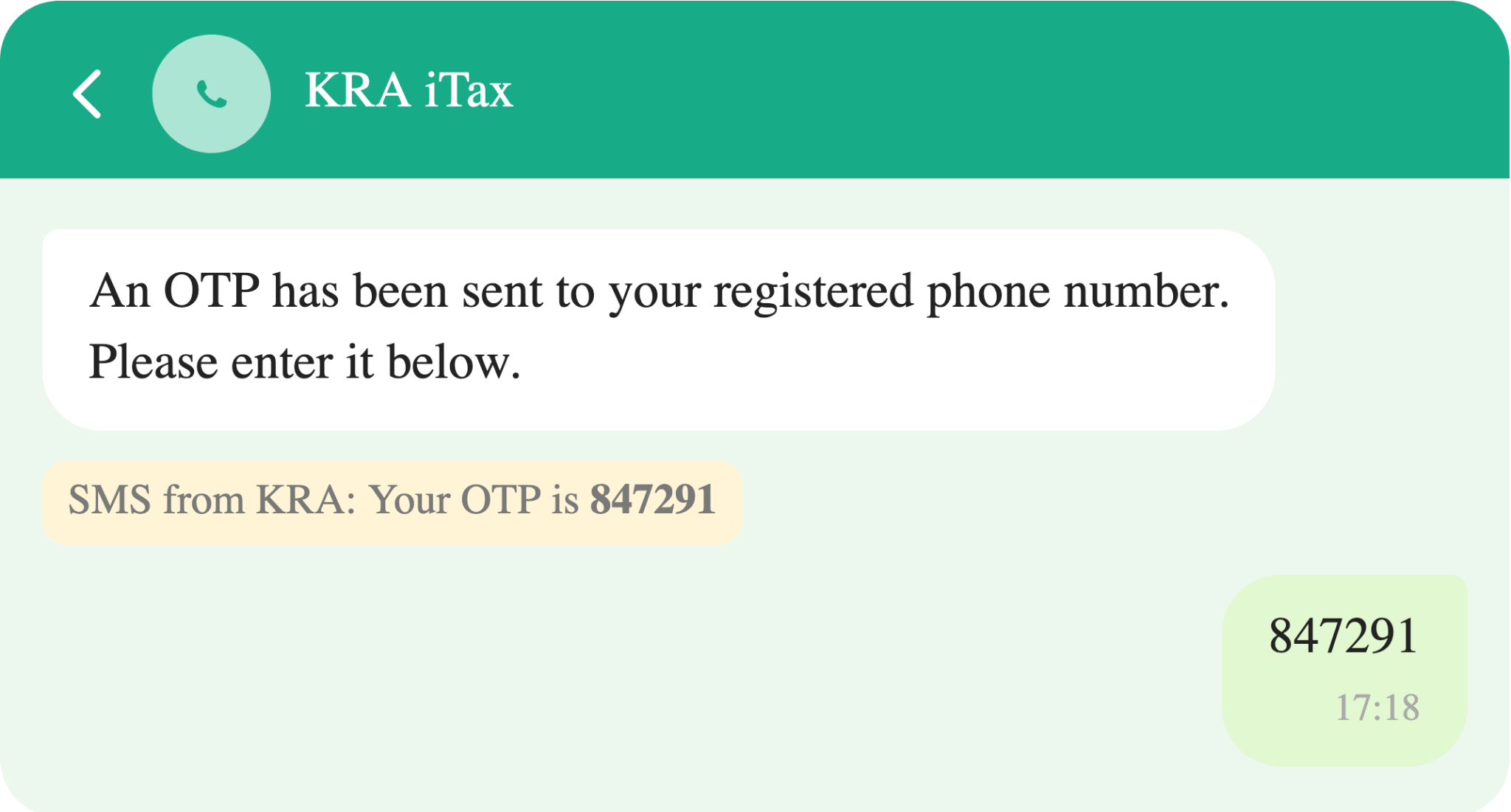
Enter the OTP

KRA will send a one-time password (OTP) to your registered phone number. Enter it in the chat to verify your identity.
Review and submit

Confirm your details on screen, then submit. You will receive a confirmation SMS from KRA once the return has been filed successfully.
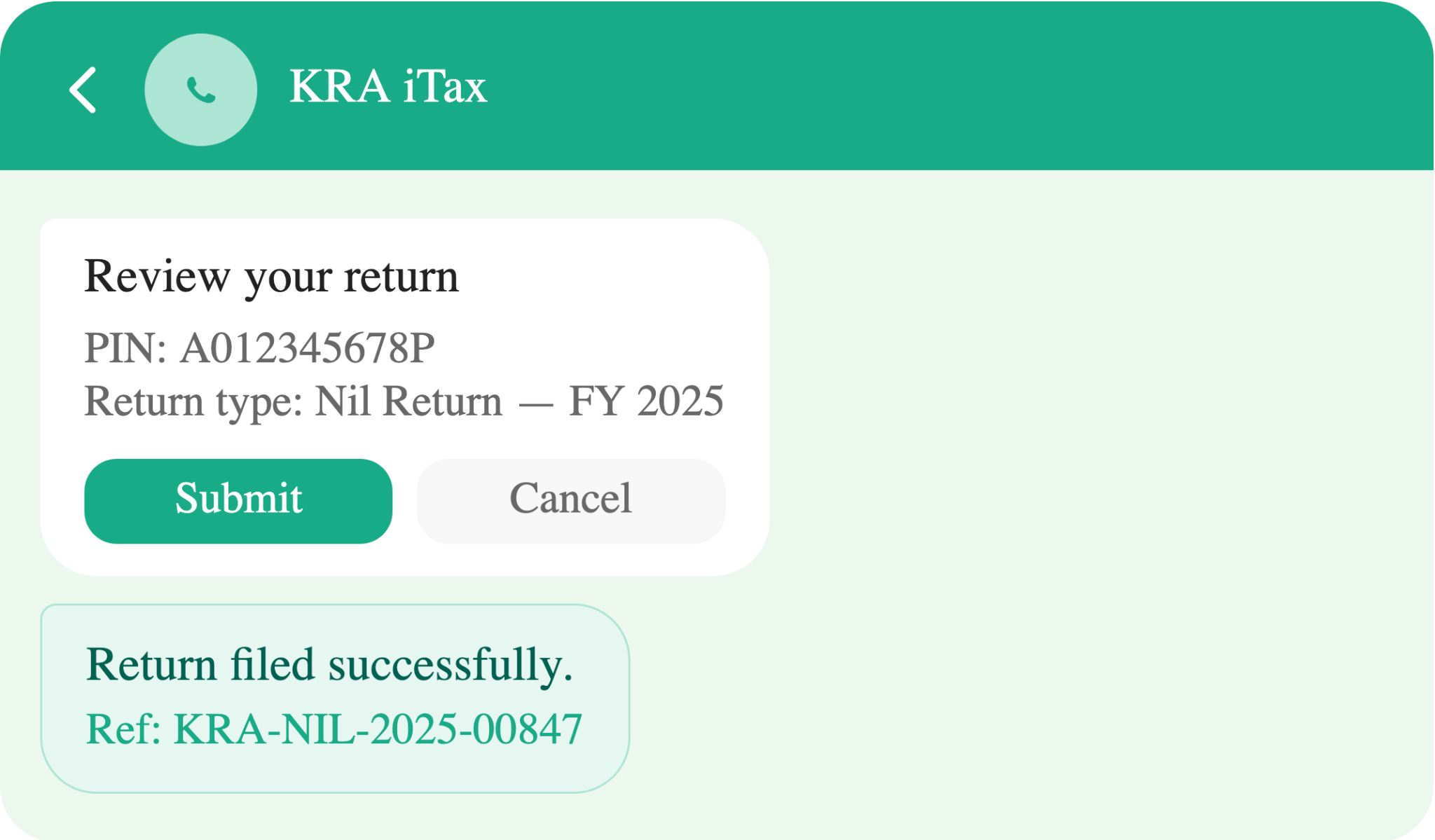
The confirmation SMS is your proof of filing. Save it or take a screenshot. It contains your acknowledgement number, which you can use if KRA ever queries your filing status.

What Changed in 2026

KRA has made three significant changes to how nil returns are handled this year. These changes affect who can file, whether your filing will be accepted, and what happens if you do not file at all.

1. AI-driven validation

Automated income cross-check: KRA now uses an automated system that cross-references your PIN with bank records, eTIMS transaction data, and mobile money activity. If the system detects income, your nil return will be rejected before it is processed.

This is the most operationally significant change of 2026. In previous years, a taxpayer could file a nil return without KRA having a reliable way to verify it in real time. Well, that is no longer the case.

If you received mobile money transfers, bank deposits, or issued eTIMS receipts during the year, the system may flag these as income. In that scenario, filing a nil return will fail, and you will be directed to file the appropriate income return instead.

Filing a false nil return deliberately is treated as a compliance violation and can trigger an audit.

2. PIN with No Obligation (PWO)

New exemption category for non-earners: If you consistently have no income and no obligation to file, you can now apply to register under the PIN with No Obligation (PWO) category. PWO status exempts you from the annual nil return requirement entirely.

This is a meaningful change for long-term non-earners such as full-time students, retirees with no taxable income, or dependants. Rather than filing a nil return every year, you register once under PWO, and the annual obligation falls away.

PWO registration is done through the iTax portal or at a KRA service center. Once registered, you do not need to file annually unless your circumstances change and you begin earning income.

3. Stricter Penalties

Penalty for non-filing is now KES 2,000: Individuals who fail to file a return at all face a fixed penalty of KES 2,000. Filing a false nil return, where income is detected by the automated system, can trigger an audit flag in addition to the penalty.

The KES 2,000 penalty is fixed and applies regardless of income level. It is simple to avoid; Just file your nil return before 30 June or apply for PWO status if you qualify. Either path clears your obligation for the year.

The more serious risk is filing incorrectly. An audit flag on your PIN can create complications with future tax compliance, credit checks, and any government interactions that require a clean tax record.


Tags: eTIMSiTaxKRAWhatsApp
SendShare243Tweet152
Kevin Ngugi

Kevin Ngugi

A serial online rambler with an eye for spotting trends and the stories behind the headlines. Just give him enough coffee and a fully charged phone. Contact him on mail via: [email protected]

Related Posts

KRA iCMS portal

KRA to Shut Down Customs System iCMS for 12 Hours on September 13

September 10, 2026
KRA Consolidated Cargo Directive

Ruto Orders KRA to Reverse Consolidated Cargo Benchmark to KES 2.5 Million

September 3, 2026
How CA Proposes to Fix Kenya’s Mobile Number Shortage

How CA Proposes to Fix Kenya’s Mobile Number Shortage

September 2, 2026
eTIMS

KRA Links eTIMS With IFMIS to Validate Government Invoices

August 31, 2026
YouTube

Google to Withhold 5% Tax From Kenyan YouTube Earnings From September

August 31, 2026
KRA Containerized Cargo

KRA Raises Customs Benchmark for Consolidated Cargo to KES 3.2M

August 25, 2026

Latest

Fiber Internet

Fixed Internet Subscriptions Surge 32%, Thanks to Fiber and Starlink

September 18, 2026
Pay TV

GOtv and DStv Grow as Kenya’s Pay TV Market Slips

September 18, 2026
Postal Corporation of Kenya

Kenya’s Postal Service Is Dying, but Couriers and E-Commerce Are Picking up the Slack

September 18, 2026
Mobile Subscriptions

Mobile Subscriptions Rise to 88 Million as Mobile Penetration Hits 165%

September 18, 2026
Mobile Money

Mobile Money Accounts Hit 54 Million as M-Pesa Holds 88.8% Share

September 18, 2026
Cybersecurity

Kenya Records 29% Rise in Cyber Threats to 11.12 Billion

September 18, 2026

Best devices

Best Infinix Phones of 2025

Best Infinix Phones of 2025: Budget Prices With Premium Features

December 31, 2025

The Best Infinix Accessories Worth Buying in 2025

November 26, 2025

Best Budget Wireless Earbuds To Buy in Kenya (2025)

October 8, 2025

Samsung Galaxy A36 5G vs Samsung Galaxy A56 5G: Comparison Review

August 29, 2025

Infinix Hot 60 Pro+ vs Infinix Hot 60i: Comparison Review

August 22, 2025

Best Budget Smartwatches To Buy in Kenya 2025

February 13, 2025

Techweez is where tomorrow’s tech stories break today, thanks to intelligent analysis, real-world insight, and visionary storytelling.

Follow Us

Editorials

Yubo: The App That Went From Tinder for Teens to 60 Million Users

Tangle Is What Happens When Texting Meets a Phone Call

Absa Next Is Building Something Different From a Banking App

Flighty App: A Flight Tracker With an Early Warning System

Convos Wants to Be the First Messaging App Built for the Age of AI

Marvel Snap: Marvel Heroes, Strategy, and Quick Matches Into One Card Game

More News

Claude Adds Docs and Slides to Compete With Google Workspace

How to Install Apple TV on Android TV in Kenya

WSO2 Launches Agent Manager to Help Companies Control Their Growing Army of AI Agents

How to Recover a Terminated YouTube Channel

High Court Declares Safaricom Stake Sale to Vodacom Unlawful

Apple TV Is Now Free With iCloud+ in Kenya

  • Terms Of Use
  • Techweez Brand
  • Privacy & Policy
  • Contact Us

© 2024 Techweez - Palahala Media Group may earn a commission when you buy through links on our sites.
A Palahala Media Group Brand. All rights reserved.
.

Welcome Back!

Login to your account below

Forgotten Password?

Retrieve your password

Please enter your username or email address to reset your password.

Log In

Add New Playlist

Techweez | Tech News, Reviews, Deals, Tips and How To
Crunchy Cookies 🍪 Ahead!

Hey there! Just a heads-up: we're big fans of cookies - both the digital and edible kind! 🍪 We use our cookies and some from third parties to ensure your browsing experience on our site is smooth sailing and secure.


But wait, there's more! We also use cookies to gather stats and insights on how you navigate our site. It's like getting a behind-the-scenes peek at your digital adventures!


Don't worry, you're in control. You can adjust your cookie settings anytime to suit your preferences. Feeling curious? Dive into our Privacy Policy for all the juicy details. Happy browsing! 🚀

Functional Always active
Listen, this legal stuff is about as exciting as watching paint dry. But it basically says we only use your stuff for what you asked us to do, and nobody else gets to peek!
Preferences
The technical storage or access is necessary for the legitimate purpose of storing preferences that are not requested by the subscriber or user.
Statistics
It's those sneaky cookie crumbs websites leave behind to count visitors, like counting ants at a picnic! Totally harmless, just for fun facts. The technical storage or access that is used exclusively for anonymous statistical purposes. Without a subpoena, voluntary compliance on the part of your Internet Service Provider, or additional records from a third party, information stored or retrieved for this purpose alone cannot usually be used to identify you.
Marketing
Hey there! Just letting you know we use some fancy gizmos to remember your preferences. This way, we can show you ads that are, well, not completely bananas.
Manage options Manage services Manage {vendor_count} vendors Read more about these purposes
Make cookies
{title} {title} {title}
Techweez | Tech News, Reviews, Deals, Tips and How To
Crunchy Cookies 🍪 Ahead!
To provide the best experiences, we use technologies like cookies to store and/or access device information. Consenting to these technologies will allow us to process data such as browsing behavior or unique IDs on this site. Not consenting or withdrawing consent, may adversely affect certain features and functions.
Functional Always active
Listen, this legal stuff is about as exciting as watching paint dry. But it basically says we only use your stuff for what you asked us to do, and nobody else gets to peek!
Preferences
The technical storage or access is necessary for the legitimate purpose of storing preferences that are not requested by the subscriber or user.
Statistics
It's those sneaky cookie crumbs websites leave behind to count visitors, like counting ants at a picnic! Totally harmless, just for fun facts. The technical storage or access that is used exclusively for anonymous statistical purposes. Without a subpoena, voluntary compliance on the part of your Internet Service Provider, or additional records from a third party, information stored or retrieved for this purpose alone cannot usually be used to identify you.
Marketing
Hey there! Just letting you know we use some fancy gizmos to remember your preferences. This way, we can show you ads that are, well, not completely bananas.
Manage options Manage services Manage {vendor_count} vendors Read more about these purposes
Make cookies
{title} {title} {title}
No Result
View All Result
  • News
  • Reviews
  • Features
  • Editorial
  • Automotive
  • Entertainment

© 2024 Techweez - Palahala Media Group may earn a commission when you buy through links on our sites.
A Palahala Media Group Brand. All rights reserved.
.