






Instagram has introduced a new feature that allows creators to link multiple Reels into a series, making it easier to tell stories, share tutorials, and keep viewers engaged across multiple videos.
This global rollout brings a big boost to creators who rely on episodic content and want smoother navigation for their audiences.
Reels have quickly become the centerpiece of Instagram, but until now, creators often struggled with multi-part storytelling.
If you uploaded a “Part 1,” viewers had to manually search for “Part 2” on your profile.
With the new Reels Series feature, creators can now link videos together. When someone watches your Reel, a “Watch Next” button (like Watch Part 2) will appear, allowing viewers to seamlessly continue watching.
This works perfectly for:
- Tutorials (recipes, DIYs, fitness routines)
- Episodic storytelling
- Behind-the-scenes series
- Multi-part educational content
How to Link Multiple Reels on Instagram
Here’s a step-by-step guide to using Instagram’s new feature:
Linking a Reel While Posting a New One
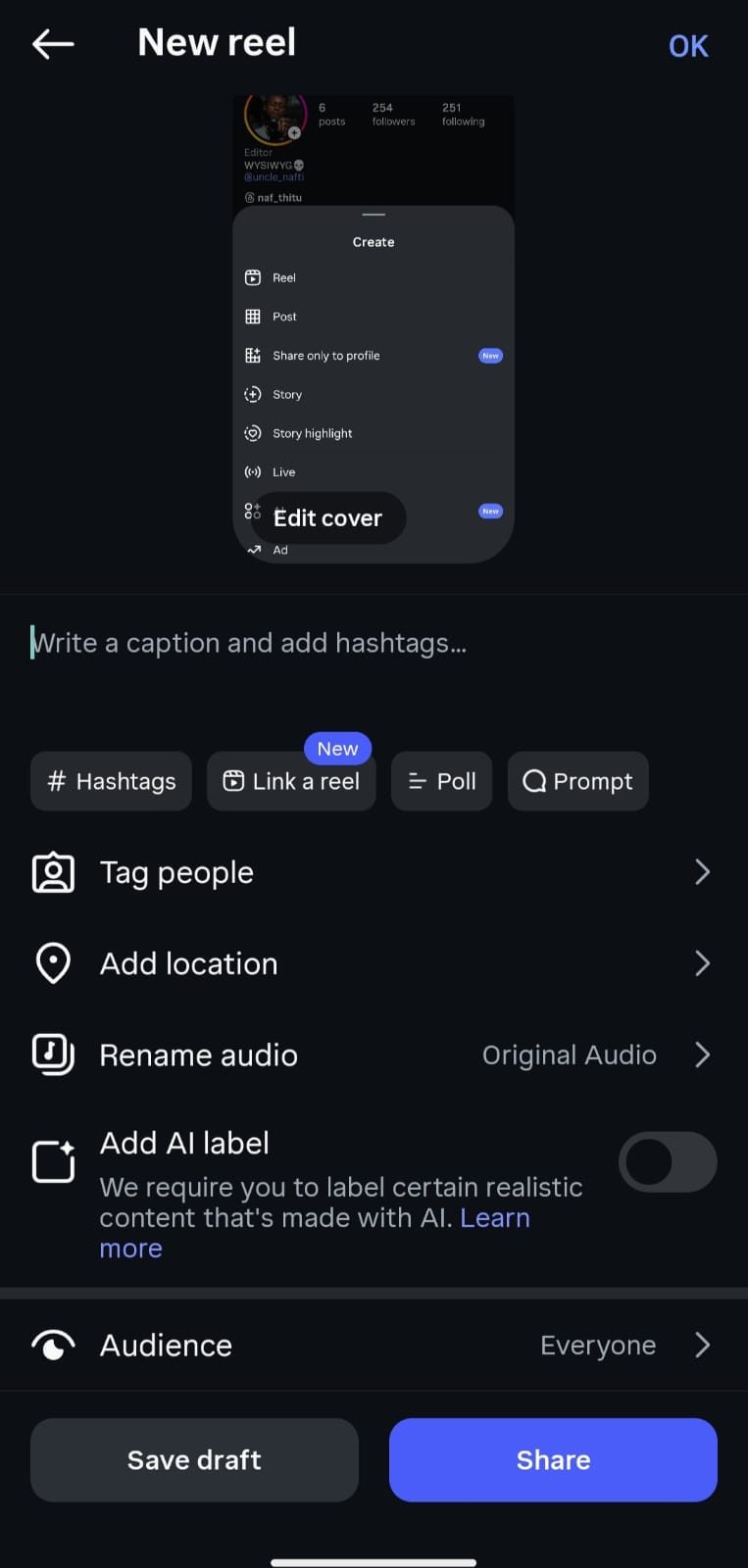
- Create or upload your Reel as usual.
- On the caption screen, scroll down and tap “Link a Reel.”
- Select the Reel you want to connect to your new video.
- Optionally, add a title (up to 15 characters) like “Part 2” or “Next Chapter.”
- Tap OK, then hit Share to publish.
Your audience will now see a button to continue to the linked Reel.
Linking an Existing Reel
You can also connect older Reels together:
- Go to the Reel you want to update.
- Tap the three-dot (•••) menu in the top right.
- Select “Add linked reel.”
- Pick another Reel to link, or tap Edit linked reel if you already have one connected.
- You can change or remove the link at any time.
The Instagram feature works on both new and existing Reels but isn’t available for Close Friends or subscriber-only content.
Global rollout of the feature began today. Viewers will see a “Watch Next” or “Watch Part 2” button in the bottom left corner.
Smart Ways to Use the New Reels Feature
- Label clearly: Add “Part 1,” “Part 2,” etc. in your captions and titles.
- Plan ahead: Record your content in parts so the transitions feel smooth.
- Hook early: Tease the “next part” at the end of each reel to encourage clicks.
- Cross-promote: Mention in your Stories or captions that your Reels are linked in a series.
Instagram’s new Reels Series linking feature is a game-changer for creators. If you’ve been making multi-part Reels, now is the time to go back, link them up, and give your viewers a seamless binge-watching experience.