Microsoft has released a new Windows 11 Dev Channel build (Build 26220.6772, KB5065797) for Insiders, introducing a mix of usability tweaks, security upgrades, and visual refinements.
However, one particular change, the removal of local account setup options, is already stirring debate among users. The headline feature in this update is the expansion of Windows Hello Enhanced Sign-in Security (ESS) to peripheral fingerprint sensors.
Previously, ESS only worked on devices with built-in biometric hardware, but now any supported external fingerprint reader can benefit from the same advanced protection.
This upgrade means desktop PCs and the latest Copilot+ PCs can now enjoy Microsoft’s Windows Hello experience. Users can enable it by navigating to Settings > Accounts > Sign-in options, plugging in a supported fingerprint reader, and following the prompts to enroll.
In the Windows Setup Experience (OOBE), Microsoft is introducing new customization options while also removing some of the flexibility users previously had.
For the first time, you can now set a custom name for your default user folder (C:\Users\<name>) during setup. This can be done by pressing Shift + F10 at the Microsoft account sign-in screen to open the Command Prompt and entering:
cd oobe
SetDefaultUserFolder.cmd
The name can be up to 16 Unicode characters long, with special characters automatically removed.
On the flip side, Microsoft is removing known local-only setup commands, which users have long used to install Windows without signing in with a Microsoft account.
The company explained that these commands “inadvertently skip critical setup screens,” leaving devices partially configured. From now on, users must complete the Setup Experience in Windows 11 with an internet connection and a Microsoft account.
While Microsoft says this ensures a smoother, more complete setup, critics view it as another step toward restricting offline and privacy-first installations.
File Explorer Gets a Dark Mode Refresh
Microsoft has also refined the dark mode experience in File Explorer, extending it to more dialogs and operations. The improvements now cover copy, move, and delete dialogs (in both default and expanded states), as well as progress bars and chart views.
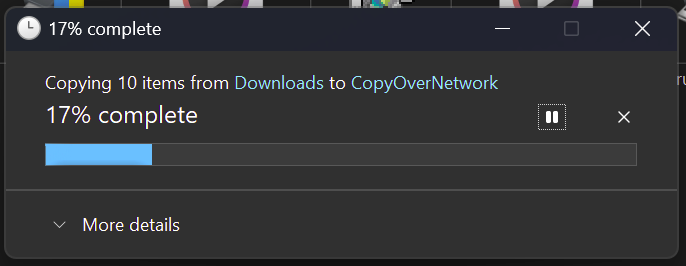
These updates make File Explorer’s dark mode more cohesive and visually balanced, reducing the jarring transitions between light and dark elements that previously disrupted the user experience.
Rollout and Availability
These features are gradually rolling out to Windows Insiders in the Dev Channel. Users who have enabled the option to receive the latest updates will see them appear first through Settings in Windows Update. Others in the Dev Channel will receive the updates in the coming weeks.