

• Latest
  • All
  • How To
Google Drive

How to Create a Shared Folder in Google Drive with Restricted Access

October 14, 2025
iPhone Duo

Apple Is Paying Samsung About $250 for Every iPhone Duo Screen

September 12, 2026
Yubo: The App That Went From Tinder for Teens to 60 Million Users

Yubo: The App That Went From Tinder for Teens to 60 Million Users

September 11, 2026
Spotify Brings Nyashinski’s Greasy Tunes Set to Global Audiences

Spotify Brings Nyashinski’s Greasy Tunes Set to Global Audiences

September 11, 2026
Claude used to generate political propaganda posts for Kenya

Claude Used to Push Pro-Government Propaganda in Kenya

September 12, 2026
DHgate Tablet Cases deals
Claude

Anthropic Reveals How Criminals Tried to Weaponize Claude

September 11, 2026
Switch Password Managers on Android

Google Makes It Easier to Switch Password Managers on Android

September 10, 2026
Absa Bank Kenya CEO Yusuf Omari

Absa Bank Kenya Confirms Yusuf Omari as New CEO

September 10, 2026
KRA iCMS portal

KRA to Shut Down Customs System iCMS for 12 Hours on September 13

September 10, 2026
Apple September 9 Event

Apple Unveils AirPods 5, Watch Series 12 and Ultra 4

September 10, 2026
iPhone 18 Pro

Apple Unveils iPhone 18 Pro and iPhone 18 Pro Max

September 10, 2026
iPhone Duo

Apple Unveils $1,999 iPhone Duo With 7.6-Inch Foldable Display

September 10, 2026
X Is Replacing Revenue Sharing With Original Content Rewards Program

X Is Replacing Revenue Sharing With Original Content Rewards Program

September 9, 2026
Techweez | Tech News, Reviews, Deals, Tips and How To
  • News
  • Entertainment
  • Reviews
  • Features
  • Editorial
No Result
View All Result
Techweez | Tech News, Reviews, Deals, Tips and How To
  • News
  • Entertainment
  • Reviews
  • Features
  • Editorial
No Result
View All Result
Techweez | Tech News, Reviews, Deals, Tips and How To
No Result
View All Result

How to Create a Shared Folder in Google Drive with Restricted Access

Naftary Thitu by Naftary Thitu
October 14, 2025
in How To
Reading Time: 4 mins read
307
0
Google Drive

Google Drive has become the go-to cloud storage service for millions of people, from students to professionals. It makes file sharing and collaboration easy, but not everything you upload should be open to everyone. Sometimes, you want to share files without giving up control.

Whether you’re working on a team project, managing business documents, or simply sharing photos with family, you can easily create a shared folder in Google Drive and limit who gets access and what they can do with your content.

Here’s how to set it up in a few simple steps.

Step 1: Create a New Google Drive Folder

  1. Open Google Drive on your browser.
  2. Click the “+ New” button on the left side.
  3. Select “Folder.”
  4. Give it a name and hit Create.

Your new folder will now appear in your Drive.

Step 2: Add Files to the folder.

Next, upload the files you want to share:
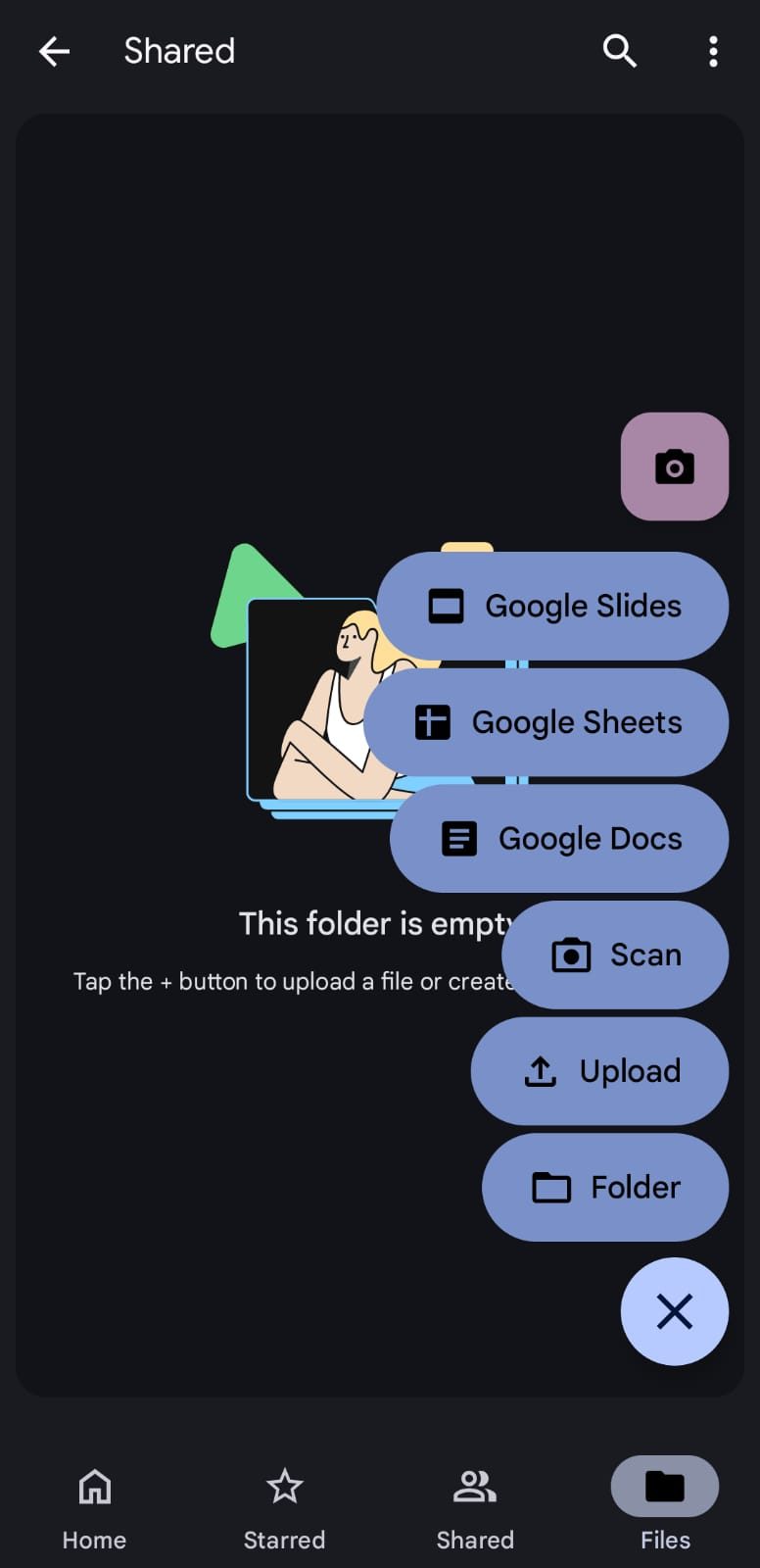
  • Drag and drop files directly into the folder, or:
  • Click add New > File Upload to select them manually.

You can also create new Google Docs, Sheets, or Slides within the folder; they’ll automatically inherit the same sharing settings once you set them.

Step 3: Share the Google Drive Folder

Now, it’s time to decide who gets access:
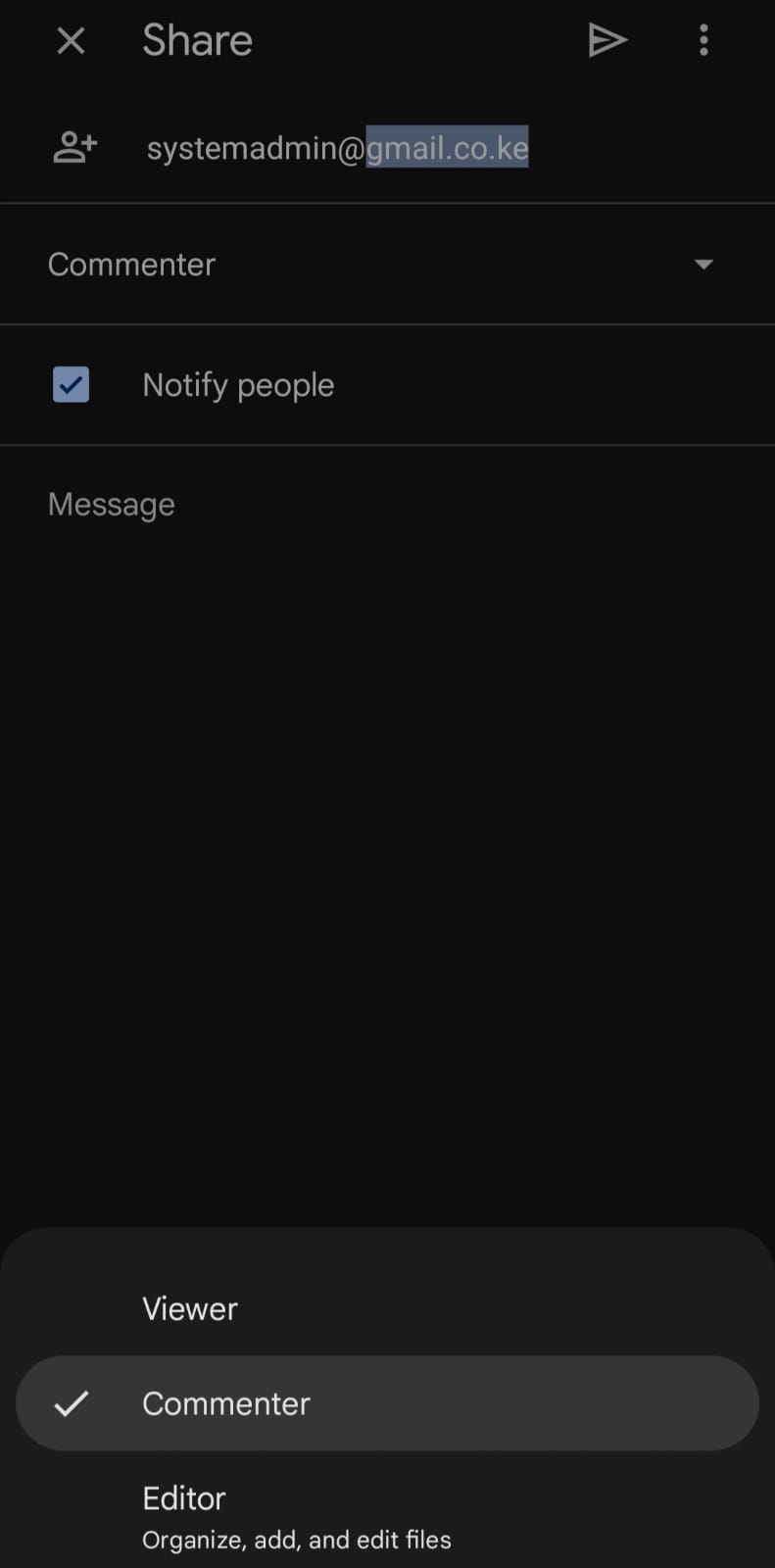
  1. Right-click the folder and select “Share.”
  2. Enter the email addresses of the people you want to share with.
  3. Assign the right permission level:
    • Viewer: Can only see and open files.
    • Commenter: Can view and leave feedback.
    • Editor: Can view, comment, and make changes.

For most cases, “Viewer” or “Commenter” is ideal when you want to keep things private.

Step 4: Restrict File Access and Prevent Forwarding

To make your shared folder more secure, open the Share window and click the gear icon (Settings).

Here, you can precisely control who has access to your files. Start by turning off the option that allows editors to share or change permissions, then disable the setting that lets viewers and commenters download, print, or copy your files.

These small tweaks go a long way in keeping sensitive content private and preventing unauthorized sharing. If you ever need to adjust permissions later, simply right-click the folder, select Share, and go to Manage Access.

From there, you can update roles, remove users, or even disable the shared link completely. This gives you the flexibility to stay in control of your folder’s access at all times, even after it’s been shared.

If you’re using Google Workspace, consider using a shared drive instead of a regular one. Unlike personal folders, Shared Drives are owned by your organization, meaning files remain accessible to the team even if someone leaves.


Tags: GoogleGoogle Drive
SendShare175Tweet110
Naftary Thitu

Naftary Thitu

Tech enthusiast and ICT guru by trade, I simplify digital trends and gadgets into articles everyone can enjoy. Email: [email protected]

Related Posts

Switch Password Managers on Android

Google Makes It Easier to Switch Password Managers on Android

September 10, 2026
Google Launches Pics, an AI Image Editing Tool Built Into Workspace

Google Launches Pics, an AI Image Editing Tool Built Into Workspace

September 2, 2026
YouTube

Google to Withhold 5% Tax From Kenyan YouTube Earnings From September

August 31, 2026
Google Cloud Takes Gemini AI Into Banking and Law

Google Cloud Takes Gemini AI Into Banking and Law

August 28, 2026
Android Motion Assist

Android 17 Adds Motion Assist to to Reduce Nausea in Cars

August 25, 2026
Google’s Preferred Source Button Puts Ranking Power in Publishers’ Hands

Google’s Preferred Source Button Puts Ranking Power in Publishers’ Hands

August 21, 2026

Latest

iPhone Duo

Apple Is Paying Samsung About $250 for Every iPhone Duo Screen

September 12, 2026
Yubo: The App That Went From Tinder for Teens to 60 Million Users

Yubo: The App That Went From Tinder for Teens to 60 Million Users

September 11, 2026
Spotify Brings Nyashinski’s Greasy Tunes Set to Global Audiences

Spotify Brings Nyashinski’s Greasy Tunes Set to Global Audiences

September 11, 2026
Claude used to generate political propaganda posts for Kenya

Claude Used to Push Pro-Government Propaganda in Kenya

September 12, 2026
Claude

Anthropic Reveals How Criminals Tried to Weaponize Claude

September 11, 2026
Switch Password Managers on Android

Google Makes It Easier to Switch Password Managers on Android

September 10, 2026

Best devices

Best Infinix Phones of 2025

Best Infinix Phones of 2025: Budget Prices With Premium Features

December 31, 2025

The Best Infinix Accessories Worth Buying in 2025

November 26, 2025

Best Budget Wireless Earbuds To Buy in Kenya (2025)

October 8, 2025

Samsung Galaxy A36 5G vs Samsung Galaxy A56 5G: Comparison Review

August 29, 2025

Infinix Hot 60 Pro+ vs Infinix Hot 60i: Comparison Review

August 22, 2025

Best Budget Smartwatches To Buy in Kenya 2025

February 13, 2025

Techweez is where tomorrow’s tech stories break today, thanks to intelligent analysis, real-world insight, and visionary storytelling.

Follow Us

Editorials

Yubo: The App That Went From Tinder for Teens to 60 Million Users

Tangle Is What Happens When Texting Meets a Phone Call

Absa Next Is Building Something Different From a Banking App

Flighty App: A Flight Tracker With an Early Warning System

Convos Wants to Be the First Messaging App Built for the Age of AI

Marvel Snap: Marvel Heroes, Strategy, and Quick Matches Into One Card Game

More News

Absa Bank Kenya Confirms Yusuf Omari as New CEO

KRA to Shut Down Customs System iCMS for 12 Hours on September 13

Apple Unveils AirPods 5, Watch Series 12 and Ultra 4

Apple Unveils iPhone 18 Pro and iPhone 18 Pro Max

Apple Unveils $1,999 iPhone Duo With 7.6-Inch Foldable Display

X Is Replacing Revenue Sharing With Original Content Rewards Program

  • Terms Of Use
  • Techweez Brand
  • Privacy & Policy
  • Contact Us

© 2024 Techweez - Palahala Media Group may earn a commission when you buy through links on our sites.
A Palahala Media Group Brand. All rights reserved.
.

Welcome Back!

Login to your account below

Forgotten Password?

Retrieve your password

Please enter your username or email address to reset your password.

Log In

Add New Playlist

Techweez | Tech News, Reviews, Deals, Tips and How To
Crunchy Cookies 🍪 Ahead!

Hey there! Just a heads-up: we're big fans of cookies - both the digital and edible kind! 🍪 We use our cookies and some from third parties to ensure your browsing experience on our site is smooth sailing and secure.


But wait, there's more! We also use cookies to gather stats and insights on how you navigate our site. It's like getting a behind-the-scenes peek at your digital adventures!


Don't worry, you're in control. You can adjust your cookie settings anytime to suit your preferences. Feeling curious? Dive into our Privacy Policy for all the juicy details. Happy browsing! 🚀

Functional Always active
Listen, this legal stuff is about as exciting as watching paint dry. But it basically says we only use your stuff for what you asked us to do, and nobody else gets to peek!
Preferences
The technical storage or access is necessary for the legitimate purpose of storing preferences that are not requested by the subscriber or user.
Statistics
It's those sneaky cookie crumbs websites leave behind to count visitors, like counting ants at a picnic! Totally harmless, just for fun facts. The technical storage or access that is used exclusively for anonymous statistical purposes. Without a subpoena, voluntary compliance on the part of your Internet Service Provider, or additional records from a third party, information stored or retrieved for this purpose alone cannot usually be used to identify you.
Marketing
Hey there! Just letting you know we use some fancy gizmos to remember your preferences. This way, we can show you ads that are, well, not completely bananas.
Manage options Manage services Manage {vendor_count} vendors Read more about these purposes
Make cookies
{title} {title} {title}
Techweez | Tech News, Reviews, Deals, Tips and How To
Crunchy Cookies 🍪 Ahead!
To provide the best experiences, we use technologies like cookies to store and/or access device information. Consenting to these technologies will allow us to process data such as browsing behavior or unique IDs on this site. Not consenting or withdrawing consent, may adversely affect certain features and functions.
Functional Always active
Listen, this legal stuff is about as exciting as watching paint dry. But it basically says we only use your stuff for what you asked us to do, and nobody else gets to peek!
Preferences
The technical storage or access is necessary for the legitimate purpose of storing preferences that are not requested by the subscriber or user.
Statistics
It's those sneaky cookie crumbs websites leave behind to count visitors, like counting ants at a picnic! Totally harmless, just for fun facts. The technical storage or access that is used exclusively for anonymous statistical purposes. Without a subpoena, voluntary compliance on the part of your Internet Service Provider, or additional records from a third party, information stored or retrieved for this purpose alone cannot usually be used to identify you.
Marketing
Hey there! Just letting you know we use some fancy gizmos to remember your preferences. This way, we can show you ads that are, well, not completely bananas.
Manage options Manage services Manage {vendor_count} vendors Read more about these purposes
Make cookies
{title} {title} {title}
No Result
View All Result
  • News
  • Reviews
  • Features
  • Editorial
  • Automotive
  • Entertainment

© 2024 Techweez - Palahala Media Group may earn a commission when you buy through links on our sites.
A Palahala Media Group Brand. All rights reserved.
.