


• Latest
  • All
  • How To
Stellar Repair for Photo

Stellar Repair for Photo Review: What Happens When a Photo File Goes Bad?

September 24, 2026
Albo: The App That Turns Saved Social Media Posts Into a Library

Albo: The App That Turns Saved Social Media Posts Into a Library

October 10, 2026
US Green Card Visa

US Suspends Green Card Sponsorship for Microsoft and Other Tech Firms

October 9, 2026
Why Tech Companies Are Struggling to Operate in Kenya

Why Tech Companies Are Struggling to Operate in Kenya

October 9, 2026
X Is Preparing One Subscription for X, Grok, and Cursor

X Is Preparing One Subscription for X, Grok, and Cursor

October 9, 2026
DHgate Tablet Cases deals
KRA to Use eTIMS to Check Business Inventory Records

KRA to Use eTIMS to Check Business Inventory Records

October 8, 2026
Dan Kwach

Dan Kwach Returns to Cassava Technologies to Lead AI Data Centers

October 8, 2026
Safaricom Launches Ziidi Shari’ah Money Market Fund on M-PESA

Safaricom Launches Ziidi Shari’ah Money Market Fund on M-PESA

October 8, 2026
Parliament Questions Safaricom SIM Deactivation as CA Sets New Rules for Recycled Numbers

Parliament Questions Safaricom SIM Deactivation as CA Sets New Rules for Recycled Numbers

October 8, 2026
Kenya’s Ebola Tools Face Their First Real Test

Kenya’s Ebola Tools Face Their First Real Test

October 6, 2026
ADaM Ebola tracking

ADaM: The Outbreak Tracking Tool That Could Help Contain Ebola in Kenya

October 6, 2026
Eric Muriuki

Eric Muriuki Leaves NCBA After 19 Years to Lead Pan-African Digital Growth at Absa

October 6, 2026
Gemini Could Soon Call Your Mom for You And Do the Talking

Gemini Could Soon Call Your Mom for You And Do the Talking

October 6, 2026
Techweez | Tech News, Reviews, Deals, Tips and How To
  • News
  • Entertainment
  • Reviews
  • Features
  • Editorial
No Result
View All Result
Techweez | Tech News, Reviews, Deals, Tips and How To
  • News
  • Entertainment
  • Reviews
  • Features
  • Editorial
No Result
View All Result
Techweez | Tech News, Reviews, Deals, Tips and How To
No Result
View All Result

Stellar Repair for Photo Review: What Happens When a Photo File Goes Bad?

Techweez by Techweez
September 24, 2026
in Reviews
Reading Time: 8 mins read
257
0
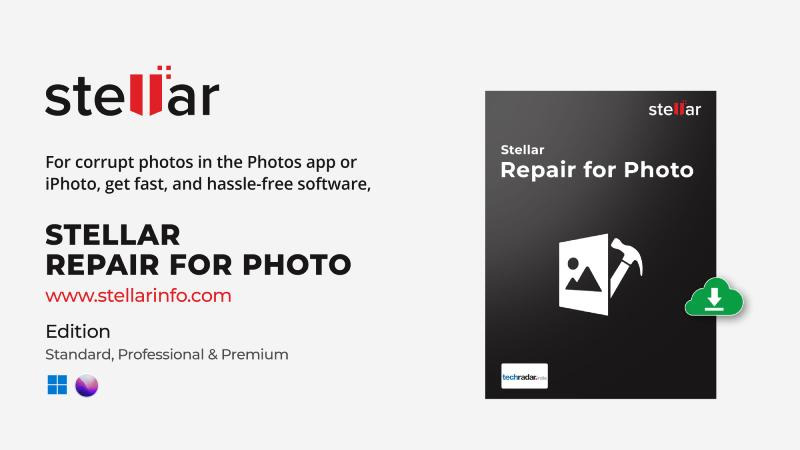
Stellar Repair for Photo

There’s a particular kind of photo problem that can ruin your day.

You know the image is there. You can see the filename, the thumbnail may even show up normally, but when you try to open the actual photo, something is wrong.

Maybe the viewer throws an error. Maybe only part of the image appears. Sometimes you get a grey block where the photograph should be. And unlike a bad photograph, you can’t simply edit your way out of it.

That is what makes corrupted photo files so frustrating. The original picture might be perfectly good in every other sense; it’s the file that’s causing the problem.

That is what led us to take a closer look at Stellar Repair for Photo to see what it actually does in this situation and, more importantly, whether it’s useful when the photos you’re dealing with are genuinely important.

First, Understand What This Software Is For

Stellar Repair for Photo isn’t another Lightroom or Photoshop alternative.

It won’t rescue a badly exposed photograph, remove an unwanted person from the background, or make an out-of-focus shot magically sharp. Those are editing problems.

Photo repair is different. Here, the problem is that the image file itself has become damaged or won’t open correctly.

That could happen after a problematic file transfer, an issue with a memory card, a storage drive behaving badly, an interrupted process, or simply a file that has somehow become corrupted over time.

And that’s where Stellar’s approach starts to make sense.

The Workflow Is Pretty Uncomplicated

The first thing we noticed is that there isn’t much of a learning curve.

You open the application, add the photographs you’re having trouble with and start the repair process. If you’re dealing with several files, you don’t have to feed them into the program one by one either.
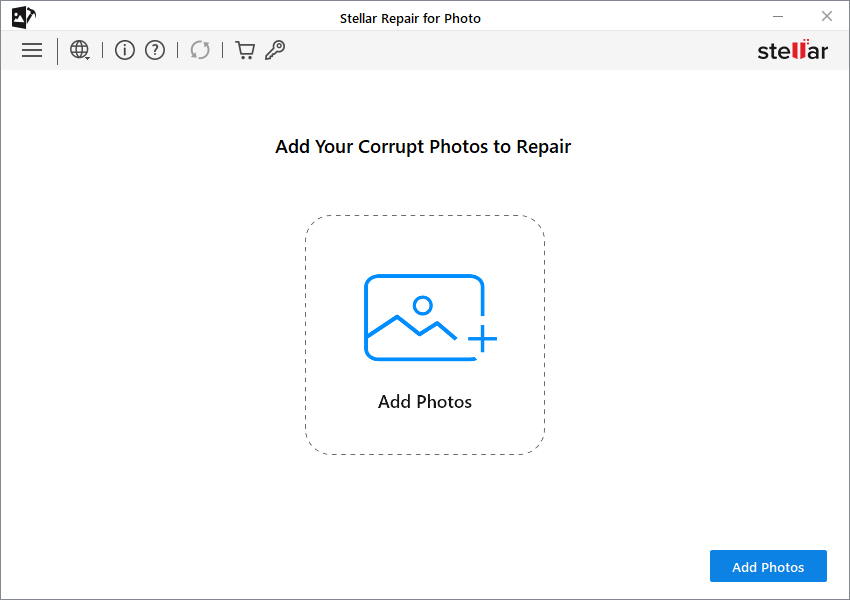
Once the repair is finished, you can preview what Stellar was able to recover before deciding what to do next.
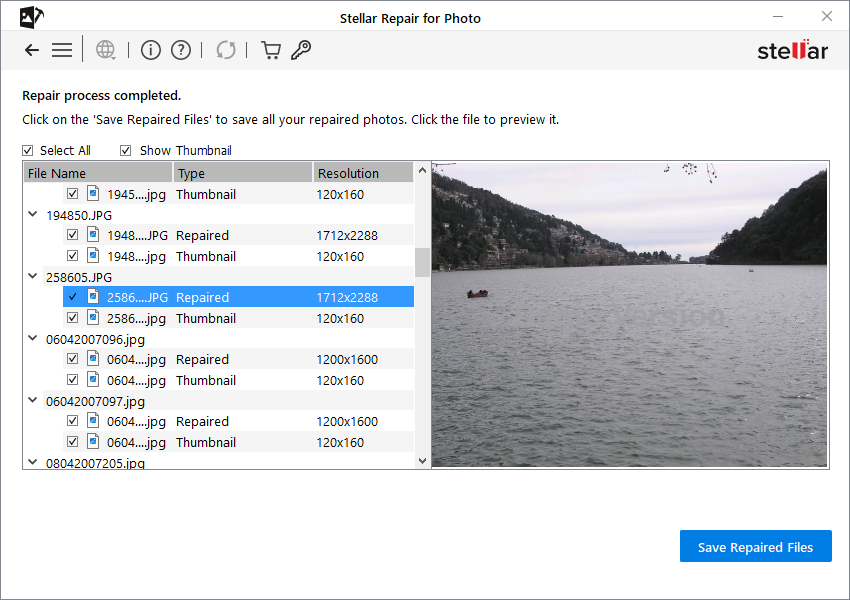
That’s actually an important part of the experience.

With repair software, we don’t want to be told that a file has been “successfully repaired” and then find out later that the resulting photograph is useless.

We’d rather see the result first.

This Is Where the RAW Support Matters

For someone who mostly shoots with a phone, JPEG or HEIC support might be enough. Photographers working with cameras have a different concern.

A RAW file can represent hours of work like a wedding, a landscape trip, a family event, or simply an old image that you never got around to editing properly.

Stellar Repair for Photo supports common formats such as JPEG and JPG, along with TIFF, HEIC and HEIF, as well as a range of camera RAW formats.

That’s useful, but there’s one thing we’d still recommend: check the supported formats for your particular camera before depending on the software for a large batch of important images.

RAW isn’t one universal format, and camera manufacturers have their own variations.

What If the Photo Is Seriously Damaged?

This is probably the more interesting part of the software.

For files that don’t respond to the normal repair process, Stellar offers an Advanced Repair option. Instead of trying to work entirely from the damaged file, you provide a healthy photograph as a reference.

Ideally, that reference image should have been taken with the same camera and under similar settings.

The idea is fairly straightforward: the healthy file gives the software additional information that it can use while working on the damaged photograph.

We prefer this kind of approach to the usual “one click and everything is fixed” promise you see with some repair tools. There are limits, after all.

If portions of the original image data have completely disappeared, no software can recreate the exact pixels that no longer exist. A repair program can work with the information that’s still available; it can’t perform magic.

Batch Repair Is More Useful Than It Sounds

Repairing one photograph isn’t particularly difficult. The situation changes when you discover that a whole group of images has problems.

Imagine copying a shoot from an SD card and finding 20, 30 or even more files that won’t open properly. That’s where batch repair becomes useful.

Instead of repeating the same process for every photograph, you can add multiple files and let Stellar process them together.

It’s not the sort of feature that sounds exciting in a product description, but if you’ve ever had a folder full of problematic images, you’ll appreciate it.

How Do Photos End up Corrupted in the First Place?

Unfortunately, there isn’t one answer.

A memory card can develop problems. A transfer can get interrupted. A storage drive can start throwing errors. A camera can lose power at an unfortunate moment.

And sometimes you simply don’t know what happened. One day the photograph opens normally. The next day it doesn’t.

If you’re dealing with something like this, there’s one thing we’d do before experimenting with any repair software: make a copy of the damaged file and work from that copy.

And if you suspect the memory card itself is failing, stop using it until you’ve figured out what’s going on.

Continuing to shoot onto a card that may already be having problems can turn a repair problem into a much bigger recovery problem.

What Does Stellar Repair for Photo Cost?

Stellar Repair for Photo starts at $39.99 for Windows and Mac.

For someone who regularly works with important photographs, that isn’t an unreasonable price for having a dedicated repair tool available when something goes wrong.

But there’s also an easier option if you don’t want to purchase the desktop software straight away.

If you simply want to test how well Stellar can handle your damaged photographs, or you’re looking for a more pocket-friendly option, you can try the Stellar Online Photo Repair tool directly from your browser.

There’s nothing to install, so you can upload a damaged photo and see what kind of repair result you get before deciding whether the desktop software makes sense for you.

So, Is Stellar Repair for Photo Worth Using?

That really depends on the photograph.

If it’s a random image you downloaded from the internet and you have another copy somewhere, we wouldn’t make a big deal out of it.

But if the file is from a wedding, family trip, professional shoot or some other event that you can’t simply recreate, the equation changes.

The useful thing about Stellar is that you can preview the repair before saving the repaired image. That gives you a chance to see what the software can actually do with your files instead of buying it purely on a promise.

The software isn’t a replacement for a proper backup strategy, either. We’d still much rather have two or three good copies of our important photographs than depend on repair software after something goes wrong.

Think of this as a tool for when that backup plan hasn’t quite worked out.

Our Final Thoughts

What we like about Stellar Repair for Photo is that it doesn’t try to pretend that every photography problem is a repair problem.

Its purpose is much narrower: you’ve got an image file that should contain a photograph, but something has gone wrong with that file.

The straightforward workflow helps. RAW support makes it relevant to camera users. Advanced Repair gives you another option when the normal repair process isn’t enough, and batch processing becomes useful when corruption affects multiple photographs.

We also appreciate that the software doesn’t make us assume every damaged image can be restored perfectly. The condition of the original file still matters.

If you have a few corrupted photographs sitting on your computer or storage drive, we’d start by trying the repair and looking at the preview.

If the result brings back an image you thought was gone, then you have your answer, and if it doesn’t, at least you haven’t spent hours trying random fixes on the original file.


Tags: SoftwareStellar
SendShare149Tweet93
Techweez

Techweez

Techweez is where tomorrow’s tech stories break today, thanks to intelligent analysis, real-world insight, and visionary storytelling. Follow us for exclusive interviews and authoritative stories on world Technology. Talk to us at [email protected]

Related Posts

Gibson Njine

Kenyan Student Builds App to Make Splitting Restaurant Bills Fairer

September 16, 2026
Zoho

Zoho and KNCCI Launch KES 65,000 Software Support for Kenyan Small Businesses

July 22, 2026
Software

Finance Act 2026 Increases Software and Cloud Service Costs by 25%

July 6, 2026
ChatGPT Health

Kenya Pushes Clinical-Level Oversight for AI Tools in Healthcare

May 6, 2026
Safaricom ERP

Safaricom Moves Deeper Into Business Tech with New All-in-One Platform

March 30, 2026
Anthropic

Cybersecurity Stocks Drop After Anthropic Launches Claude Code Security

February 21, 2026

Latest

Albo: The App That Turns Saved Social Media Posts Into a Library

Albo: The App That Turns Saved Social Media Posts Into a Library

October 10, 2026
US Green Card Visa

US Suspends Green Card Sponsorship for Microsoft and Other Tech Firms

October 9, 2026
Why Tech Companies Are Struggling to Operate in Kenya

Why Tech Companies Are Struggling to Operate in Kenya

October 9, 2026
X Is Preparing One Subscription for X, Grok, and Cursor

X Is Preparing One Subscription for X, Grok, and Cursor

October 9, 2026
KRA to Use eTIMS to Check Business Inventory Records

KRA to Use eTIMS to Check Business Inventory Records

October 8, 2026
Dan Kwach

Dan Kwach Returns to Cassava Technologies to Lead AI Data Centers

October 8, 2026

Top stories

Copia Global

Copia Kenya Ordered Into Liquidation After Two-Year Rescue Effort

September 30, 2026

CBK Licenses 29 New Digital Lenders, Bringing Total to 281

September 30, 2026

New Bill Could Let M-Pesa and Airtel Money Invest Customer Funds

September 30, 2026

Kenya Has 22,000 Digital Services but Still Face a Manual Backend

September 23, 2026

WSO2 Says Kenyan Businesses Must Make Systems Ready for AI Agents

September 23, 2026

New Payment Bill Wants to Force Banks and M-PESA to Open Up Their Data

September 22, 2026

Techweez is where tomorrow’s tech stories break today, thanks to intelligent analysis, real-world insight, and visionary storytelling.

Follow Us

Editorials

Albo: The App That Turns Saved Social Media Posts Into a Library

ADaM: The Outbreak Tracking Tool That Could Help Contain Ebola in Kenya

The World May Not Be Desperate for AI Agents, Yet

AppBlock: The App That Blocks Apps, Including the One You Use to Uninstall It

Yubo: The App That Went From Tinder for Teens to 60 Million Users

Tangle Is What Happens When Texting Meets a Phone Call

More News

Safaricom Launches Ziidi Shari’ah Money Market Fund on M-PESA

Parliament Questions Safaricom SIM Deactivation as CA Sets New Rules for Recycled Numbers

Kenya’s Ebola Tools Face Their First Real Test

ADaM: The Outbreak Tracking Tool That Could Help Contain Ebola in Kenya

Eric Muriuki Leaves NCBA After 19 Years to Lead Pan-African Digital Growth at Absa

Gemini Could Soon Call Your Mom for You And Do the Talking

  • Terms Of Use
  • Techweez Brand
  • Privacy & Policy
  • Contact Us

© 2024 Techweez - Palahala Media Group may earn a commission when you buy through links on our sites.
A Palahala Media Group Brand. All rights reserved.
.

Welcome Back!

Login to your account below

Forgotten Password?

Retrieve your password

Please enter your username or email address to reset your password.

Log In

Add New Playlist

Techweez | Tech News, Reviews, Deals, Tips and How To
Crunchy Cookies 🍪 Ahead!

Hey there! Just a heads-up: we're big fans of cookies - both the digital and edible kind! 🍪 We use our cookies and some from third parties to ensure your browsing experience on our site is smooth sailing and secure.


But wait, there's more! We also use cookies to gather stats and insights on how you navigate our site. It's like getting a behind-the-scenes peek at your digital adventures!


Don't worry, you're in control. You can adjust your cookie settings anytime to suit your preferences. Feeling curious? Dive into our Privacy Policy for all the juicy details. Happy browsing! 🚀

Functional Always active
Listen, this legal stuff is about as exciting as watching paint dry. But it basically says we only use your stuff for what you asked us to do, and nobody else gets to peek!
Preferences
The technical storage or access is necessary for the legitimate purpose of storing preferences that are not requested by the subscriber or user.
Statistics
It's those sneaky cookie crumbs websites leave behind to count visitors, like counting ants at a picnic! Totally harmless, just for fun facts. The technical storage or access that is used exclusively for anonymous statistical purposes. Without a subpoena, voluntary compliance on the part of your Internet Service Provider, or additional records from a third party, information stored or retrieved for this purpose alone cannot usually be used to identify you.
Marketing
Hey there! Just letting you know we use some fancy gizmos to remember your preferences. This way, we can show you ads that are, well, not completely bananas.
Manage options Manage services Manage {vendor_count} vendors Read more about these purposes
Make cookies
{title} {title} {title}
Techweez | Tech News, Reviews, Deals, Tips and How To
Crunchy Cookies 🍪 Ahead!
To provide the best experiences, we use technologies like cookies to store and/or access device information. Consenting to these technologies will allow us to process data such as browsing behavior or unique IDs on this site. Not consenting or withdrawing consent, may adversely affect certain features and functions.
Functional Always active
Listen, this legal stuff is about as exciting as watching paint dry. But it basically says we only use your stuff for what you asked us to do, and nobody else gets to peek!
Preferences
The technical storage or access is necessary for the legitimate purpose of storing preferences that are not requested by the subscriber or user.
Statistics
It's those sneaky cookie crumbs websites leave behind to count visitors, like counting ants at a picnic! Totally harmless, just for fun facts. The technical storage or access that is used exclusively for anonymous statistical purposes. Without a subpoena, voluntary compliance on the part of your Internet Service Provider, or additional records from a third party, information stored or retrieved for this purpose alone cannot usually be used to identify you.
Marketing
Hey there! Just letting you know we use some fancy gizmos to remember your preferences. This way, we can show you ads that are, well, not completely bananas.
Manage options Manage services Manage {vendor_count} vendors Read more about these purposes
Make cookies
{title} {title} {title}
No Result
View All Result
  • News
  • Reviews
  • Features
  • Editorial
  • Automotive
  • Entertainment

© 2024 Techweez - Palahala Media Group may earn a commission when you buy through links on our sites.
A Palahala Media Group Brand. All rights reserved.
.