




Apple officially opened access to the iOS 26 public beta on July 24, allowing iPhone users to explore upcoming features ahead of the official launch later this year.
For iPhone users eager to experience Apple’s next major software release, iOS 26 brings interface changes, AI tools, and functional upgrades that signal a new chapter in iPhone software.
iOS 26 requires an iPhone running the A13 Bionic chip or newer, which means the iPhone 11 series and second-generation iPhone SE are the earliest supported devices. This includes all newer models up to the iPhone 16 series.
Unfortunately, iPhone XR, iPhone XS, and iPhone XS Max, which use the A12 chip, are no longer supported and will not receive this update.
What’s New in iOS 26
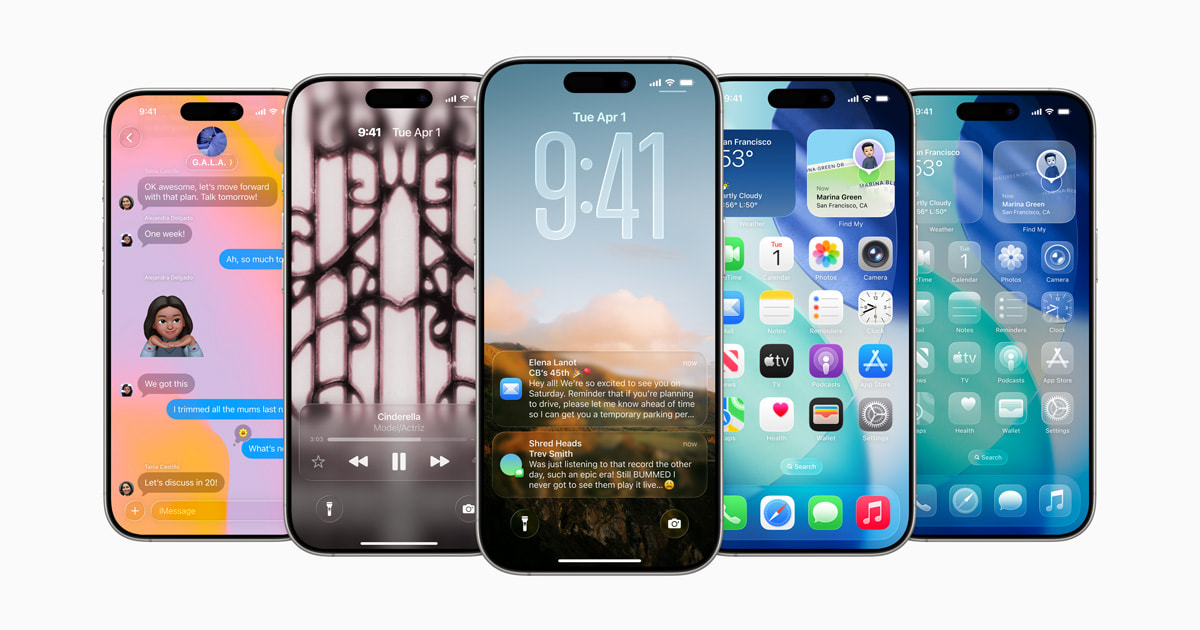
One of the most noticeable changes in iOS 26 is the introduction of the Liquid Glass interface. It’s a shift away from the flat design language Apple has used for the past decade and brings a more modern visual style to the iPhone experience.
A key highlight of iOS 26 is Apple Intelligence, Apple’s system-wide AI layer. However, not all devices will support it. These features require the A17 Pro chip or newer, meaning only the iPhone 15 Pro, 15 Pro Max, and the iPhone 16 series will have access.
For those with supported devices, Apple Intelligence introduces smart notification summaries, writing suggestions across apps, Genmoji (AI-generated emojis), and a new Image Playground that lets users create stylized images.
Siri also gets an upgrade, with improved natural language understanding and access to deeper system controls. Apple has partnered with OpenAI to allow optional ChatGPT integration directly within Siri and the system.
In the Messages app, Apple has introduced several functional improvements. Users can now format text with bold, italics, and bullet points, conduct polls in group chats, and apply backgrounds to conversations.
Phone App Improvements
The Phone app has also received new capabilities. A call screening feature now requires unknown callers to state their name before you decide to answer, similar to Google’s call screening system.
Additionally, a new Hold Assist function will notify you when a call on hold resumes. Live Voicemail transcription has also been enhanced for better accuracy and responsiveness.
iOS 26 also makes updates to the Camera and Photos apps. The camera now supports external microphones, ideal for content creators and journalists. The Photos app now allows you to share Live Photos directly within shared albums.
In addition, AI-generated notification summaries for news apps have returned to iOS 26 after being temporarily removed in earlier versions due to concerns over misinterpretation and misinformation.
Now, users must opt into these summaries during setup, and Apple includes a prominent warning stating that summarization may alter the meaning of original headlines.
How to Install the iOS 26 Public Beta
To try iOS 26 now, follow these install steps:
- Back up your device via iCloud or Finder to prevent data loss.
- Visit the Apple Beta software website and sign in with your Apple ID.
- Enroll your iPhone in the Apple Beta Software Program.
- On your iPhone:
- Go to Settings > General > Software Update > Beta Updates
- Select iOS 26 Public Beta
- Download and Install
Note that beta software may contain bugs, instability, and shorter battery life. It’s best to install this on a secondary device if possible, or wait for the final version if you rely heavily on your phone.
Apple is expected to release the final version of iOS 26 in September, likely alongside the iPhone 17 launch. The public beta will receive ongoing updates over the coming weeks, with new features, refinements, and bug fixes added in each release.